Qualified
Mobile apps types
Summary
Native and hybrid apps are installed in an app store, whereas web apps are mobile-optimized webpages that look like an app. Both hybrid and web apps render HTML web pages, but hybrid apps use app-embedded browsers to do that
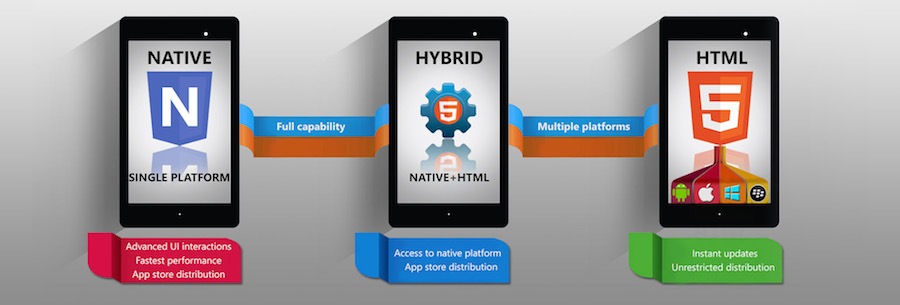
Native Apps
Such apps are developed for a single mobile operating system exclusively, therefore they are “native” for a particular platform or device. App built for systems like iOS, Android, Windows phone, Symbian, Blackberry can not be used on a platform other than their own. In other words, you won’t be able to use Android app on iPhone.
Main advantage of native apps is high performance and ensuring good user experience as developers use native device UI. Moreover, an access to wide range of APIs that puts no limitation on app usage. Native applications are distinctly accessible from app stores of their kind and have the clear tendency to reach target customers.
Some cons to native apps are higher cost compared to other types of apps – due to the need of creating app duplicates for other platforms, separate support and maintenance for different types of apps resulting in bigger product price.
Platforms/Languages
- iOS on Objective-C or Swift
- Android on Java
- Windows Phone on Net
- live on the device and are accessed through icons on the device home screen.
- are installed through an application store (such as Google Play or Apple’s App Store).
- they are developed specifically for one platform, and can take full advantage of all the device features — they can use the camera, the GPS, the accelerometer, the compass, the list of contacts, and so on.
- they can also incorporate gestures (either standard operating-system gestures or new, app-defined gestures).
- native apps can use the device’s notification system and can work offline.
Mobile web Apps
These are software applications that behave in a fashion similar to native applications. Web apps use a browser to run and are usually written in HTML5, JavaScript or CSS. These apps redirect a user to URL and offer “install” option by simply creating a bookmark to their page.
Web applications require minimum of device memory, as a rule. As all personal databases are saved on a server, users can get access from any device whenever there is internet connection. That is why the use of web apps with poor connection would result in bad user experience. The drawback is access to not that many APIs for developers, with exception of geolocation and few others.
- Web apps are not real applications; they are really websites that, in many ways, look and feel like native applications, but are not implemented as such.
- They are run by a browser and typically written in HTML5.
- Users first access them as they would access any web page: they navigate to a special URL and then have the option of “installing” them on their home screen by creating a bookmark to that page.
Web apps became really popular when HTML5 came around and people realized that they can obtain native-like functionality in the browser. Today, as more and more sites use HTML5, the distinction between web apps and regular web pages has become blurry.
Its web app is, in many ways, hard to distinguish from a native app. For instance, there are no visible browser buttons or bars, although it runs in Safari (when accessed from an iPhone). Users can swipe horizontally to move on to new sections of the app. And, due to browser caching, it’s even possible to read the newspaper offline.
These are all features that are available in HTML5. Also available are the GPS, the tap-to-call feature, and, there is talk about a camera API. There are, however, native features that remain inaccessible (at least from now) in the browser: the notifications, running in the background, accelerometer information (other than detecting landscape or portrait orientations), complex gestures.
Hybrid apps
Hybrid apps for all platforms altogether with Xamarin, React Native, Ionic, Angular Mobile Sencha Touch etc.
They are built using multi-platform web technologies (for example HTML5, CSS and Javascript). So-called hybrid apps are mainly website applications disguised in a native wrapper. Apps possess usual pros and cons of both native and web mobile applications.
Hybrid multi-platform apps are fast and relatively easy to develop – a clear advantage. Single code base for all platforms ensures low-cost maintenance and smooth updates. Widely used APIs, like gyroscope, accelerometer, geolocation are available.
On the other hand, hybrid applications lack in performance, speed and overall optimization in comparison to native apps for instance. Also, there are certain design issues due to app inability to look in exactly same way on two or more platforms.
Hybrid apps are part native apps, part web apps.
- like native apps, they live in an app store and can take advantage of the many device features available.
- like web apps, they rely on HTML being rendered in a browser, with the caveat that the browser is embedded within the app.
Hybrid apps are also popular because they allow crossplatform development and thus significantly reduce development costs: that is, the same HTML code components can be reused on different mobile operating systems. Tools such as PhoneGap and Sencha Touch allow people to design and code across platforms, using the power of HTML.
WebView concept
- iOS: WKWebView
- Android: Web View for Android
Webview
A “webview” is a browser bundled inside of a mobile application producing what is called a hybrid app. Using a webview allows mobile apps to be built using Web technologies (HTML, JavaScript, CSS, etc.) but still package it as a native app and put it in the app store. In addition to allowing devs to work with familiar technologies, other advantages of building a hybrid app include greater code reuse across the app and the website, and easier support for multiple mobile platforms.
Web Views, which are a full screen and full-powered web browser.
Modern Web Views offer many built-in HTML5 APIs for hardware functionality such as cameras, sensors, GPS, speakers, and Bluetooth, but sometimes it may also be necessary to access platform-specific hardware APIs.
WebView — это компонент платформы, который позволяет встраивать web-страницы в Android-приложения. По сути, это встраиваемый браузер.
Example for React Native
import React, { Component } from 'react'
import { View, WebView, StyleSheet }

from 'react-native'
const WebViewExample = () => {
   return (
      <View style = {styles.container}>
         <WebView
            source = {{ uri:
            'https://www.google.com/?gws_rd=cr,ssl&ei=SICcV9_EFqqk6ASA3ZaABA#q=tutorialspoint' }}
         />
      </View>
   )
}
export default WebViewExample;

const styles = StyleSheet.create({
   container: {
      height: 350,
   }
})
Main concept of hybrid applications
- Single code base for all platforms means write once and run anywhere but for native app scenario, we need to build and maintain separate app and code for each platform.
- Same development team can deliver app for any platform including website as well because all required is web technologies.
- Hybrid App is based on web technologies, so same app can be run on browser like any other website or can be run as Progressive Web App(PWA).
- Hybrid apps can achieve the same hardware-based performance acceleration as native app.
- Hybrid app can have same and consistent user experience across platform regardless of user moves between different devices or browser.
pros
Unified Development
The principle advantage of hybrid apps arises from the fact that you are saving the stress of building two apps
Only one Codebase to deal with
Hybrid apps are easier to maintain as you have to manage only one codebase
Fastest Development Speed
Hybrid apps can be developed easily without much efforts in a short period of time.
Efficient Scaling
Hybrid apps are known as cross-platform applications which are easy to scale on different platforms and on different operating devices
Offline Support
Hybrid apps support offline work, but while working offline data cannot be updated.
Hybrid apps cost less
cons
Slow performance
Hybrid apps are a bit slower because they are based on the web technology and normally hybrid apps utilize the mobile platform’s such as kendo, onsen, ionic, Cordova and many more.
Poor UX
One of the serious disadvantage of a hybrid app is that they never offer a user the full native experience
Mobile app development tools
- Ionic
- React Native
- Phone Gap