Qualified
Modules:
Control flow (Async tasks, Callbacks):
Package.json:
GLOBAL:
HTTP create server:
Reading and Writing Files:
Node.js fundamental concepts
It’s a JavaScript runtime built on Chrome’s V8 JavaScript engine.
- Both Node and the JS that is executed inside of your browser are running on the same engine → It’s an open source engine that takes JS code and compiles it to much faster machine code → this is what makes Node.js so fast!
Uses an event-driven, non-blocking I/O model that makes it light weight & efficient
Event Driven Programming is a computer programming paradigm in which control flow of the program is determined by the occurrence of events. These events are monitored by code known as an event listener that, if it detects that its assigned event has occurred, runs an event “handler”, typically a callback function or method. This handler deals with the event by responding to it with program code.
Node.js’ package ecosystem, npm, is the largest ecosystem if open source libraries in the world (see below for more details)
Following are the areas where Node.js is proving itself as a perfect technology partner
- I/O bound Applications
- Data Streaming Applications
- Data Intensive Real-time Applications (DIRT)
- JSON APIs based Applications
- Single Page Applications
NodeJS Program Lifecycle 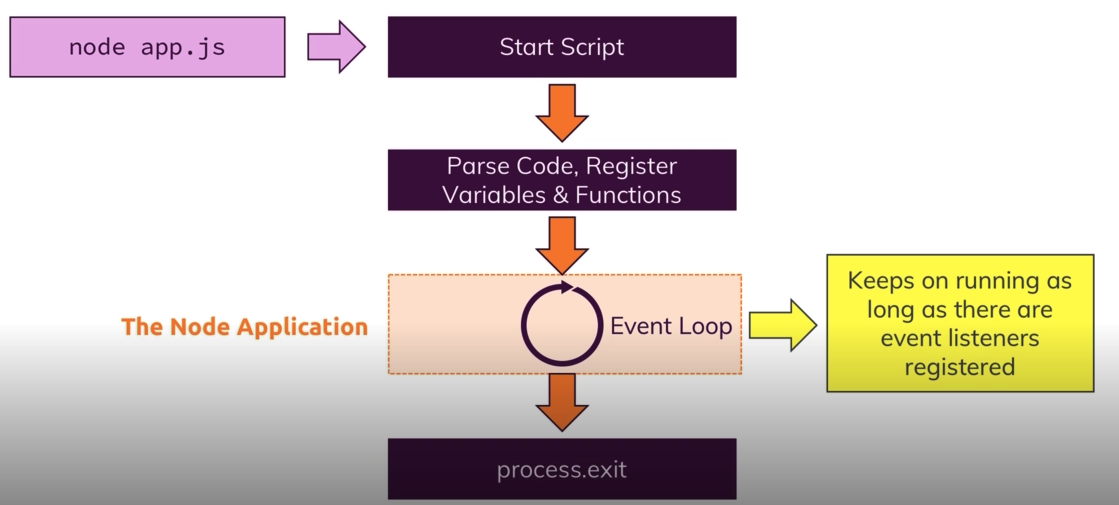
Event-driven programming is a programming style whereby the f ow is determined by the occurrence of events. Programmers register callbacks to be used as event handlers for events they are interested in, and the system invokes these handlers when those events occur. This model of programming has some advantages over the traditional blocking paradigm where, to scale, you have to use multiple processes or threads. JavaScript is a powerful language, which is well suited for this style of programming, mainly because it has first-class functions and closures.
Modules
importing built-in modules
| module | description |
|---|---|
| buffer | to handle binary data |
| child_process | to run a child process |
| crypto | to handle OpenSSL cryptographic functions |
| dns | to do DNS lookups and name resolution functions |
| events | to handle events |
| fs | to handle the file system |
| http | to make Node.js act as an HTTP server |
| https | to make Node.js act as an HTTPS server |
| net | to create servers and clients |
| path | to handle file paths |
| querystring | to handle URL query strings |
| readline | to handle readable streams one line at the time |
| stream | to handle streaming data |
| url | to parse URL strings |
| util | to access utility functions |
const fs = require('fs');

fs.appendFile('message.txt', 'data to append', (err) => {
  if (err) throw err;
  console.log('The "data to append" was appended to file!');
});
const EventEmitter = require('events');

class MyEmitter extends EventEmitter {
    //...
}

const myEmitter = new MyEmitter();
myEmitter.on('event', () => {
  console.log('an event occurred!');
});
myEmitter.emit('event');
const path = require('path');

path.parse('/home/user/dir/file.txt');
/* Returns:
    {
      root: '/',
      dir: '/home/user/dir',
      base: 'file.txt',
      ext: '.txt',
      name: 'file'
    }
*/
Control flow (Async tasks, Callbacks):
Async lib
Async is a utility module which provides straight-forward, powerful functions for working with asynchronous JavaScript.
Async provides around 70 functions that include the usual 'functional' suspects (map, reduce, filter, each…) as well as some common patterns for asynchronous control flow (parallel, series, waterfall…). All these functions assume you follow the Node.js convention of providing a single callback as the last argument of your asynchronous function -- a callback which expects an Error as its first argument -- and calling the callback once.
async.map(['file1','file2','file3'], fs.stat, function(err, results) {
    // results is now an array of stats for each file
});

async.filter(['file1','file2','file3'], function(filePath, callback) {
  fs.access(filePath, function(err) {
    callback(null, !err)
  });
}, function(err, results) {
    // results now equals an array of the existing files
});

async.parallel([
    function(callback) { ... },
    function(callback) { ... }
], function(err, results) {
    // optional callback
});

async.series([
    function(callback) { ... },
    function(callback) { ... }
]);
Promises
const util = require('util');

const openFile = util.promisify(fs.open);
const fs = require('fs-extra');

fs.copy('/tmp/myfile', '/tmp/mynewfile')
  .then(() => console.log('success!'));
function readFileAsync (file, encoding) {
  return new Promise(function (resolve, reject) {
    fs.readFile(file, encoding, function (err, data) {
      if (err) return reject(err) // rejects the promise with `err` as the reason
      resolve(data)               // fulfills the promise with `data` as the value
    })
  })
}
readFileAsync('myfile.txt').then(console.log, console.error)
fs.promises API provides an alternative set of asynchronous file system methods that return Promise objects rather than using callbacks. The API is accessible via:
const fs = require('fs').promises;
Examples
function handler (done) {
  validateParams((err) => {
    if (err) return done(err)
    dbQuery((err, dbResults) => {
      if (err) return done(err)
      serviceCall((err, serviceResults) => {
        done(err, { dbResults, serviceResults })
      })
    })
  })
}
to
// promises
function handler () {
  return validateParams()
    .then(dbQuery)
    .then(serviceCall)
    .then((result) => {
      console.log(result)
      return result
    })
}

// or async
function handler (done) {
  async.waterfall([validateParams, dbQuery, serviceCall], done)
}
Package.json
A package.json file:
- lists the packages your project depends on
- specifies versions of a package that your project can use using semantic versioning rules
- makes your build reproducible, and therefore easier to share with other developers
npm init -y
Required fields
Required name and version fields
structure
name: The name for the project, which should be all lower case and URL-safe. The name can be prefixed with a scope (i.e.: @angular/angular-cli) and is optional if the project is private, but if the project is to be published publicly the name is required and must be unique on the npm repository.
version: A version number that should be understandable by node-semver. This is also optional for private and required and very important for public modules.
description: A description for the project. This is optional and is useful if you can the project to be found easily on the repository.
main: The entry file for the project.
scripts: The scripts key expects an object with script names as keys and commands as values. This is useful to specify scripts that can be run directly from the command line and that can do all sorts of things like starting your project on a local server, building for production or running your tests. Chances are that scripts is where you’ll make the most manual changes in a typical package.json file.
engines: The versions of the node and npm used. These versions are specified in case the application is deployed on cloud like heroku or google-cloud.
keywords: An array of keywords to helps with finding the module on the npm repository.
author: The author field expects an object with keys for name, email and url. It makes it easy for people to then get in touch with the project’s owner.
license: Expects a license name using its SPDX identifier. It defaults to the ISC license, and MIT would be another popular license choice. You can also use UNLICENSED for projects that are private and closed-source.
dependencies: The third party package or modules installed using npm are specified in this segment.
devDependencies: The dependencies that are used only in the development part of the application are specified in this segment. These dependencies do not get rolled out when the application is in production stage.
repository: It contain the information about the type and url of the repository where the code of the application lives is mentioned here in this segment.
bugs: The url and email where the bugs in the application should be reported are mentioned in this segment.
{
  "name": "GeeksForGeeks",
  "version": "1.0.0",
  "description": "GeeksForGeeks",
  "main": "index.js",
  "scripts": {
    "test": "echo \"Error: no test specified\" && exit 1",
    "start": "node start.js",
  },
  "engines": {
    "node": ">=7.6.0",
    "npm": ">=4.1.2"
  },
  "author": "GeeksForGeeks",
  "license": "ISC",
  "dependencies": {
    "body-parser": "^1.17.1",
    "express": "^4.15.2",
    "express-validator": "^3.1.2",
    "mongoose": "^4.8.7",
    "nodemon": "^1.14.12",
  },
  "devDependencies": {},
  "repository": {
    "type": "git",
    "url": "https://github.com/gfg/gfg.git"
  },
  "bugs": {
    "url": "https://github.com/gfg/gfg/issues"
  },
  "homepage": "https://github.com/gfg/gfg#readme"
}
devDependencies should contain packages which are used during development or which are used to build your bundle, for example, mocha, jscs, grunt-contrib-watch, gulp-jade and etc. These packages are neseccery only while you are developing your project, also ESlint is used to check everything during building your bundle.
By the way, npm install by default installing packages from both dependencies and devDependencies. I haven't seen usage of this flag for years, but I will just let you know this, for small projects this may work npm install --production , --production flag says to the npm, heey, I want you to install packages only from usual dependencies.
GLOBAL
These objects are available in all modules. (__dirname, __filename, exports, require)
__dirname
The directory name of the current module. This is the same as the path.dirname() of the __filename.
console.log(__dirname);
// Prints: /Users/mjr
console.log(path.dirname(__filename));
// Prints: /Users/mjr
###__filename
The file name of the current module. This is the current module file's absolute path with symlinks resolved.
For a main program this is not necessarily the same as the file name used in the command line.
console.log(__filename);
// Prints: /Users/mjr/example.js
console.log(__dirname);
// Prints: /Users/mjr
HTTP create server
HTTP is an application-level protocol for content and application delivery. It uses TCP as its transport protocol, and it is the foundation of data communication for the World Wide Web. One of the preferred application deployment mechanisms is to provide an HTTP service on the Internet that answers HTTP client requests.
how to create simple server
var http = require('http');

//create a server object:
http.createServer(function (req, res) {
  res.write('Hello World!'); //write a response to the client
  res.end(); //end the response
}).listen(8080); //the server object listens on port 8080
const http = require('http');
const port = 3000;

const requestHandler = (request, response) => {
  console.log(request.url);
  response.end('Hello Node.js Server!');
}

const server = http.createServer(requestHandler);

server.listen(port, (err) => {
  if (err) {
    return console.log('something bad happened', err)
  }
  console.log(`server is listening on ${port}`)
})
Reading and Writing Files:
fs.open
The fs.open() method takes a "flag" as the second argument, if the flag is "w" for "writing", the specified file is opened for writing. If the file does not exist, an empty file is created
fs.open(path, flags[, mode], callback)
- path
<string> | <Buffer> | <URL>- this is the string having file name including path - flags
<string> | <number>flags indicate the behavior of the file to be opened (default: 'r'). - mode
<integer>it sets the file mode (permission and sticky bits), but only if the file was created. It defaults to 0666, readable and writeable. - callback
<Function>this is the callback function which gets two arguments (err, fd).- err
<Error> - fd
<integer>
- err
TIP
With fs.open() you open the file and can then can do several things to it. Read it, write it, close it etc.. With fs.readFile() without having to open or close the file you read it.
const fs = require('fs');

fs.open('mynewfile2.txt', 'w', (err, file) => {
  if (err) {
    throw err;
  }
  console.log('Saved!');
});
| flag | Description |
|---|---|
| r | open file for reading. An exception occurs if the file does not exist |
| r+ | open file for reading and writing. An exception occurs if the file does not exist |
| rs | open file for reading in synchronous mode |
| rs+ | open file for reading and writing, asking the OS to open it synchronously. See notes for 'rs' about using this with caution |
| w | open file for writing. The file is created (if it does not exist) or truncated (if it exists) |
| wx | like 'w' but fails if the path exists |
| w+ | open file for reading and writing. The file is created (if it does not exist) or truncated (if it exists) |
| wx+ | like 'w+' but fails if path exists |
| a | open file for appending. The file is created if it does not exist |
| ax | like 'a' but fails if the path exists |
| a+ | open file for reading and appending. The file is created if it does not exist |
| ax+ | like 'a+' but fails if the the path exists |
Process
The process object is a global that provides information about, and control over, the current Node.js process. As a global, it is always available to Node.js applications without using require(). It can also be explicitly accessed using require(). The process object is an instance of EventEmitter.
Listener functions must only perform synchronous operations.
Process events
| code | name | description |
|---|---|---|
| 1 | exit | emitted when the process is about to exit. There is no way to prevent the exiting of the event loop at this point, and once all exit listeners have finished running, the process will exit |
| 2 | beforeExit | this event is emitted when node empties its event loop and has nothing else to schedule. Normally, the node exits when there is no work scheduled, but a listener for 'beforeExit' can make asynchronous calls, and cause the node to continue |
| 3 | uncaughtException | emitted when an exception bubbles all the way back to the event loop. If a listener is added for this exception, the default action (which is to print a stack trace and exit) will not occur |
| 4 | Signal Events | emitted when the processes receives a signal such as SIGINT, SIGHUP, etc |
const process = require('process');
process.exit()
process.on('exit', code =>
  console.log(`About to exit with code: ${code}`)
);
Process properties
| property | description |
|---|---|
| stdout | a Writable Stream to stdout |
| stderr | a Writable Stream to stderr |
| stdin | a Writable Stream to stdin |
| argvAn | array containing the command line arguments. The first element will be 'node', the second element will be the name of the JavaScript file. The next elements will be any additional command line arguments |
| execPath | This is the absolute pathname of the executable that started the process |
| execArgv | this is the set of node-specific command line options from the executable that started the process |
| env | an object containing the user environment |
| exitCode | a number which will be the process exit code, when the process either exits gracefully, or is exited via process.exit() without specifying a code |
| version | acompiled-in property that exposes NODE_VERSION |
| versions | a property exposing the version strings of node and its dependencies |
| config | an Object containing the JavaScript representation of the configure options that were used to compile the current node executable. This is the same as the "config.gypi" file that was produced when running the ./configure script |
| pid | the PID of the process |
| title | Getter/setter to set what is displayed in 'ps' |
| arch | what processor architecture you're running on: 'arm', 'ia32', or 'x64' |
| platform | what platform you're running on: 'darwin', 'freebsd', 'linux', 'sunos' or 'win32' |
| mainModule | alternate way to retrieve require.main. The difference is that if the main module changes at runtime, require.main might still refer to the original main module in modules that were required before the change occurred. Generally it's safe to assume that the two refer to the same module |
// Printing to console
process.stdout.write("Hello World!" + "\n");

// Reading passed parameter
process.argv.forEach(function(val, index, array) {
   console.log(index + ': ' + val);
});

// Getting executable path
console.log(process.execPath);

// Platform Information
console.log(process.platform);
process.cwd
cwd() - returns the current working directory of the process.
process.cwd() returns the current working directory, i.e. the directory from which you invoked the node command. __dirname returns the directory name of the directory containing the JavaScript source code file.
Есть три пути ссылаться на текущую директорию в Node.js.
- __dirname - возвращает путь к каталогу текущего исполняемого файла (__dirname использует локацию выполняемого скрипта (файла)).
- process.cwd() - возвращает директорию из которой вы запустили Node.js файл.
- (./ и ../) - относительный путь.
Express js
Express
Fast, unopinionated, minimalist web framework for Node.js
const express = require('express');
const app = express();
const port = 3000;

app.get('/', (req, res) => res.send('Hello World!'));

app.listen(port, () => console.log(`Example app listening on port ${port}!`));
serving Static Content
To serve static files such as images, CSS files, and JavaScript files, use the express.static built-in middleware function in Express.
express.static(root, [options])
The root argument specifies the root directory from which to serve static assets.
For example, use the following code to serve images, CSS files, and JavaScript files in a directory named public:
app.use(express.static('public'));
Now, you can load the files that are in the public directory:
- http://localhost:3000/images/kitten.jpg
- http://localhost:3000/css/style.css
- http://localhost:3000/js/app.js
- http://localhost:3000/images/bg.png
- http://localhost:3000/hello.html
Express looks up the files relative to the static directory, so the name of the static directory is not part of the URL. To use multiple static assets directories, call the express.static middleware function multiple times:
app.use(express.static('public'));
app.use(express.static('files'));
Express looks up the files in the order in which you set the static directories with the express.static middleware function.
NOTE
For best results, use a reverse proxy cache to improve performance of serving static assets.
To create a virtual path prefix (where the path does not actually exist in the file system) for files that are served by the express.static function, specify a mount path for the static directory, as shown below:
app.use('/static', express.static('public'))
Now, you can load the files that are in the public directory from the /static path prefix.
- http://localhost:3000/static/images/kitten.jpg
- http://localhost:3000/static/css/style.css
- http://localhost:3000/static/js/app.js
- http://localhost:3000/static/images/bg.png
- http://localhost:3000/static/hello.html
However, the path that you provide to the express.static function is relative to the directory from where you launch your node process. If you run the express app from another directory, it’s safer to use the absolute path of the directory that you want to serve:
app.use('/static', express.static(path.join(__dirname, 'public')));
app.engine
Registers the given template engine callback as ext.
app.engine(ext, callback)
By default, Express will require() the engine based on the file extension. For example, if you try to render a “foo.pug” file, Express invokes the following internally, and caches the require() on subsequent calls to increase performance.
app.engine('pug', require('pug').__express);
Use this method for engines that do not provide .__express out of the box, or if you wish to “map” a different extension to the template engine.
For example, to map the EJS template engine to “.html” files:
app.engine('html', require('ejs').renderFile);
In this case, EJS provides a .renderFile() method with the same signature that Express expects: (path, options, callback), though note that it aliases this method as ejs.__express internally so if you’re using “.ejs” extensions you don’t need to do anything.
Some template engines do not follow this convention. The consolidate.js library maps Node template engines to follow this convention, so they work seamlessly with Express.
const engines = require('consolidate');
app.engine('haml', engines.haml);
app.engine('html', engines.hogan);
midleware
Middleware
Middleware functions are functions that have access to the request object (req), the response object (res), and the next function in the application’s request-response cycle. The next function is a function in the Express router which, when invoked, executes the middleware succeeding the current middleware.
Middleware functions can perform the following tasks:
- Execute any code.
- Make changes to the request and the response objects.
- End the request-response cycle.
- Call the next middleware in the stack.
const myLogger = (req, res, next) => {
  console.log('LOGGED');
  next();
}
const requestTime = (req, res, next) => {
  req.requestTime = Date.now();
  next();
}
Notice the call above to next(). Calling this function invokes the next middleware function in the app. The next() function is not a part of the Node.js or Express API, but is the third argument that is passed to the middleware function. The next() function could be named anything, but by convention it is always named “next”. To avoid confusion, always use this convention.
To load the middleware function, call app.use(), specifying the middleware function. For example, the following code loads the myLogger middleware function before the route to the root path (/).
app.use(myLogger);
Configurable middlewares
module.exports = function (options) {
  return function (req, res, next) {
    // Implement the middleware function based on the options object
    next()
  }
}

//...

const mw = require('./my-middleware.js');
app.use(mw({ option1: '1', option2: '2' }));
Application-level middleware
app.use(myMiddleware)Router-level middleware
const router = express.Router();

router.use(function (req, res, next) {
  console.log('Time:', Date.now())
  next()
});
Error-handling middleware (4 arguments)
app.use(function (err, req, res, next) {
  console.error(err.stack)
  res.status(500).send('Something broke!')
});
Built-in middleware
- express.static serves static assets such as HTML files, images, and so on.
- express.json parses incoming requests with JSON payloads. NOTE: Available with Express 4.16.0+
- express.urlencoded parses incoming requests with URL-encoded payloads. NOTE: Available with Express 4.16.0+
Third-party middleware
const express = require('express'); const app = express(); const cookieParser = require('cookie-parser'); // load the cookie-parsing middleware app.use(cookieParser());- body-parser parse HTTP request body. See also: body, co-body, and raw-body.
- cookie-parser parse cookie header and populate req.cookies. See also cookies and keygrip.
- cors enable cross-origin resource sharing (CORS) with various options.
- morgan HTTP request logger.
- multer handle multi-part form data.
- serve-favicon serve a favicon.
- passport authentication using “strategies” such as OAuth, OpenID and many others.
request and response
Request
The req object represents the HTTP request and has properties for the request query string, parameters, body, HTTP headers, and so on. In this documentation and by convention, the object is always referred to as req (and the HTTP response is res) but its actual name is determined by the parameters to the callback function in which you’re working.
app.get('/user/:id', function(req, res) {
  res.send('user ' + req.params.id);
});
req.body
Contains key-value pairs of data submitted in the request body. By default, it is undefined, and is populated when you use body-parsing middleware such as body-parser and multer.
const app = require('express')();
const bodyParser = require('body-parser');
const multer = require('multer');
const upload = multer(); // for parsing multipart/form-data

// for parsing application/json
app.use(bodyParser.json());
// for parsing application/x-www-form-urlencoded
app.use(bodyParser.urlencoded({ extended: true }));

app.post('/profile', upload.array(), (req, res, next) => {
  console.log(req.body);
  res.json(req.body);
});
Properties
req.method contains a string corresponding to the HTTP method of the request: GET, POST, PUT, and so on.
req.params this property is an object containing properties mapped to the named route “parameters”. For example, if you have the route
/user/:name, then the “name” property is available as req.params.name. This object defaults to {}.req.query this property is an object containing a property for each query string parameter in the route. If there is no query string, it is the empty object, {}.
req.cookies when using cookie-parser middleware, this property is an object that contains cookies sent by the request. If the request contains no cookies, it defaults to {}.
req.path contains the path part of the request URL.
req.protocol contains the request protocol string: either http or (for TLS requests) https.
req.route contains the currently-matched route, a string. For example:
req.app - this property holds a reference to the instance of the Express application that is using the middleware.
req.baseUrl - the URL path on which a router instance was mounted.
req.hostname
req.ip
Methods
- req.accepts(types) checks if the specified content types are acceptable, based on the request’s Accept HTTP header field. The method returns the best match, or if none of the specified content types is acceptable, returns false (in which case, the application should respond with 406 "Not Acceptable").
req.accepts('text/html'); // => "text/html" req.accepts(['json', 'text']); // => "json" - req.get(field) returns the specified HTTP request header field (case-insensitive match). The Referrer and Referer fields are interchangeable.
req.get('Content-Type'); // => "text/plain"
Response
The res object represents the HTTP response that an Express app sends when it gets an HTTP request.
app.get('/user/:id', function(req, res){
  res.send('user ' + req.params.id);
});
Properties
res.app This property holds a reference to the instance of the Express application that is using the middleware. res.app is identical to the req.app property in the request object.
res.headersSent Boolean property that indicates if the app sent HTTP headers for the response.
app.get('/', function (req, res) {
  console.log(res.headersSent); // false
  res.send('OK');
  console.log(res.headersSent); // true
});
res.locals An object that contains response local variables scoped to the request, and therefore available only to the view(s) rendered during that request / response cycle (if any). Otherwise, this property is identical to app.locals.
This property is useful for exposing request-level information such as the request path name, authenticated user, user settings, and so on.
app.use(function(req, res, next){
  res.locals.user = req.user;
  res.locals.authenticated = ! req.user.anonymous;
  next();
});
Methods
res.append(field [, value]) Appends the specified value to the HTTP response header field. If the header is not already set, it creates the header with the specified value. The value parameter can be a string or an array.
res.append('Set-Cookie', 'foo=bar; Path=/; HttpOnly');res.attachment([filename]) Sets the HTTP response Content-Disposition header field to “attachment”. If a filename is given, then it sets the Content-Type based on the extension name via res.type(), and sets the Content-Disposition “filename=” parameter.
res.attachment('path/to/logo.png');
// Content-Disposition: attachment; filename="logo.png"
// Content-Type: image/png
res.cookie(name, value [, options]) Sets cookie name to value. The value parameter may be a string or object converted to JSON.
res.cookie('name', 'tobi', { domain: '.example.com', path: '/admin', secure: true });
res.cookie('rememberme', '1', { expires: new Date(Date.now() + 900000), httpOnly: true });
res.clearCookie(name [, options]) Clears the cookie specified by name.
res.cookie('name', 'tobi', { path: '/admin' });
res.clearCookie('name', { path: '/admin' });
res.download(path [, filename] [, options] [, fn])
Transfers the file at path as an “attachment”. Typically, browsers will prompt the user for download. By default, the Content-Disposition header “filename=” parameter is path (this typically appears in the browser dialog). Override this default with the filename parameter.
When an error occurs or transfer is complete, the method calls the optional callback function fn. This method uses res.sendFile() to transfer the file.
The optional options argument passes through to the underlying res.sendFile() call, and takes the exact same parameters.
res.download('/report-12345.pdf', 'report.pdf', function(err){
  if (err) {
    // Handle error, but keep in mind the response may be partially-sent
    // so check res.headersSent
  } else {
    // decrement a download credit, etc.
  }
});
res.end([data] [, encoding])
Ends the response process. This method actually comes from Node core, specifically the response.end() method of http.ServerResponse. Use to quickly end the response without any data. If you need to respond with data, instead use methods such as res.send() and res.json().
res.end();
res.status(404).end();
res.json([body]) Sends a JSON response. This method sends a response (with the correct content-type) that is the parameter converted to a JSON string using JSON.stringify().
The parameter can be any JSON type, including object, array, string, Boolean, number, or null, and you can also use it to convert other values to JSON.
res.json(null);
res.json({ user: 'tobi' });
res.status(500).json({ error: 'message' });
res.jsonp([body]) Sends a JSON response with JSONP support. This method is identical to res.json(), except that it opts-in to JSONP callback support.
res.links(links) Joins the links provided as properties of the parameter to populate the response’s Link HTTP header field.
res.links({
  next: 'http://api.example.com/users?page=2',
  last: 'http://api.example.com/users?page=5'
});
res.location(path) Sets the response Location HTTP header to the specified path parameter.
res.location('/foo/bar');
res.location('http://example.com');
res.location('back');
A path value of “back” has a special meaning, it refers to the URL specified in the Referer header of the request. If the Referer header was not specified, it refers to “/”.
res.redirect([status,] path)
Redirects to the URL derived from the specified path, with specified status, a positive integer that corresponds to an HTTP status code . If not specified, status defaults to “302 “Found”.
res.redirect('/foo/bar');
res.redirect('http://example.com');
res.redirect(301, 'http://example.com');
res.redirect('../login');
res.render(view [, locals] [, callback])
Renders a view and sends the rendered HTML string to the client. Optional parameters:
- locals, an object whose properties define local variables for the view.
- callback, a callback function. If provided, the method returns both the possible error and rendered string, but does not perform an automated response. When an error occurs, the method invokes
next(err)internally.
The view argument is a string that is the file path of the view file to render. This can be an absolute path, or a path relative to the views setting. If the path does not contain a file extension, then the view engine setting determines the file extension. If the path does contain a file extension, then Express will load the module for the specified template engine (via require()) and render it using the loaded module’s __express function.
// send the rendered view to the client
res.render('index');

// if a callback is specified, the rendered HTML string has to be sent explicitly
res.render('index', function(err, html) {
  res.send(html);
});

// pass a local variable to the view
res.render('user', { name: 'Tobi' }, function(err, html) {
  // ...
});
res.send([body]) Sends the HTTP response.
The body parameter can be a Buffer object, a String, an object, or an Array.
res.send(new Buffer('whoop'));
res.send({ some: 'json' });
res.send('<p>some html</p>');
res.status(404).send('Sorry, we cannot find that!');
res.status(500).send({ error: 'something blew up' });
This method performs many useful tasks for simple non-streaming responses: For example, it automatically assigns the Content-Length HTTP response header field (unless previously defined) and provides automatic HEAD and HTTP cache freshness support.
res.sendFile(path [, options] [, fn])
app.get('/file/:name', function (req, res, next) {

  const fileName = req.params.name;
  const options = {
    root: __dirname + '/public/',
    dotfiles: 'deny',
    headers: {
        'x-timestamp': Date.now(),
        'x-sent': true
    }
  };

  res.sendFile(fileName, options, function (err) {
    if (err) {
      next(err);
    } else {
      console.log('Sent:', fileName);
    }
  });
});
res.sendStatus(statusCode)
Sets the response HTTP status code to statusCode and send its string representation as the response body.
res.sendStatus(200); // equivalent to res.status(200).send('OK')
res.sendStatus(403); // equivalent to res.status(403).send('Forbidden')
res.sendStatus(404); // equivalent to res.status(404).send('Not Found')
res.sendStatus(500); // equivalent to res.status(500).send('Internal Server Error')
res.set(field [, value]) sets the response’s HTTP header field to value. To set multiple fields at once, pass an object as the parameter. Aliased as res.header(field [, value]).
res.set('Content-Type', 'text/plain');

res.set({
  'Content-Type': 'text/plain',
  'Content-Length': '123',
  'ETag': '12345'
});
res.status(code) Sets the HTTP status for the response. It is a chainable alias of Node’s response.statusCode.
res.status(403).end();
res.status(400).send('Bad Request');
res.status(404).sendFile('/absolute/path/to/404.png');
res.type(type) Sets the Content-Type HTTP header to the MIME type as determined by mime.lookup() for the specified type. If type contains the “/” character, then it sets the Content-Type to type.
res.type('.html');              // => 'text/html'
res.type('html');               // => 'text/html'
res.type('json');               // => 'application/json'
res.type('application/json');   // => 'application/json'
res.type('png');                // => image/png:
routing
Routing refers to determining how an application responds to a client request to a particular endpoint, which is a URI (or path) and a specific HTTP request method (GET, POST, and so on).
Each route can have one or more handler functions, which are executed when the route is matched.
Route definition takes the following structure:
app.METHOD(PATH, HANDLER)
Where:
- app is an instance of express.
- METHOD is an HTTP request method, in lowercase (get, post, put, patch, delete, ...).
- PATH is a path on the server.
- HANDLER is the function executed when the route is matched.
Examples
Respond with Hello World! on the homepage:
app.get('/', function (req, res) {
  res.send('Hello World!')
})
Respond to POST request on the root route (/), the application’s home page:
app.post('/', function (req, res) {
  res.send('Got a POST request')
});
Respond to a PUT request to the /user route:
app.put('/user', function (req, res) {
  res.send('Got a PUT request at /user')
});
Respond to a DELETE request to the /user route:
app.delete('/user', function (req, res) {
  res.send('Got a DELETE request at /user')
});
working with view
index.js
app.set('views', path.join(__dirname, 'views'));
app.set('view engine', 'pug')
index.pug:
html
  head
    title= title
  body
    h1= message
app.get('/', function (req, res) {
  res.render('index', { title: 'Hey', message: 'Hello there!' })
})