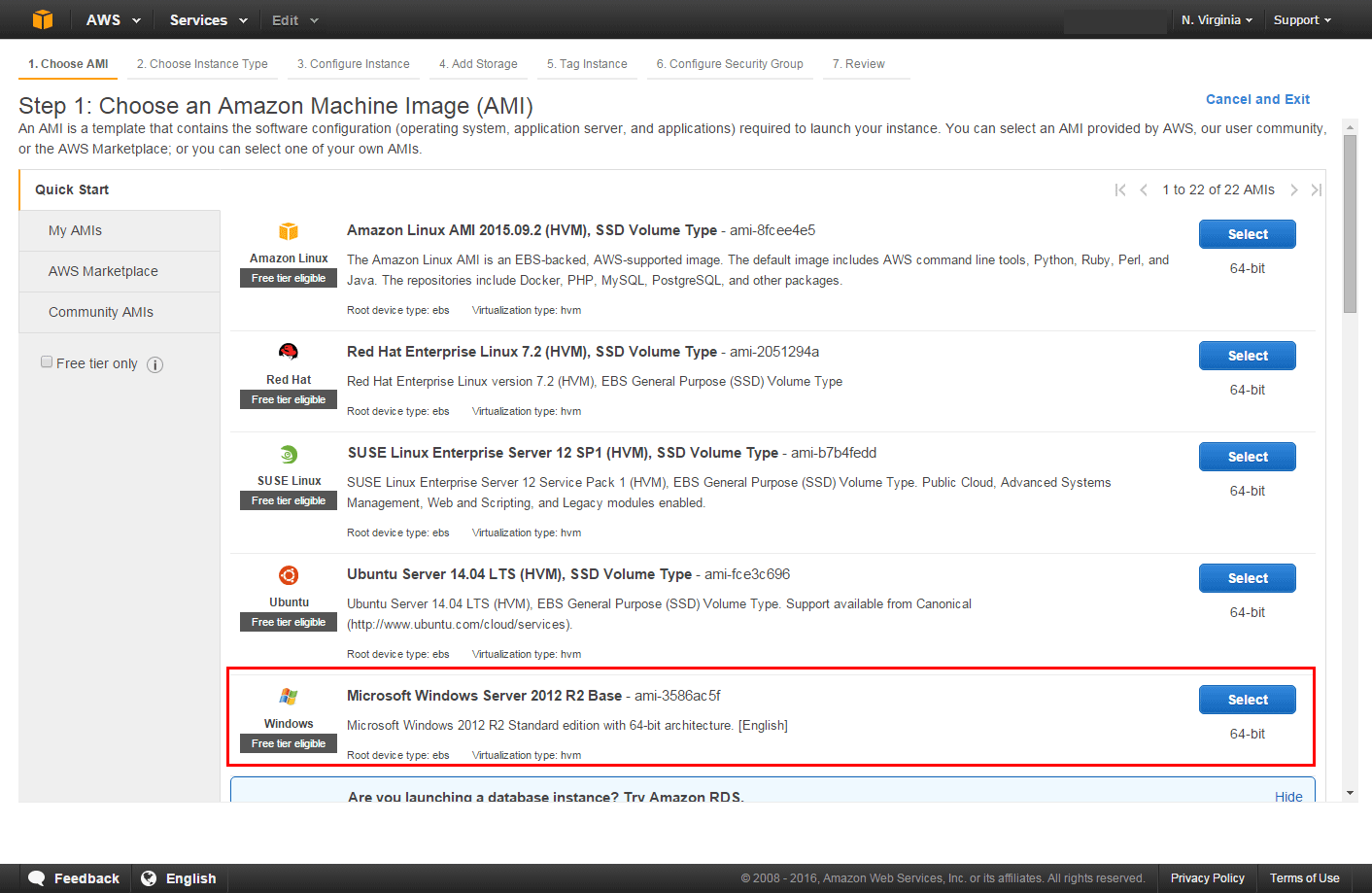
Qualified
Cloud computing patterns
Virtualization and Virtual machines
Making Front end built artifact as separated part of application
AWS/Azure/google cloud platform/digital ocean/rack space
Cloud types
Cloud computing
Cloud computing is the on-demand availability of computer system resources, especially data storage and computing power, without direct active management by the user. The term is generally used to describe data centers available to many users over the Internet. Large clouds, predominant today, often have functions distributed over multiple locations from central servers. If the connection to the user is relatively close, it may be designated an edge server.
IaaS, PaaS, SaaS — это модели предоставления облачных сервисов. То, как они соотносятся друг с другом, часто изображают в виде пирамиды с разным уровнем контроля информации. Вершина — это конечный пользователь, который работает с личными данными, «завернутыми» в виде программы или сервиса с удобным интерфейсом. Программа или сервис разворачиваются на некой технологической платформе, это второй уровень пирамиды. Наконец, ее основа — это инфраструктура: виртуальные серверы, вычислительные мощности, накопители и каналы связи.
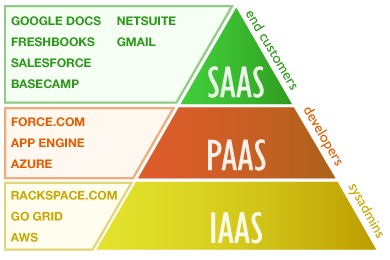
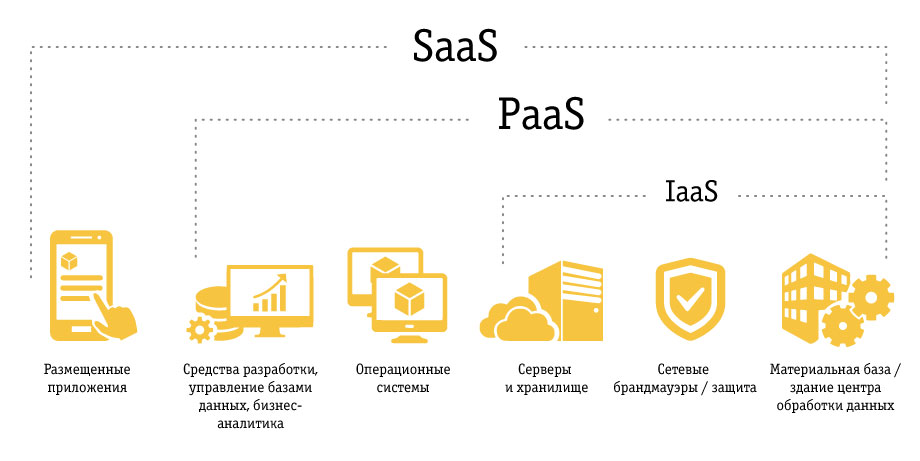
- в IaaS клиент получает только инфраструктуру,
- в PaaS — инфраструктуру и подготовленное для разработки приложений ПО,
- в SaaS — готовое работающее в облаке приложение.
| Platform Type | Examples |
|---|---|
| SaaS | Google Apps, Dropbox, Salesforce, Cisco WebEx, Concur, GoToMeeting |
| PaaS | AWS Elastic Beanstalk, Windows Azure, Heroku, Force.com, Google App Engine, Apache Stratos, OpenShift |
| IaaS | DigitalOcean, Linode, Rackspace, Amazon Web Services (AWS), Cisco Metapod, Microsoft Azure, Google Compute Engine (GCE) |
SaaS (Software-as-a-Service)
Переводится это так: «программное обеспечение как услуга». В этой модели поставщик сервиса использует собственное интернет-приложение и предоставляет возможность потребителям пользоваться им через Всемирную сеть. Основные особенности SaaS:
- Пользователи услуги не платят за обновления, установку, обслуживание используемого аппаратного и программного обеспечения.
- Улучшение и обновление сервиса осуществляется прозрачно для пользователей — им не нужно вручную производить для этого какие-либо манипуляции.
- За использование сервиса поставщик взимает оплату. Цена определяется продолжительностью доступа к услуге (например, за месяц) или объемом выполненных операций.
Софт — это знакомые всем программы. Для печати текста, отправки почты, создания иллюстраций и т. д. Но это еще и программы для работы внутри компании: CRM, ERP и другие системы.
Раньше пользователи покупали эти программы и устанавливали каждый на свой компьютер. Теперь достаточно открыть приложение в браузере. Это и есть SaaS.
Пример. Для конечных клиентов: Office 365 от Microsoft, сервисы Яндекса и Google. В корпоративном сегменте: 1С, amoCRM, «Битрикс 24».
В отличие от приложений, поставляемых on-premise, в модели SaaS не надо покупать полную версию, то есть не надо платить за раз много; не надо устанавливать на свое устройство; можно иметь доступ с разных устройств.
PaaS (Platform-as-a-Service)
Переводится как «платформа как услуга». В этой модели поставщик предлагает клиентам использовать свою облачную инфраструктуру для установки своего программного обеспечения. Здесь речь идет о целых платформах: ОС, СУБД, а также всевозможных инструментах для разработки. Основные особенности PaaS:
- Доступ к управлению облачной инфраструктурой PaaS имеет только провайдер. Он же задает набор доступных платформ, настроек и услуг.
- Стоимость определяется объемом оказанных услуг, который может измеряться временем их использования, количеством операций, проходящим трафиком и другими факторами.
Чтобы создать программное обеспечение, нужно другое программное обеспечение. Нужна платформа — среды разработки, средства для развертывания, базы данных, библиотеки машинного обучения и т. д. Готовые приложения надо где-то размещать. Организовывать всё это самому дорого и долго.
Чтобы сэкономить, можно воспользоваться облачной средой разработки (онлайн-IDE), а готовые программы разместить на хостинге приложений с поддержкой всех необходимых служб и сервисов. Такие услуги называются PaaS.
Пример. Облачная среда разработки Codenvy; хостинг приложений Google App Engine, Microsoft Azure или AWS; средство для развертывания приложений Docker; услуги разработки бессерверных приложений от AWS, базы данных от Oracle и др.
Главное преимущество PaaS — возможность быстро запускать приложения, в том числе для небольших команд. Кроме того, используя облачные сервисы, разработчики могут собирать статистику по работе своего ПО, анализировать и принимать оптимальные для бизнеса решения.
IaaS (Infrastructure-as-a-Service)
Переводится как «инфраструктура как услуга». В отличие от первых двух, в этой модели предполагается большая свобода действий — потребитель может собственноручно управлять предоставляемыми сервисами. Это могут быть средства для управления самыми разными ресурсами и контроля над ними.
Для организации работы с информацией и доступа в сеть компании нужно обеспечить хранение и доступ к данным. Нужна инфраструктура — серверное и сетевое оборудование, помещение для его размещения (дата-центр или серверная комната), специалисты для настройки и обслуживания. Организовывать собственную инфраструктуру дорого и долго.
Чтобы снизить расходы, можно арендовать место в дата-центре и установить там собственный сервер (colocation), можно арендовать сразу сервер (хостинг), а можно — вычислительные мощности: число ядер процессора, RAM и т. д. Последнее и будет IaaS.
Пример. Услугами IaaS является «виртуальный дата-центр» от Selectel или CloudLITE, «виртуальный сервер» от ISPserver или RuVDS.
Главное отличие IaaS от традиционного хостинга — возможность быстро масштабироваться и брать плату только за потреблённые ресурсы.
DaaS (Desktop-as-a-Service)
Переводится как «рабочий стол как услуга». Модель DaaS — это логическое продолжение SaaS. Здесь сервисом является не определенное программное обеспечение, а рабочее место, которое готово к использованию и снабжено всеми необходимыми средствами. Сеть дата-центров 3data использует именно эту модель обслуживания, как наиболее современную и расширяемую.
Другие виды XaaS
База данных как сервис (DBaaS), хранилище как сервис (Storage-as-a-Service), десктоп как сервис (DaaS), коммуникации как сервис (CaaS), мониторинг как сервис (MaaS) и даже кибератаки как сервис (MaaS).
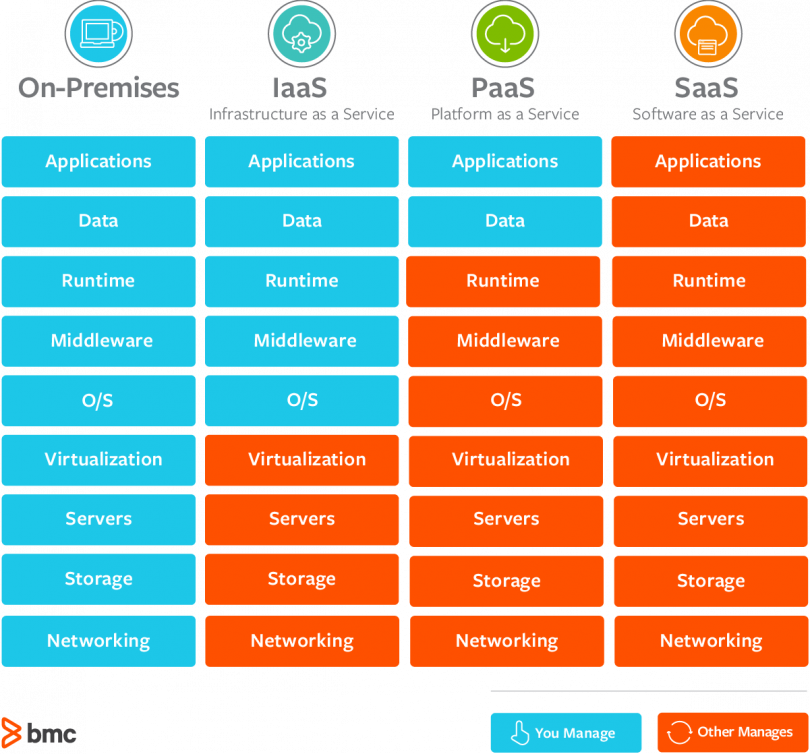
Service models
Public cloud
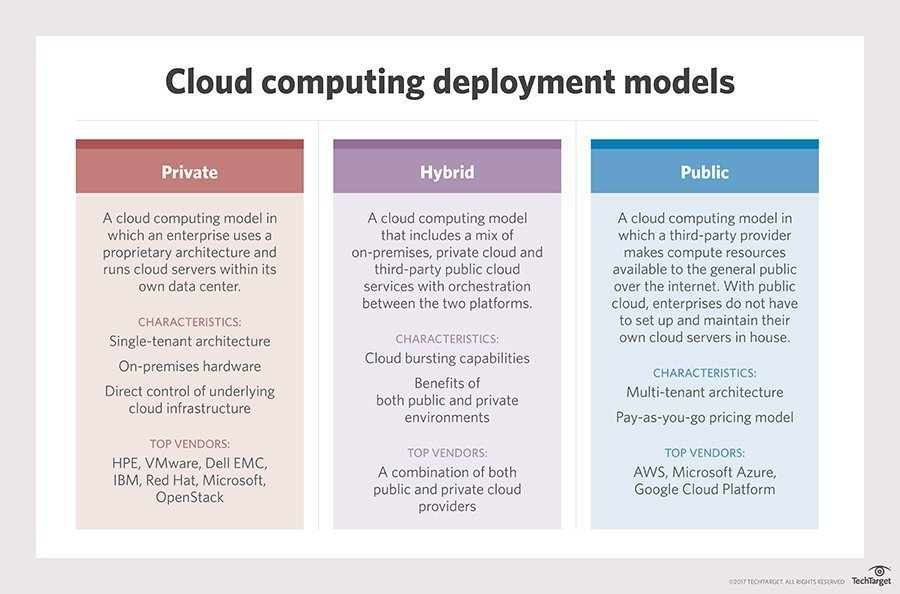
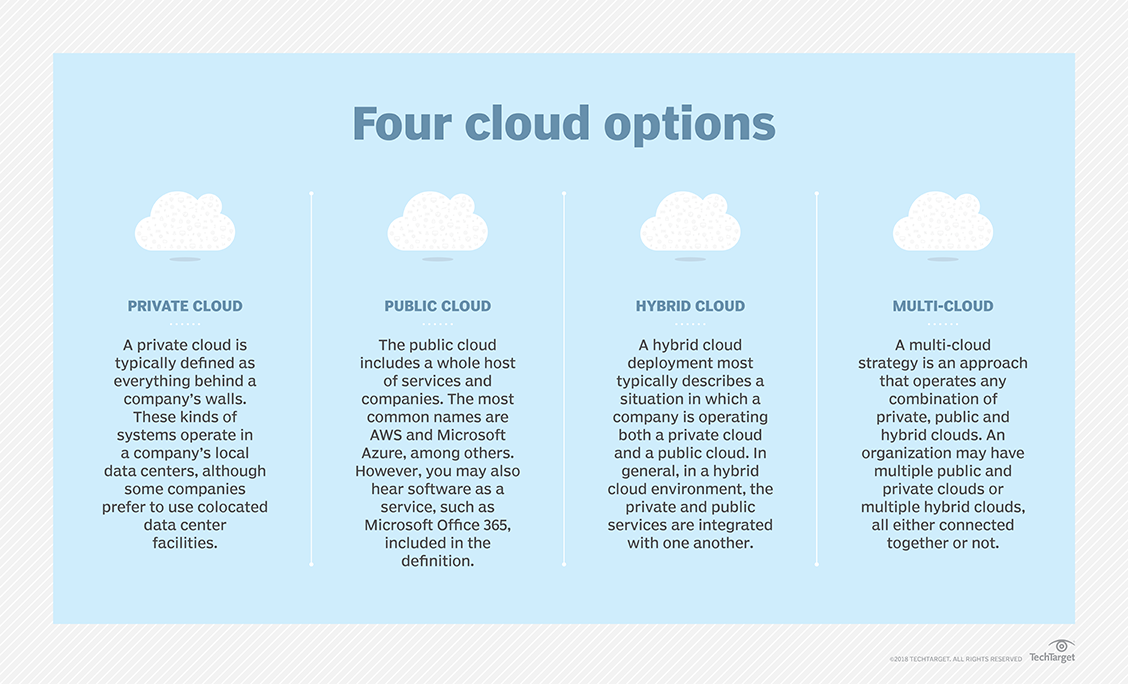
A public cloud is one based on the standard cloud computing model, in which a service provider makes resources, such as virtual machines (VMs), applications or storage, available to the general public over the internet. Public cloud services may be free or offered on a pay-per-usage model.
TIP
A public cloud is where an independent, third-party provider, such as Amazon Web Services (AWS) or Microsoft Azure, owns and maintains compute resources that customers can access over the internet. Public cloud users share these resources, a model known as a multi-tenant environment.
The main benefits of using a public cloud service are:
- it reduces the need for organizations to invest in and maintain their own on-premises IT resources;
- it enables scalability to meet workload and user demands; and
- there are fewer wasted resources because customers only pay for the resources they use.
Public cloud is a fully virtualized environment. In addition, providers have a multi-tenant architecture that enables users -- or tenants -- to share computing resources. Each tenant's data in the public cloud, however, remains isolated from other tenants. Public cloud also relies on high-bandwidth network connectivity to rapidly transmit data.
Public cloud storage is typically redundant, using multiple data centers and careful replication of file versions. This characteristic has given it a reputation for resiliency.
Public cloud architecture can be further categorized by service model. Common service models include:
- software as a service (SaaS), in which a third-party provider hosts applications and makes them available to customers over the internet;
- platform as a service (PaaS), in which a third-party provider delivers hardware and software tools -- usually those needed for application development -- to its users as a service;
- infrastructure as a service (IaaS), in which a third-party provider offers virtualized computing resources, such as VMs and storage, over the internet.
pros and cons
In general, the public cloud is seen as a way for enterprises to scale IT resources on demand, without having to maintain as many infrastructure components, applications or development resources in house.
The pay-per-usage pricing structure offered by most public cloud providers is also seen by some enterprises as an attractive and more flexible financial model. For example, organizations account for their public cloud service as an operational or variable cost rather than as a capital or fixed cost. In some cases, this means organizations do not require lengthy reviews or advanced budget planning for public cloud decisions.
However, because users typically deploy public cloud services in a self-service model, some companies find it difficult to accurately track cloud service usage, and potentially end up paying for more cloud resources than they actually need. Some organizations also just prefer to directly supervise and manage their own on-premises IT resources, including servers.
In addition, because of the multi-tenant nature of public cloud, security is an ongoing concern for some enterprises evaluating the cloud. While public cloud providers offer security technologies, such as encryption and identity and access management tools, some organizations -- especially those with strict regulatory or governance requirements -- choose to keep workloads on premises.
providers and adoption
The public cloud market is led by a few key players, including Amazon Web Services (AWS), Microsoft Azure and Google Cloud Platform. These providers deliver their services over the internet and use a fundamental pay-per-usage approach. Each provider offers a range of offerings oriented toward different workloads and enterprise needs.
Private cloud
Private cloud is a type of cloud computing that delivers similar advantages to public cloud, including scalability and self-service, but through a proprietary architecture. Unlike public clouds, which deliver services to multiple organizations, a private cloud is dedicated to the needs and goals of a single organization.
As a result, private cloud is best for businesses with dynamic or unpredictable computing needs that require direct control over their environments, typically to meet security, business governance or regulatory compliance requirements.
By comparison, a private cloud is created and maintained by an individual enterprise. The private cloud might be based on resources and infrastructure already present in an organization's on-premises data center or on new, separate infrastructure. In both cases, the enterprise itself owns and operates the private cloud.
Pros and cons
When an organization properly architects and implements a private cloud, it can provide most of the same benefits found in public clouds, such as user self-service and scalability, as well as the ability to provision and configure virtual machines (VMs) and change or optimize computing resources on demand. An organization can also implement chargeback tools to track computing usage and ensure business units pay only for the resources or services they use.
Private clouds are often deployed when public clouds are deemed inappropriate or inadequate for the needs of a business. For example, a public cloud might not provide the level of service availability or uptime that an organization needs. In other cases, the risk of hosting a mission-critical workload in the public cloud might exceed an organization's risk tolerance, or there might be security or regulatory concerns related to the use of a multi-tenant environment. In these cases, an enterprise might opt to invest in a private cloud to realize the benefits of cloud computing, while maintaining total control and ownership of its environment.
However, private clouds also have some disadvantages. First, private cloud technologies, such as increased automation and user self-service, can bring some complexity into an enterprise. These technologies typically require an IT team to rearchitect some of its data center infrastructure, as well as adopt additional management tools. As a result, an organization might have to adjust or even increase its IT staff to successfully implement a private cloud. This is different than public cloud, where most of the underlying complexity is handled by the cloud provider.
Another potential disadvantage of private clouds is cost. A benefit of public cloud is cost mitigation through the use of computing as a "utility" -- customers only pay for the resources they use. When a business owns its private cloud, however, it bears all of the acquisition, deployment, support and maintenance costs involved.
Major private cloud vendors
A private cloud is commonly deployed on premises in much the same way a business would build and operate its own traditional data center. However, an increasing number of vendors offer private cloud services that can bolster or even replace on-premises systems.
Some of the largest players in the private cloud market include Hewlett Packard Enterprise (HPE) with its Helion Cloud Suite software, Helion CloudSystem hardware, Helion Managed Private Cloud and Managed Virtual Private Cloud services. VMware is another major player, not just for enabling virtualization with its vSphere product, but also because of its vRealize Suite cloud management platform and its Cloud Foundation Software-Defined Data Center (SDDC) platform for private clouds.
More major players include Dell EMC, which offers virtual private cloud services, as well as cloud management and cloud security software; Oracle, which offers its Cloud Platform; and IBM, which offers private cloud hardware, along with IBM Cloud Managed Services, cloud security tools and cloud management and orchestration tools.
Red Hat has also emerged as a major vendor for private cloud deployment and management with a range of platforms, including OpenStack and Gluster Storage, as well as Red Hat Cloud Suite for management and development.
hybrid cloud
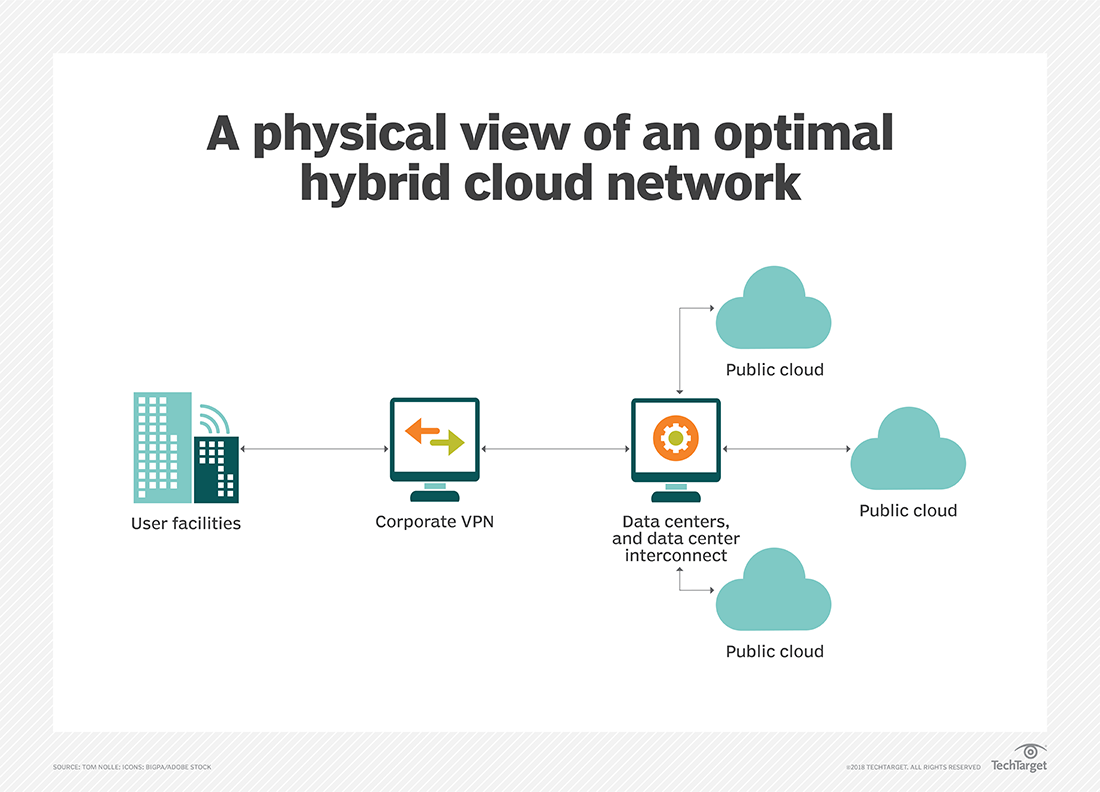
Hybrid cloud is a cloud computing environment that uses a mix of on-premises, private cloud and third-party, public cloud services with orchestration between the two platforms. By allowing workloads to move between private and public clouds as computing needs and costs change, hybrid cloud gives businesses greater flexibility and more data deployment options.
Hybrid cloud architecture
Establishing a hybrid cloud requires the availability of:
- A public infrastructure as a service (IaaS) platform, such as Amazon Web Services, Microsoft Azure or Google Cloud Platform;
- The construction of a private cloud, either on premises or through a hosted private cloud provider;
- And adequate wide area network (WAN) connectivity between those two environments.
Typically, an enterprise will choose a public cloud to access compute instances, storage resources or other services, such as big data analytics clusters or serverless compute capabilities.
However, an enterprise has no direct control over the architecture of a public cloud, so, for a hybrid cloud deployment, it must architect its private cloud to achieve compatibility with the desired public cloud or clouds. This involves the implementation of suitable hardware within the data center, including servers, storage, a local area network (LAN) and load balancers.
An enterprise must then deploy a virtualization layer, or a hypervisor, to create and support virtual machines (VMs) and, in some cases, containers. Then, IT teams must install a private cloud software layer, such as OpenStack, on top of the hypervisor to deliver cloud capabilities, such as self-service, automation and orchestration, reliability and resilience, and billing and chargeback. A private cloud architect will typically create a menu of local services, such as compute instances or database instances, from which users can choose.
The key to create a successful hybrid cloud is to select hypervisor and cloud software layers that are compatible with the desired public cloud, ensuring proper interoperability with that public cloud's application programming interfaces (APIs) and services. The implementation of compatible software and services also enables instances to migrate seamlessly between private and public clouds. A developer can also create advanced applications using a mix of services and resources across the public and private platforms.
Hybrid cloud benefits and use cases
Hybrid cloud computing enables an enterprise to deploy an on-premises private cloud to host sensitive or critical workloads, and use a third-party public cloud provider to host less-critical resources, such as test and development workloads.
Hybrid cloud is also particularly valuable for dynamic or highly changeable workloads. For example, a transactional order entry system that experiences significant demand spikes around the holiday season is a good hybrid cloud candidate. The application could run in private cloud, but use cloud bursting to access additional computing resources from a public cloud when computing demands spike.
Another hybrid cloud use case is big data processing. A company, for example, could use hybrid cloud storage to retain its accumulated business, sales, test and other data, and then run analytical queries in the public cloud, which can scale a Hadoop or other analytics cluster to support demanding distributed computing tasks.
Hybrid cloud also enables an enterprise to use broader mix of IT services. For example, a business might run a mission-critical workload within a private cloud, but use the database or archival services of a public cloud provider.
Hybrid cloud challenges
Despite its benefits, hybrid cloud computing can present technical, business and management challenges. Private cloud workloads must access and interact with public cloud providers, so, as mentioned above, hybrid cloud requires API compatibility and solid network connectivity.
For the public cloud piece of a hybrid cloud, there are potential connectivity issues, service-level agreements (SLAs) breaches and other possible service disruptions. To mitigate these risks, organizations can architect hybrid cloud workloads that interoperate with multiple public cloud providers. However, this can complicate workload design and testing. In some cases, an enterprise needs to redesign workloads slated for hybrid cloud to address specific public cloud providers' APIs.
Another challenge with hybrid cloud computing is the construction and maintenance of the private cloud itself, which requires substantial expertise from local IT staff and cloud architects. The implementation of additional software, such as databases, helpdesk systems and other tools can further complicate a private cloud. What's more, the enterprise is fully responsible for the technical support of a private cloud, and must accommodate any changes to public cloud APIs and service changes over time.
Hybrid cloud management tools
Management tools such as Egenera PAN Cloud Director, RightScale Cloud Management, Cisco CloudCenter and Scalr Enterprise Cloud Management Platform help businesses handle workflow creation, service catalogs, billing and other tasks related to hybrid cloud. Additional hybrid cloud management tools include BMC Cloud Lifecycle Management, IBM Cloud Orchestrator, Abiquo Hybrid Cloud, Red Hat CloudForms and VMware vCloud Suite. Given the sheer volume of potential tools available, it is important for potential adopters to test and evaluate candidates carefully in their own hybrid cloud environment before making a commitment to any particular tool.
Cloud computing patterns
Cloud Computing Fundamentals
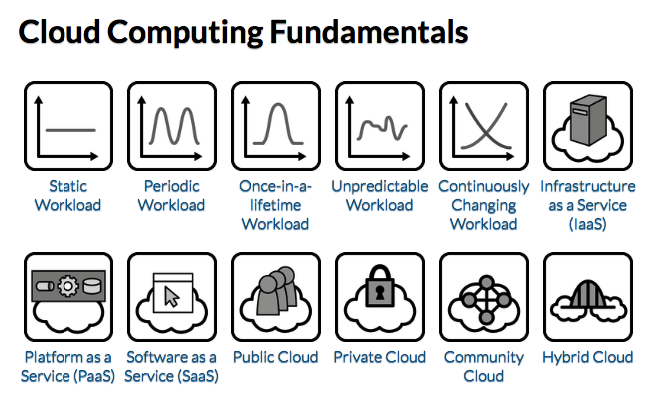
Static Workload
TIP
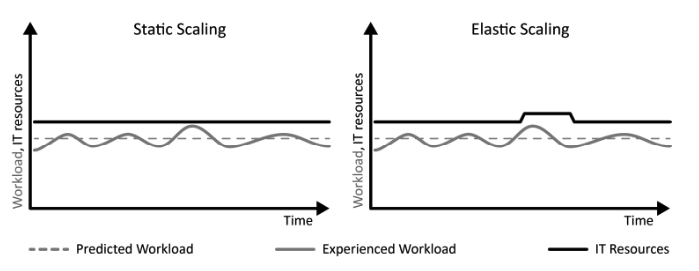
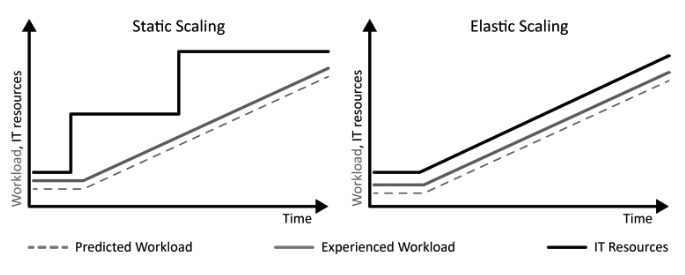
IT resources with an equal utilization over time experience Static Workload.
How can an equal utilization be characterized and how can applications experiencing this workload benefit from cloud computing?
Context Static Workloads are characterized by a more-or-less flat utilization profile over time within certain boundaries.
Solution An application experiencing Static Workload is less likely to benefit from an elastic cloud that offers a pay-per-use billing, because the number of required resources is constant.
Periodic Workload
TIP
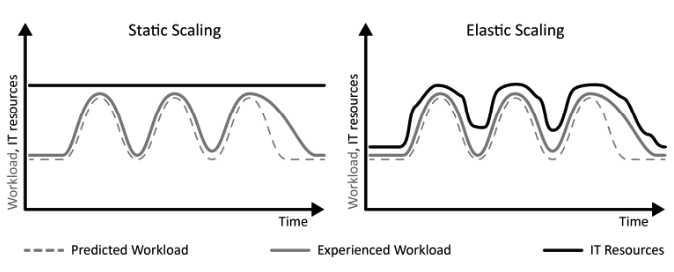
IT resources with a peaking utilization at reoccurring time intervals experience periodic workload.
How can a periodically peaking utilization over time be characterized and how can applications experiencing this workload benefit from cloud computing?
Context In our real lives, periodic tasks and routines are very common. For example, monthly paychecks, monthly telephone bills, yearly car checkups, weekly status reports, or the daily use of public transport during rush hour, all these tasks and routines occur in well-defined intervals.
Solution From a customer perspective the cost-saving potential in scope of Periodic Workload is to use a provider with a pay-per-use pricing model allowing the decommissioning of resources during non-peak times.
Once-in-a-lifetime Workload
TIP
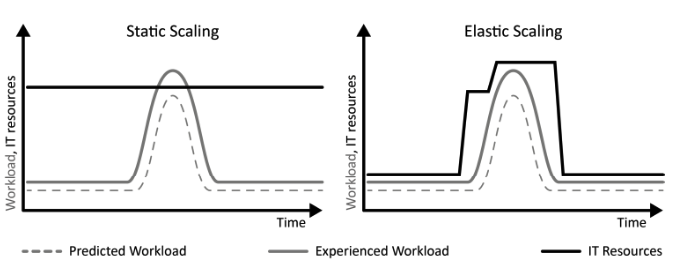
IT resources with an equal utilization over time disturbed by a strong peak occurring only once experience Once-in-a-lifetime Workload.
How can equal utilization with a one-time peak be characterized and how can applications experiencing this workload benefit from cloud computing?
Context As a special case of Periodic Workload, the peaks of periodic utilization can occur only once in a very long timeframe. Often, this peak is known in advance as it correlates to a certain event or task.
Solution The elasticity of a cloud is used to obtain IT resources necessary. The provisioning and decommissioning of IT resources can often be realized as a manual task, because it is performed at a known point in time.
Unpredictable Workload
TIP
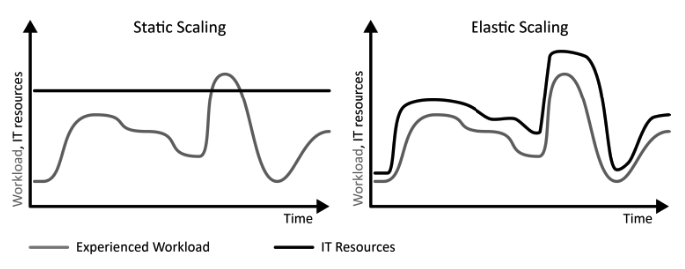
IT resources with a random and unforeseeable utilization over time experience unpredictable workload.
How can random and unforeseeable utilization be characterized and how can applications experiencing this workload benefit from cloud computing?
Context Random workloads are a generalization of Periodic Workloads as they require elasticity but are not predictable. Such workloads occur quite often in the real world.
Solution Unplanned provisioning and decommissioning of IT resources is required. The necessary provisioning and decommissioning of IT resources is, therefore, automated to align the resource numbers to changing workload.
Continuously Changing Workload
TIP
IT resources with a utilization that grows or shrinks constantly over time experience Continuously Changing Workload.
How can a continuous growth or decline in utilization be characterized and how can applications experiencing this workload benefit from cloud computing?
Context Many applications experience a long term change in workload.
Solution Continuously Changing Workload is characterized by an ongoing continuous growth or decline of the utilization. Elasticity of clouds enables applications experiencing Continuously Changing Workload to provision or decommission resources with the same rate as the workload changes.
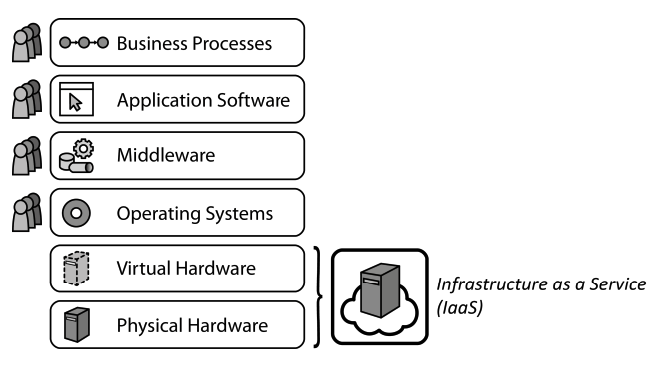
Infrastructure as a Service (IaaS)
IaaS
Providers share physical and virtual hardware IT resources between customers to enable self-service, rapid elasticity, and pay-per-use pricing.
How can different customers share a physical hosting environment so that it can be used on-demand with a pay-per-use pricing model?
Context In the scope of Periodic Workloads with reoccurring peaks and the special case of Once-in-a-lifetime Workloads with one dramatic increase in workload, IT resources have to be provisioned flexibly.
Solution A provider offers physical and virtual hardware, such as servers, storage and networking infrastructure that can be provisioned and decommissioned quickly through a self-service interface.
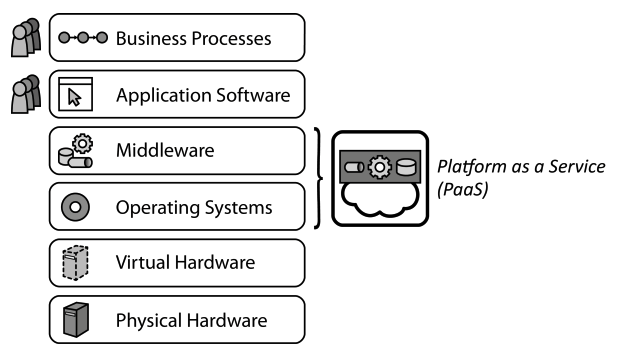
Platform as a Service (PaaS)
PaaS
Providers share IT resources providing an application hosting environment between customers to enable self-service, rapid elasticity, and pay-per-use pricing.
How can custom applications of the same customer or different customers share an execution environment so that it can be used on-demand with a pay-per-use pricing model?
Context If many customers require similar hosting environments for their applications, there are many redundant installations resulting in an inefficient use of the overall cloud.
Solution A cloud provider offers managed operating systems and middleware. Management operations are handled by the provider, such as the elastic scaling and failure resiliency of hosted applications.
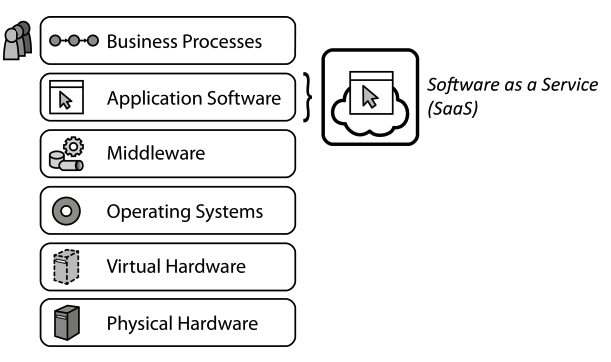
Software as a Service (SaaS)
SaaS
Providers share IT resources providing human-usable application software between customers to enable self-service, rapid elasticity, and pay-per-use pricing.
How can customers share a provider-supplied software application so that it can be used on-demand with a pay-per-use pricing model?
Context Small and medium enterprises may not have the manpower and know-how to develop custom software applications. Other applications have become commodity and are used by many companies, for example, office suites, collaboration software, or communications software.
Solution A provider offers a complete software application to customers who may use it on-demand via a self-service interface.
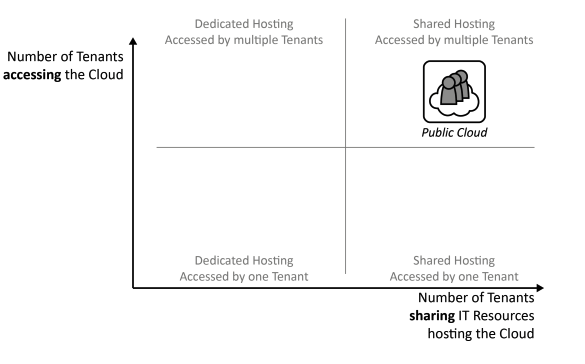
Public Cloud
Public Cloud
IT resources are provided as a service to a very large customer group in order to enable elastic use of a static resource pool.
How can the cloud properties – on demand self-service, broad network access, pay-per-use, resource pooling, and rapid elasticity – be provided to a large customer group?
Context A provider offering IT resources according to IaaS, PaaS, or SaaS has to maintain physical data centers. IT resources, nevertheless, shall be made accessible dynamically.
Solution The hosting environment is shared between many customers possibly reducing the costs for an individual customer. Leveraging economies of scale enables a dynamic use of resources, because workload peaks of some customers occur during times of low workload of other customers.
Private Cloud
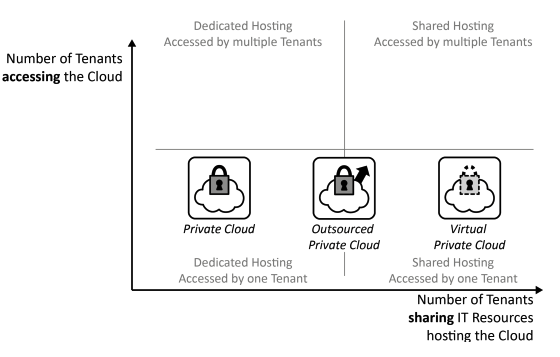
Private Cloud
IT resources are provided as a service exclusively to one customer in order to meet high requirements on privacy, security, and trust while enabling elastic use of a static resource pool as good as possible.
How can the cloud properties – on demand self-service, broad network access, pay-per-use, resource pooling, and rapid elasticity – be provided in environments with high privacy, security and trust requirements?
Context Many factors, such as legal limitations, trust, and security regulations, motivate dedicated, company-internal hosting environments only accessible by employees and applications of a single company.
Solution Cloud computing properties are enabled in a company-internal data center. Alternatively, the Private Cloud may be hosted exclusively in the data center of an external provider, then referred to as outsourced Private Cloud. Sometimes, Public Cloud providers also offer means to create an isolated portion of their cloud made accessible to only one customer: a virtual Private Cloud.
Community Cloud
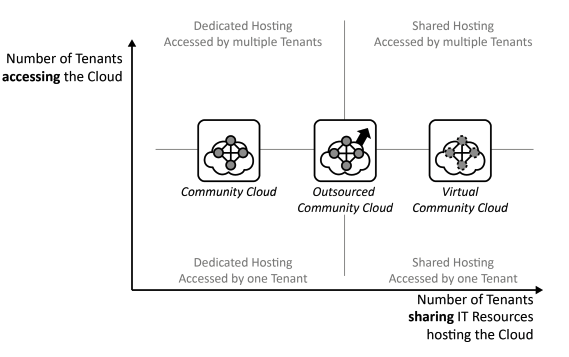
Community Cloud
IT resources are provided as a service to a group of customers trusting each other in order to enable collaborative elastic use of a static resource pool.
How can the cloud properties – on demand self-service, broad network access, pay-per-use, resource pooling, and rapid elasticity – be provided to exclusively to a group of customers forming a community of trust?
Context Whenever companies collaborate, they commonly have to access shared applications and data to do business. While these companies trust each other due to established contracts etc., the handled data and application functionality may be very sensitive and critical to their business.
Solution IT resources required by all collaborating partners are offered in a controlled environment accessible only by the community of companies that generally trust each other.
Hybrid Cloud
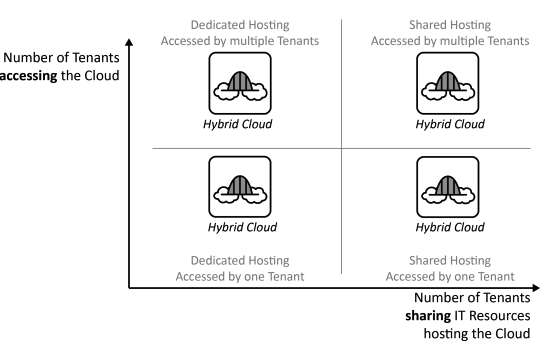
Hybrid Cloud
Different clouds and static data centers are integrated to form a homogeneous hosting environment.
How can the cloud properties – on demand self-service, broad network access, pay-per-use, resource pooling, and rapid elasticity – be provided across clouds and other environments?
Context A company is likely to use a large set of applications to support its business, which have versatile requirements making different Cloud Deployment Models suitable to host them.
Solution Private Clouds, Public Clouds, Community Clouds, and static data centers are integrated to deployed applications to the hosting environment best suited for their requirements while interconnection of these environments.
Cloud Offerings
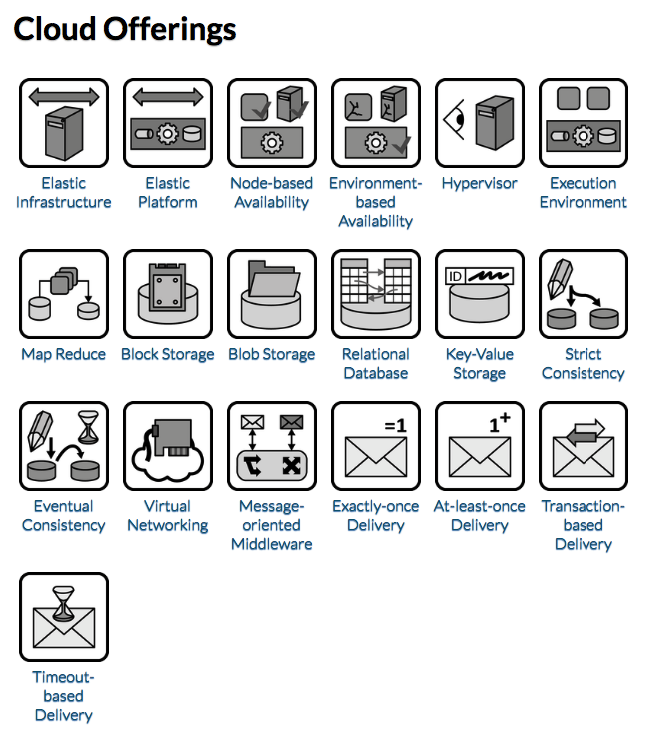
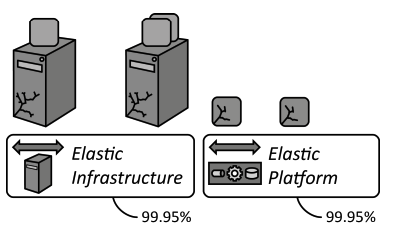
Elastic Infrastructure
TIP
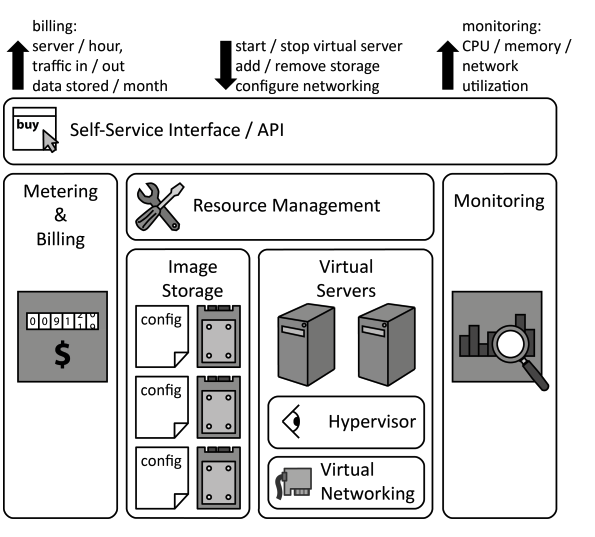
Hosting of virtual servers, disk storage, and configuration of network connectivity is offered via a self-service interface over a network.
How do Cloud Offerings providing infrastructure resources behave and how should they be used in applications?
Context An application experiences Periodic Workload, Once-in-a-lifetime Workload, Unpredictable Workload, or Continuously Changing Workload, the number of IT resources, such as servers, should be adjusted dynamically. In scope of the IaaS service model, the applications’ runtime infrastructure, thus, must support dynamic provisioning and decommissioning of virtual servers, disk storage and network connectivity.
Solution An Elastic Infrastructure provides preconfigured virtual server images, storage and network connectivity that may be provisioned by customers using a self-service interface. Monitoring information is provided to inform about resource utilization required for traceable billing and automation of management tasks.
Elastic Platform
TIP
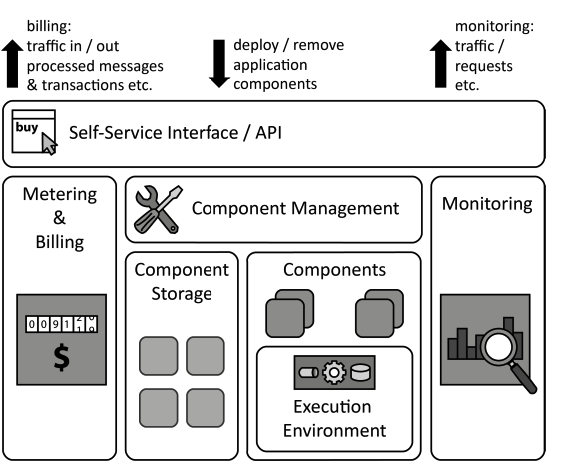
Middleware for the execution of custom applications, their communication, and data storage is offered via a self-service interface over a network.
How do Cloud Offerings providing Execution Environments behave and how should they be used in applications?
Context One of the fundamental cloud properties is the sharing of resources among a large number of customers to leverage economy of scale. Extending resource sharing between customers to the operating systems and middleware increases the beneficial effects of economies of scale as the utilization of these resources can be increased.
Solution Application components of different customers are hosted on shared middleware provided and maintained by the provider. Customers may deploy custom application components to this middleware using a self-service interface. This unification enables resource sharing and an automation of certain management tasks on the provider side, for example, provisioning of applications, update management.
Node-based Availability
TIP
A cloud provider guarantees the availability of individual nodes, such as individual virtual servers, middleware components or hosted application components.
How can providers express availability in a node-centric fashion, so that customers may estimate the availability of hosted applications?
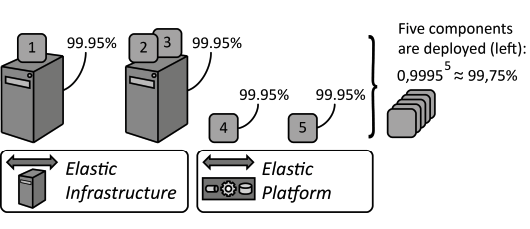
Context A provider offers an Elastic Infrastructure or an Elastic Platform and needs a means to express the availability for the offerings from which the customer may then compute the availability of the hosted application. First, conditions are defined that have to be fulfilled by an available offering. Second, the timeframe needs to be expressed for which the provider assures this availability.
Solution The provider assures availability for each hosted application component, which is defined to be available if it is reachable and performs its function as advertised, i.e., it provides correct results. This timeframe is often expressed as a percentage. An availability of 99.95%, thus, means that a hosted component will be available during 99.95% of the time it is hosted at the provider.
Environment-based Availability
TIP
A cloud provider guarantees the availability of the environment hosting individual nodes, such as virtual servers or hosted application components.
How can providers express availability in an environmental-centric fashion, so that customers may estimate the availability of hosted applications?
Context A cloud provider offers an Elastic Infrastructure or an Elastic Platform on which customers may deploy application components. The availability of this environment has to be expressed so that customers may match their requirements.
Solution The provider assures availability for the provided environment, thus, for the availability of the Elastic Platform or the Elastic Infrastructure as a whole, for example, the availability for at-least-once provisioned component or virtual server and the availability to provision replacements in case of failures is assured. There is no notion of availability for individual application components or virtual servers deployed in this environment.
Hypervisor
TIP
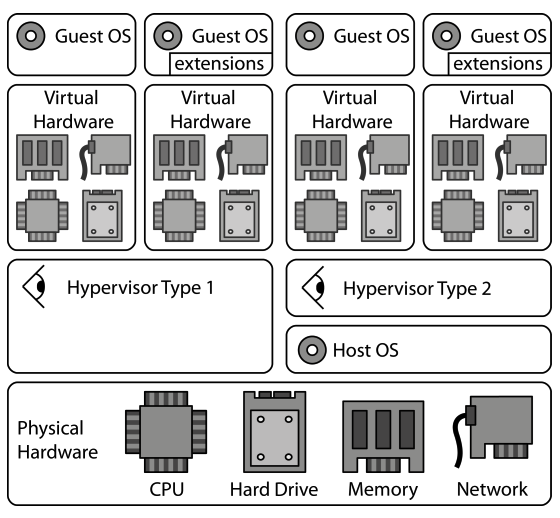
To enable the elasticity of clouds, the time required to provision and decommission servers is reduced through hardware virtualization.
How can virtual hardware that has been abstracted from physical hardware be used in applications?
Context If multiple applications are deployed on a physical server they may have to consider the other applications in their configuration. For example, if applications require the same network ports, access the same directories in the local file system etc. This sharing of common underlying physical hardware between different applications shall be simplified while also reducing dependencies of the application on the physical server.
Solution A Hypervisor abstracts the hardware of a shared physical server into virtualized hardware. On this virtual hardware, different operating systems and middleware are installed to host applications sharing the physical server while being isolated from each other regarding the use of physical hardware, such as central processing units (CPU), memory, disk storage, and networking.
Execution Environment
TIP
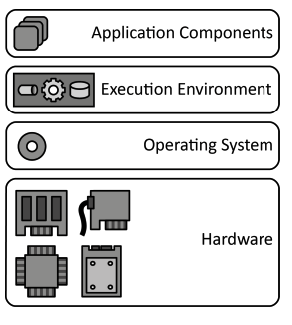
To avoid duplicate implementation of functionality, application components are deployed to a hosting environment providing middleware services as well as often used functionality.
How can multiple application components share a hosting environment efficiently?
Context Applications often use similar functions, for example, to access networking interfaces, display user interfaces, access storage of the server etc. In this case, each application implements similar components that could be shared with other applications. Sharing such common functionality between applications would also result in a better utilization of the environment.
Solution Common functionality is summarized in an Execution Environment providing functionality in platform libraries to be used in custom application implementations and in the form of the middleware. The environment, thus, executes custom application components and provides common functionality for data storages, communication etc.
Map Reduce
TIP
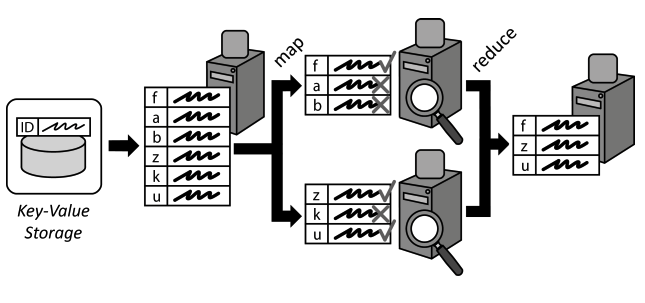
Large data sets to be processed are divided into smaller data chunks and distributed among processing application components. Individual results are later consolidated.
How can the performance of complex processing of large data sets be increased through scaling out?
Context Cloud applications often have to handle very large amounts of data, which have to be processed efficiently. As Distributed Applications are designed to scale out, data processing should be distributed among multiple application component instances in a similar means. Afterwards, results of these distributed components have to be consolidated.
Solution A large data set to be processed is split up and mapped to multiple application components handling data processing. Data Processing Components simultaneously execute the query to be performed on the assigned data chunks. Afterwards, the individual results of all Processing Components are consolidated or reduced into one result data set. During this reduction, additional functions, such calculations of sums, average values etc. may be used.
Block Storage
TIP
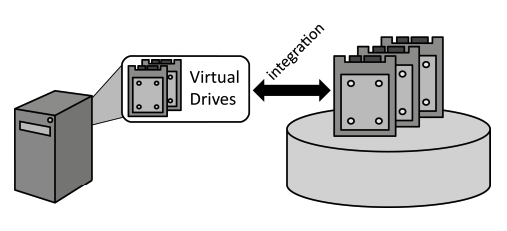
Centralized storage is integrated into servers as a local hard drive managed by the operating system to enable access to this storage via the local file system.
How can central storage be accessed as a local drive by servers and hosted applications?
Context Virtual and non-virtualized servers offered as Infrastructure as a Service (IaaS) can be managed significantly easier if they do not store any state information locally, i.e., on their (virtual) hard drives. This eases their provisioning, decommissioning, and failure handling.
Solution Centralized storage is accessed by servers as if it was a local hard drive, also referred to as block device.
Blob Storage
TIP
Data is provided in form of large files that are made available in a file system-like fashion by Storage Offerings that provides elasticity.
How can large files be stored, organized and made available over a network?
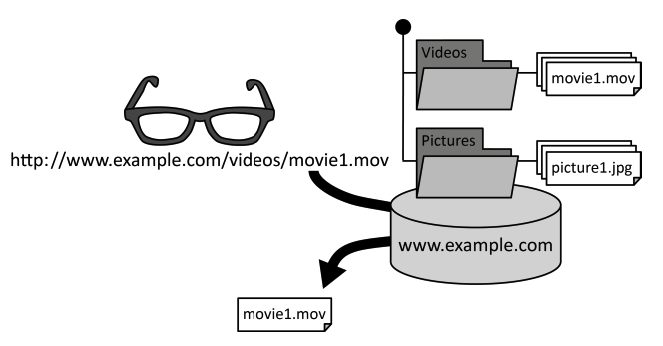
Context Distributed cloud applications often need to handle large data elements, also referred to as binary large objects (blob). Examples are virtual server images managed in an Elastic Infrastructure, pictures, or videos.
Solution Data elements are organized in a folder hierarchy similar to a local file system. Each data element is given a unique identifier comprised of its location in the folder hierarchy and a file name. This unique identifier is passed to the storage offerings to retrieve a file over a network.
Relational Database
TIP
Data is structured according to a schema that is enforced during data manipulation and enables expressive queries of handled data.
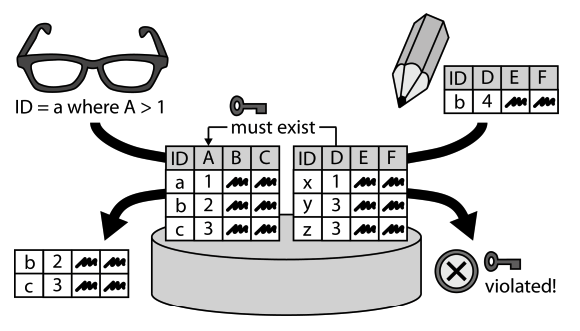
How can data elements be stored so that relations between them can be expressed and expressive queries are enabled to retrieve required information effectively?
Context Handled data is often comprised of large numbers of similar data elements. These data elements have certain dependencies among each other. If such structured data is queried, clients make certain assumptions about the data structure and the consistency of relations between the retrieved data elements.
Solution Data elements are stored in tables where each column represents an attribute of a data element. Table columns may have dependencies in the way that entries in one table column must also be present in a corresponding column of a different table. These dependencies are enforced during data manipulations.
Key-Value Storage
TIP
Semi-structured or unstructured data is stored with limited querying support but high-performance, availability, and flexibility.
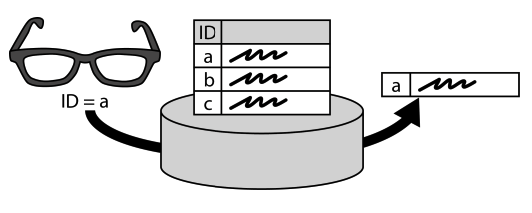
How can key-value elements be stored to support scale out and an adjustable data structure?
Context To ensure availability and performance, a data storage offering shall be distributed among different IT resources and locations. Furthermore, changes of requirements or the fact that customers share a storage offering and have different requirements, raises the demand for a flexible data structure. as data structure validation during queries requires high-performance connectivity between distributed resources storing the data elements.
Solution Pairs of identifiers (key) and associated data (value) are stored. No database schema or only a very limited one are supported to enforce a data structure. The expressiveness of queries is reduced significantly in favor of scalability and configurability: semi-structured on unstructured data can be scaled out among many IT resources without the need to access many of them for the evaluation of expressive queries.
Strict Consistency
TIP
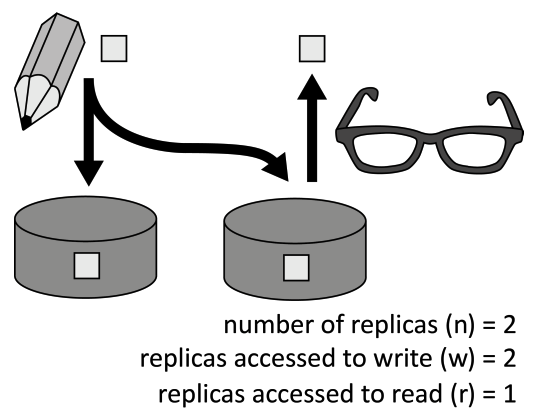
Data is stored at different locations (replicas) to improve response time and to avoid data loss in case of failures while consistency of replicas is ensured at all times.
How can data be distributed among replicas to increase availability, while ensuring data consistency at all times?
Context To ensure failure tolerance, a storage offering duplicates data among multiple replicas. These replicas store the same set of data, so in case any of these replicas is lost, data may still be obtained and recovered from the other replicas.
Solution Data is duplicated among several replicas to increase availability. A subset of data replicas is accessed by read and write operations. The ratio of the number of replicas accessed during read (r) and write (w) operations guarantees consistency: n < r + w
Eventual Consistency:::tip
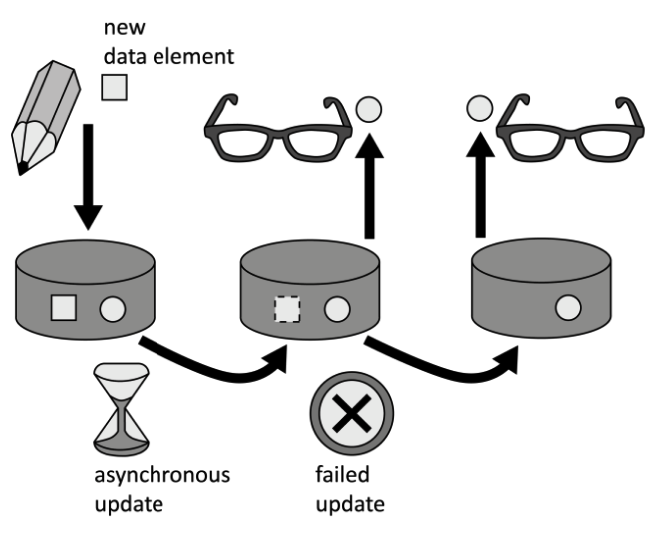
If data is stored at different locations (replicas) to improve response time and avoid data loss in case of failures. Performance and the availability of data in case of network partitioning are enabled by ensuring data consistency eventually and not at all times. :::
How can data be distributed among replicas with focus on increased availability and performance, while being resilient towards connectivity problems?
Context Using multiple replicas of data is vital to ensure resiliency of a storage offering towards resource failures. Keeping all these replicas in a consistent state, however, requires a significant overhead as multiple or all data replicas have to be accessed during read and write operations.
Solution The consistency of data is relaxed. This reduces the number of replicas that have to be accessed during read and write operations. Data alterations are eventually transferred to all replicas by propagating them asynchronously over the connection network.
Virtual Networking
TIP
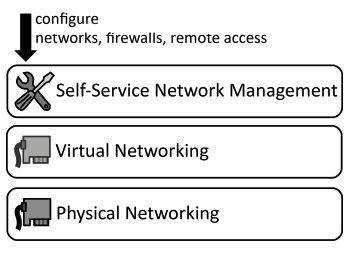
Networking resources are virtualized to empower customers to configure networks, firewalls, and remote access using a self-service interface.
How can network connectivity between IT resources hosted in a cloud be configured dynamically and on-demand?
Context Application components deployed on Elastic Infrastructures and Elastic Platforms rely on physical network hardware to communicate with each other and the outside world. On this networking layer, different customers shall be isolated from each.
Solution Physical networking resources, such as networking interface cards, switches, routers etc. are abstracted to virtualized ones. These Virtual Networking resources may share the same physical networking resources. Configuration is handled by customers through self-service interfaces.
Message-oriented Middleware
TIP
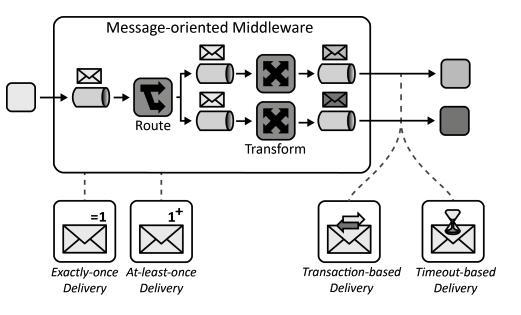
Asynchronous message-based communication is provided while hiding complexity resulting from addressing, routing, or data formats from communication partners to make interaction robust and flexible.
How can communication partners exchange information asynchronously with a communication partner?
Context The application components of a Distributed Application are hosted on multiple cloud resources and have to exchange information with each other. Often, the integration with other cloud applications and non-cloud applications is also required.
Solution Communication partners exchange information asynchronously using messages. The message-oriented middleware handles the complexity of addressing, availability of communication partners and message format transformation.
Exactly-once Delivery
TIP
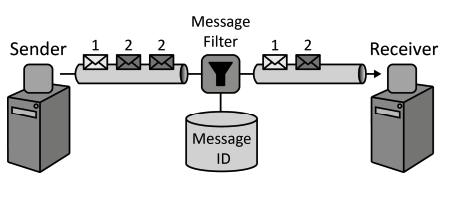
For many critical systems duplicate messages are inacceptable. The messaging system ensures that each message is delivered exactly once by filtering possible message duplicates automatically.
How can it be assured that a message is delivered only exactly once to a receiver?
Context Message duplicity is a very critical design issue for Distributed Applications and or application components that exchange messages via a Message-oriented Middleware.
Solution Upon creation, each message is associated with a unique message identifier. This identifier is used to filter message duplicates during their traversal from sender to receiver.
At-least-once Delivery
TIP
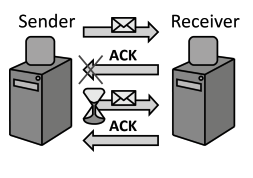
In case of failures that lead to message loss or take too long to recover from, messages are retransmitted to assure they are delivered at least once.
How can communication partners or a Message-oriented Middleware ensure that messages are received successfully?
Context Sometimes, message duplicity can be coped with by the application using a Message-oriented Middleware. Therefore, for scenarios where message duplicates are uncritical, it shall still be ensured that messages are received.
Solution For each message retrieved by a receiver an acknowledgement is sent back to the message sender. In case this acknowledgement is not received after a certain time frame, the message is resend.
Transaction-based Delivery
TIP
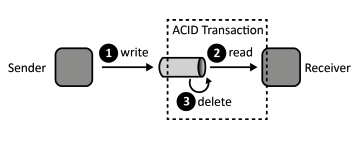
Clients retrieve messages under a transactional context to ensure that messages are received by a handling component.
How can it be ensured that messages are only deleted from a message queue if they have been received successfully?
Context While a Message-oriented Middleware can control traversing messages, it may be necessary to assure that messages are actually received successfully from a message queue by the client.
Solution The Message-oriented Middleware and the client reading a message from a queue participate in a transaction. All operations involved in the reception of a message are, therefore, performed under one transactional context guaranteeing ACID behavior.
Timeout-based Delivery
TIP
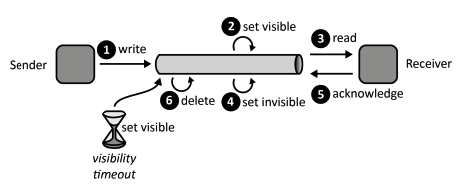
Clients acknowledge message receptions to ensure that messages are received properly.
How can it be ensured that messages are only deleted from a message queue if they have been received successfully at least once?
Context In addition to ensuring that messages are not lost while they are traversing a Message-oriented Middleware it may, thus, also be required to assure that they are actually received by a client before they are deleted from a message queue.
Solution To assure that a message is properly received, it is not deleted immediately after it has been read by a client, but is only marked as being invisible. In this state a message may not be read by another client. After a client has successfully read a message, it sends an acknowledgement to the message queue upon which reception the message is deleted.
CDN
CDN
CDN stands for “Content Delivery Network” and it is a system of computers with scripts and other content on them that are widely used by many web pages. A CDN can be a very effective way to speed up your web pages because the content will often be cached at a network node.
How a CDN Works
- The web designer links to a file on a CDN, such as a link to jQuery.
- The customer visits another website that also uses jQuery.
- Even if no one else has used that version of jQuery, when the customer comes to the page in number 1, the link to jQuery is already cached.
But there is more to it. Content Delivery Networks are designed to be cached at the network level. So, even if the customer does not visit another site using jQuery, chances are that someone on the same network node as they are on has visited a site using jQuery. And so the node has cached that site.
Any object that is cached will load from the cache, which speeds up the page download time.
TIP
Many large websites use commercial CDNs like Akamai Technologies to cache their web pages around the world. A website that uses a commercial CDN works the same way. The first time a page is requested, by anyone, it is built from the web server. But then it is also cached on the CDN server. Then when another customer comes to that same page, first the CDN is checked to determine if the cache is up-to-date. If it is, the CDN delivers it, otherwise, it requests it from the server again and caches that copy.
A commercial CDN is a very useful tool for a large website that gets millions of page views, but it might not be cost effective for smaller websites.
Small websites can also use free CDNs to cache their content. There are several good CDNs you can use, including:
- Cloudflare
- Coral CDN
- Traffic Server
When to Switch to a Content Delivery Network
The majority of response time for a web page is spent downloading the components of that web page, including images, stylesheets, scripts, and so on. By putting as many of these elements as possible on a CDN, you can improve the response time dramatically. But as I mentioned it can be expensive to use a commercial CDN. Plus, if you aren’t careful, installing a CDN on a smaller site can slow it down, rather than speed it up. So many small businesses are reluctant to make the change.
There are some indications that your website or business is big enough to benefit from a CDN.
- your site gets a lot of visitors every day
- and those visitors come from a widely distributed area
Most people feel that you need at least a million visitors per day to benefit from a CDN, but I don’t think there is any set number. A site that hosts a lot of images or video could benefit from a CDN for those images or videos even if their daily page views is lower than a million. Other file types that can benefit from being hosted on a CDN are scripts, videos, sound files, and other static page elements.
Benefits
- Different domains Browsers limit the number of concurrent connections (file downloads) to a single domain. Most permit four active connections so the fifth download is blocked until one of the previous files has been fully retrieved. You can often see this limit in action when downloading many large files from the same site.
CDN files are hosted on a different domain. In effect, a single CDN permits the browser to download a further four files at the same time.
Files may be pre-cached jQuery is ubiquitous on the web. There’s a high probability that someone visiting your pages has already visited a site using the Google CDN. Therefore, the file has already been cached by your browser and won’t need to be downloaded again.
High-capacity infrastructures You may have great hosting but I bet it doesn’t have the capacity or scalability offered by Google, Microsoft or Yahoo. The better CDNs offer higher availability, lower network latency and lower packet loss.
Distributed data centers If your main web server is based in Dallas, users from Europe or Asia must make a number of trans-continental electronic hops when they access your files. Many CDNs provide localized data centers which are closer to the user and result in faster downloads.
Built-in version control It’s usually possible to link to a specific version of a CSS file or JavaScript library. You can often request the “latest” version if required.
Usage analytics Many commercial CDNs provide file usage reports since they generally charge per byte. Those reports can supplement your own website analytics and, in some cases, may offer a better impression of video views and downloads.
Boosts performance and saves money A CDN can distribute the load, save bandwidth, boost performance and reduce your existing hosting costs — often for free.
Virtualization and Virtual machines:
Virtualization
Virtualization
Virtualization is the process of running a virtual instance of a computer system in a layer abstracted from the actual hardware. Most commonly, it refers to running multiple operating systems on a computer system simultaneously. To the applications running on top of the virtualized machine, it can appear as if they are on their own dedicated machine, where the operating system, libraries, and other programs are unique to the guest virtualized system and unconnected to the host operating system which sits below it.
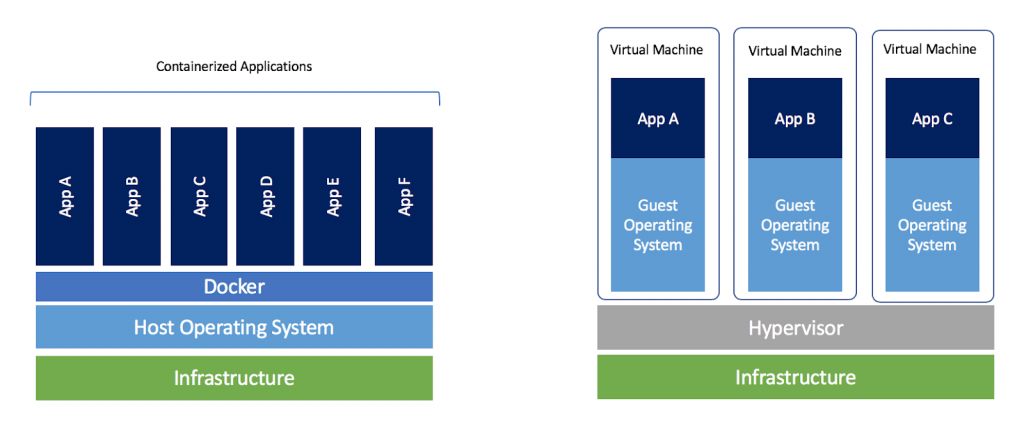
There are many reasons why people utilize virtualization in computing. To desktop users, the most common use is to be able to run applications meant for a different operating system without having to switch computers or reboot into a different system. For administrators of servers, virtualization also offers the ability to run different operating systems, but perhaps, more importantly, it offers a way to segment a large system into many smaller parts, allowing the server to be used more efficiently by a number of different users or applications with different needs. It also allows for isolation, keeping programs running inside of a virtual machine safe from the processes taking place in another virtual machine on the same host.
Hypervisor
A hypervisor is a program for creating and running virtual machines. Hypervisors have traditionally been split into two classes: type one, or "bare metal" hypervisors that run guest virtual machines directly on a system's hardware, essentially behaving as an operating system. Wype two, or "hosted" hypervisors behave more like traditional applications that can be started and stopped like a normal program. In modern systems, this split is less prevalent, particularly with systems like KVM. KVM, short for kernel-based virtual machine, is a part of the Linux kernel that can run virtual machines directly, although you can still use a system running KVM virtual machines as a normal computer itself.
Virtual machine
A virtual machine is the emulated equivalent of a computer system that runs on top of another system. Virtual machines may have access to any number of resources: computing power, through hardware-assisted but limited access to the host machine's CPU and memory; one or more physical or virtual disk devices for storage; a virtual or real network inferface; as well as any devices such as video cards, USB devices, or other hardware that are shared with the virtual machine. If the virtual machine is stored on a virtual disk, this is often referred to as a disk image. A disk image may contain the files for a virtual machine to boot, or, it can contain any other specific storage needs.
Advantages of Virtualization
Advantages and Disadvantages of VirtualizationThe advantages of switching to a virtual environment are plentiful, saving you money and time while providing much greater business continuity and ability to recover from disaster.
Reduced spending. For companies with fewer than 1,000 employees, up to 40 percent of an IT budget is spent on hardware. Purchasing multiple servers is often a good chunk of this cost. Virtualizing requires fewer servers and extends the lifespan of existing hardware. This also means reduced energy costs.
Easier backup and disaster recovery. Disasters are swift and unexpected. In seconds, leaks, floods, power outages, cyber-attacks, theft and even snow storms can wipe out data essential to your business. Virtualization makes recovery much swifter and accurate, with less manpower and a fraction of the equipment – it’s all virtual.
Better business continuity. With an increasingly mobile workforce, having good business continuity is essential. Without it, files become inaccessible, work goes undone, processes are slowed and employees are less productive. Virtualization gives employees access to software, files and communications anywhere they are and can enable multiple people to access the same information for more continuity.
More efficient IT operations. Going to a virtual environment can make everyone’s job easier – especially the IT staff. Virtualization provides an easier route for technicians to install and maintain software, distribute updates and maintain a more secure network. They can do this with less downtime, fewer outages, quicker recovery and instant backup as compared to a non-virtual environment.
Disadvantages of Virtualization
The disadvantages of virtualization are mostly those that would come with any technology transition. With careful planning and expert implementation, all of these drawbacks can be overcome.
Upfront costs. The investment in the virtualization software, and possibly additional hardware might be required to make the virtualization possible. This depends on your existing network. Many businesses have sufficient capacity to accommodate the virtualization without requiring a lot of cash. This obstacle can also be more readily navigated by working with a Managed IT Services provider, who can offset this cost with monthly leasing or purchase plans.
Software licensing considerations. This is becoming less of a problem as more software vendors adapt to the increased adoption of virtualization, but it is important to check with your vendors to clearly understand how they view software use in a virtualized environment to a
Possible learning curve. Implementing and managing a virtualized environment will require IT staff with expertise in virtualization. On the user side a typical virtual environment will operate similarly to the non-virtual environment. There are some applications that do not adapt well to the virtualized environment – this is something that your IT staff will need to be aware of and address prior to converting.
For many businesses comparing the advantages to the disadvantages, moving to a virtual environment is typically the clear winner. Even if the drawbacks present some challenges, these can be quickly navigated with an expert IT team or by outsourcing the virtualization process to a Managed IT Services provider. The seeming disadvantages are more likely to be simple challenges that can be navigated and overcome easily.
DNS
DNS
DNS, for Domain Name Service, acts as a look-up table that allows the correct servers to be contacted when a user enters a URL into a Web browser. This somewhat transparent service also provides other features that are commonly used by webmasters to organize their data infrastructure.
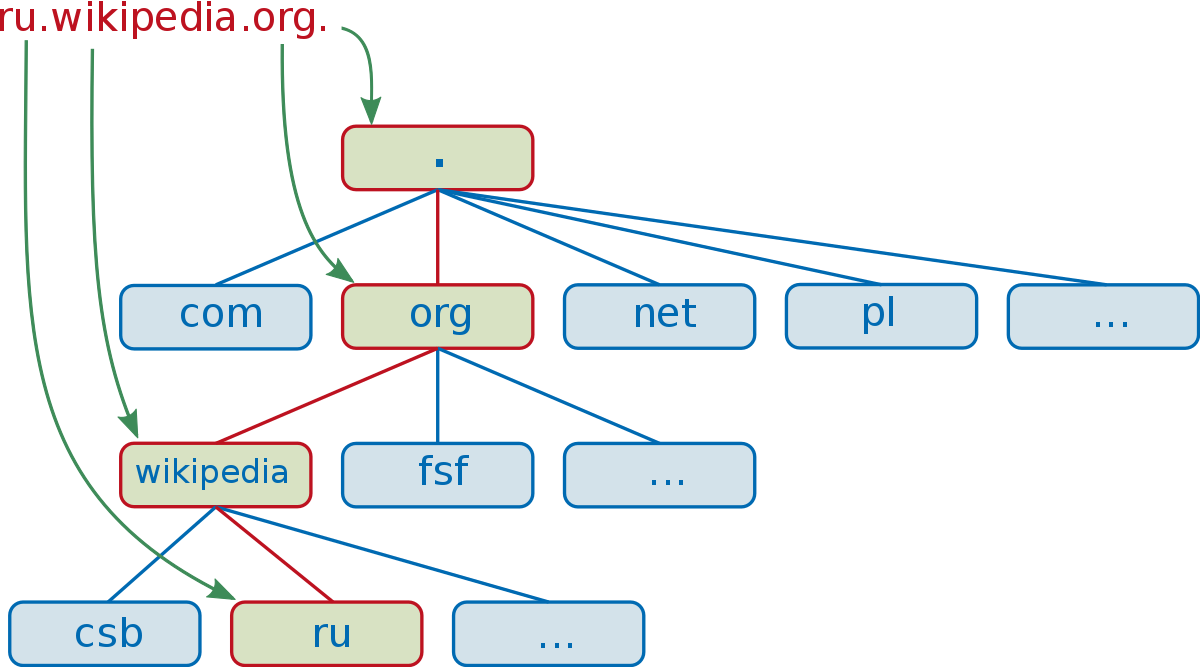
DNS (Domain Name System) is one of the most important technologies/services on the internet, as without it the Internet would be very difficult to use.
DNS provides a name to number (IP address) mapping or translation, allowing internet users to use, easy to remember names, and not numbers to access resources on a network and the Internet.
Operational Overview
DNS runs on DNS servers. When a user enters a URL, such as www.google.com, into a Web browser the request is not directly sent to the Google servers. Instead, the request goes to a DNS server, which uses a look-up table to determine several pieces of information, most importantly the IP address of the website that is being requested. It then forwards this request to the proper servers and returns the information requested to the user's Web browser.
Domain Name System
The DNS server looks at three primary pieces of information, starting with the top level domain. The top-level domain is denoted by suffixes such as .com, .org, and .gov. Once the top-dlevel domain is established, the second-level domain is analyzed. For example, the URL www.google.com possesses a top-level domain of .com and the second-level domain name google. The second-level domain is usually referred to simply as a domain name. Finally, the DNS server resolves the third-level domain, or subdomain, which is the "www" portion of the URL.
Features of Subdomains
Aside from the "www" subdomain zone, other subdomains are also worth noting. For example, subdomains such as "pop" "irc" and "aliases" exist. Each subdomain represents a different service that may be accessed on the server. For example, "pop" is used for email communications. The use of the DNS server to resolve the IP addresses of these different services allows for complex network architectures to be implemented. Despite being under the same domain name, these different services may be hosted on different machines or different geographical locations. This also allows a level of redundancy when using aliases, in case the primary domain server goes down.
User Benefits
DNS servers allow standard Internet users to use Internet resources without having to remember port numbers and IP addresses. Even similar services, such as different areas of the website, may be hosted at different IP addresses for security reasons. This allows users to memorize simple URL addresses as opposed to complex, nonintuitive lists of IP addresses and port numbers. This also allows private servers made by home users to be freely available yet somewhat shielded from having their IP address publicly known.
Making Front end built artifact as separated part of application
- npm using
- publishing of packages
git add .
git commit -m “Initial release”
git tag v0.1.0
git push origin master --tags
then
npm publish --access=public
{
    "scripts": {
    "test": "node_modules/.bin/mocha --reporter spec",
    "cover": "node_modules/istanbul/lib/cli.js cover node_modules/mocha/bin/_mocha -- -R spec test/*"
    }
}
- update version
npm version <update_type: major|minor|patch> -m "<message>"
Scoped packages are private by default. To publish private modules, you need to be a paid private modules user.
However, public scoped modules are free and don’t require a paid subscription. To publish a public scoped module, set the access option when publishing it. This option will remain set for all subsequent publishes.
TIP
When creating a scoped module, it’s a good idea to check your package.json before publishing just to make sure that the name of your package is "@username/project-name" — otherwise it won’t be scoped and if it’s meant to be private, it will end up being public by accident.
Node.js modules are a type of package that can be published to npm.
Overview
- Create a package.json file
- Create the file that will be loaded when your module is required by another application
- Test your module
Create a package.json file
To create a package.json file, on the command line, in the root directory of your Node.js module, run npm init:
- For scoped modules, run npm init --scope=@scope-name
- For unscoped modules, run npm init
Provide responses for the required fields (name and version), as well as the main field:
- name: The name of your module.
- version: The initial module version. We recommend following semantic versioning guidelines and starting with 1.0.0.
- main: The name of the file that will be loaded when your module is required by another application. The default name is index.js.
Create the file that will be loaded when your module is required by another application
Once your package.json file is created, create the file that will be loaded when your module is required. The default name for this file is index.js.
In the file, add a function as a property of the exports object. This will make the function available to other code:
exports.printMsg = function() {
  console.log("This is a message from the demo package");
}
Test your module
- Publish your package to npm:
- For private packages and unscoped packages, use npm publish.
- For scoped public packages, use npm publish --access public
- On the command line, create a new test directory outside of your project directory.
mkdir test-directory - Switch to the new directory:
cd /path/to/test-directory - In the test directory, install your module:
npm install <your-module-name> - In the test directory, create a test.js file which requires your module and calls your module as a method.
- On the command line, run node test.js. The message sent to the console.log should appear.
AWS/Azure/google cloud platform/digital ocean/rack space:
- virtual machines (what is it in context of specified cloud provider, types of VMs, how to run it, restrictions)
AWS EC2
AWS EC2
Amazon Elastic Compute Cloud (Amazon EC2) provides scalable computing capacity in the Amazon Web Services (AWS) cloud. Using Amazon EC2 eliminates your need to invest in hardware up front, so you can develop and deploy applications faster. You can use Amazon EC2 to launch as many or as few virtual servers as you need, configure security and networking, and manage storage. Amazon EC2 enables you to scale up or down to handle changes in requirements or spikes in popularity, reducing your need to forecast traffic.
Amazon EC2 provides the following features:
- Virtual computing environments, known as instances
- Preconfigured templates for your instances, known as Amazon Machine Images (AMIs), that package the bits you need for your server (including the operating system and additional software)
- Various configurations of CPU, memory, storage, and networking capacity for your instances, known as instance types
- Secure login information for your instances using key pairs (AWS stores the public key, and you store the private key in a secure place)
- Storage volumes for temporary data that's deleted when you stop or terminate your instance, known as instance store volumes
- Persistent storage volumes for your data using Amazon Elastic Block Store (Amazon EBS), known as Amazon EBS volumes
- Multiple physical locations for your resources, such as instances and Amazon EBS volumes, known as Regions and Availability Zones
- A firewall that enables you to specify the protocols, ports, and source IP ranges that can reach your instances using security groups
- Static IPv4 addresses for dynamic cloud computing, known as Elastic IP addresses
- Metadata, known as tags, that you can create and assign to your Amazon EC2 resources
- Virtual networks you can create that are logically isolated from the rest of the AWS cloud, and that you can optionally connect to your own network, known as virtual private clouds (VPCs)