Competent
Basic Modeling techniques:
Requirements artifacts: Product Vision and Scope document etc
System requirements
System requirements are the building blocks developers use to build the system. These are the traditional “shall” statements that describe what the system “shall do.” System requirements are classified as either functional or supplemental requirements. A functional requirement specifies something that a user needs to perform their work. For example, a system may be required to enter and print cost estimates; this is a functional requirement. Supplemental or non-functional requirements specify all the remaining requirements not covered by the functional requirements. I prefer to use the term supplemental requirements instead of non-functional requirements; who wants to be termed nonfunctional? Supplemental requirements are sometimes called quality of service requirements. The plan for implementing functional requirements is detailed in the system design. The plan for implementing supplemental requirements is detailed in the system architecture. The list below shows various types of supplemental requirements.
Software requirements specification establishes the basis for an agreement between customers and contractors or suppliers on how the software product should function (in a market-driven project, these roles may be played by the marketing and development divisions). Software requirements specification is a rigorous assessment of requirements before the more specific system design stages, and its goal is to reduce later redesign. It should also provide a realistic basis for estimating product costs, risks, and schedules. Used appropriately, software requirements specifications can help prevent software project failure.
The software requirements specification document lists sufficient and necessary requirements for the project development. To derive the requirements, the developer needs to have clear and thorough understanding of the products under development. This is achieved through detailed and continuous communications with the project team and customer throughout the software development process.
The SRS may be one of a contract deliverable data item descriptions or have other forms of organizationally-mandated content.
Non-functional requirements
TIP
non-functional requirements describe how the system works, while functional requirements describe what the system should do.
The definition for a non-functional requirement is that it essentially specifies how the system should behave and that it is a constraint upon the systems behaviour. One could also think of non-functional requirements as quality attributes for of a system.
Non-functional requirements cover all the remaining requirements which are not covered by the functional requirements. They specify criteria that judge the operation of a system, rather than specific behaviours, for example: “Modified data in a database should be updated for all users accessing it within 2 seconds.”
Some typical non-functional requirements are:
- Performance – for example Response Time, Throughput, Utilization, Static Volumetric
- Scalability
- Capacity
- Availability
- Reliability
- Recoverability
- Maintainability
- Serviceability
- Security
- Regulatory
- Manageability
- Environmental
- Data Integrity
- Usability
- Interoperability
non-functional requirements specify the system’s ‘quality characteristics’ or ‘quality attributes’.
Many different stakeholders have a vested interest in getting the non-functional requirements right particularly in the case of large systems where the buyer of the system is not necessarily also the user of the system.
Product champion
Each of our projects included a few key members of our user community to provide the requirements. We called these people product champions (or project champions, although that term more often refers to the management sponsors of a project)
Each product champion serves as the primary interface between members of a single user class and the project's requirements analyst. Ideally, the champions will be actual users, not surrogates such as funding sponsors, procuring customers, marketing staff, user managers, or software developers pretending to be users. Product champions collect requirements from other members of the user classes they represent and reconcile inconsistencies. Requirements development is thus a shared responsibility of the analysts and selected customers, although the analyst writes the requirements documents.
The best product champions have a clear vision of the new system and are enthusiastic about it because they see how it will benefit them and their peers. The champions should be effective communicators who are respected by their colleagues. They need a thorough understanding of the application domain and the system's operating environment. Great product champions are in demand for other assignments on their principal job, so you'll have to build a persuasive case for why particular individuals are critical to project success. My team and I found that good product champions made a huge difference in our projects, so we happily offered them public reward and recognition for their contributions.
The product champion approach works best if each champion is fully empowered to make binding decisions on behalf of the user class he represents. If a champion's decisions are routinely overruled by managers or by the software group, the champion's time and goodwill are being wasted. However, the champions must remember that they are not the sole customers. Problems arise when the individual filling this critical liaison role doesn't adequately communicate with his peers and presents only his own wishes and ideas.
When developing commercial software, it can be difficult to find people to serve as product champions from outside your company. If you have a close working relationship with some major corporate customers, they might welcome the opportunity to participate in requirements elicitation. You might give external product champions economic incentives for their participation. Consider offering them discounts on products or paying for the time they spend working with you on requirements. You still face the challenge of how to avoid hearing only the champions' requirements and neglecting the needs of other customers. If you have a diverse customer base, first identify core requirements that are common to all customers. Then define additional requirements that are specific to individual customers, market segments, or user classes.
Product Champion Expectations
| Category | Activities |
|---|---|
| Planning |
|
| Requirements |
|
| Validation and Verification |
|
| User Aids |
|
| Change Management |
|
User classes and their characteristics
A product's users differ, among other ways, in the following respects:
- The frequency with which they use the product
- Their application domain experience and computer systems expertise
- The features they use
- The tasks they perform in support of their business processes
- Their access privilege or security levels (such as ordinary user, guest user, or administrator)
You can group users into a number of distinct user classes based on these differences. An individual can belong to multiple user classes. For example, an application's administrator might also interact with it as an ordinary user at times. The terminators shown outside your system on a context diagram are candidates for user classes. A user class is a subset of a product's users, which is a subset of a product's customers, which is a subset of its stakeholders.
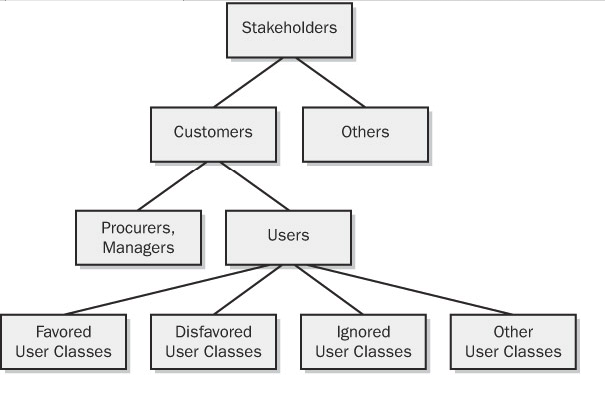
Certain user classes are more important to you than others. Favored user classes receive preferential treatment when you're making priority decisions or resolving conflicts between requirements received from different user classes. Favored user classes include those groups whose acceptance and use of the system will cause it to meet—or fail to meet—its business objectives. This doesn't mean that the stakeholders who are paying for the system (who might not be users at all) or who have the most political clout should necessarily be favored. Disfavored user classes are those groups who aren't supposed to use the product for legal, security, or safety reasons (Gause and Lawrence 1999). You might elect to ignore still other user classes. They get what they get, but you don't specifically build the product to suit them. The remaining user classes are of roughly equal importance in defining the product's requirements.
Each user class will have its own set of requirements for the tasks that members of the class must perform. They might also have different nonfunctional requirements, such as usability, that will drive user interface design choices. Inexperienced or occasional users are concerned with how easy the system is to learn (or relearn) to use. These users like menus, graphical user interfaces, uncluttered screen displays, verbose prompts, wizards, and consistency with other applications they have used. Once users gain sufficient experience with the product, they become more concerned about ease of use and efficiency. They now value keyboard shortcuts, macros, customization options, toolbars, scripting facilities, and perhaps even a command-line interface instead of a graphical user interface.
Software Quality Attributes
Several dozen product characteristics can be called quality attributes (Charette 1990), although most projects need to carefully consider only a handful of them. If developers know which of these characteristics are most crucial to project success, they can select architecture, design, and programming approaches to achieve the specified quality goals (Glass 1992; DeGrace and Stahl 1993). Quality attributes have been classified according to various schemes (Boehm, Brown, and Lipow 1976; Cavano and McCall 1978; IEEE 1992; DeGrace and Stahl 1993). One way to classify attributes distinguishes those characteristics that are discernible at run time from those that aren't (Bass, Clements, and Kazman 1998). Another approach is to separate the visible characteristics that are primarily important to the users from under-the-hood qualities that are primarily significant to technical staff. The latter indirectly contribute to customer satisfaction by making the product easier to change, correct, verify, and migrate to new platforms. Table lists several quality attributes in both categories that every project should consider. Some attributes are critical to embedded systems (efficiency and reliability), whereas others might be especially pertinent to Internet and mainframe applications (availability, integrity, and maintainability) or to desktop systems (interoperability and usability). Embedded systems often have additional significant quality attributes, including safety, installability, and serviceability. Scalability is another attribute that's important to Internet applications.
| Important Primarily to Users | Important Primarily to Developers |
|---|---|
| Availability | Maintainability |
| Efficiency | Portability |
| Flexibility | Reusability |
| Integrity | Testability |
| Interoperability | |
| Reliability | |
| Robustness | |
| Usability |
In an ideal universe, every system would exhibit the maximum possible value for all its attributes. The system would be available at all times, would never fail, would supply instantaneous results that are always correct, and would be intuitively obvious to use. Because nirvana is unattainable, you have to learn which attributes from Table are most important to your project's success. Then define the user and developer goals in terms of these essential attributes so that designers can make appropriate choices.
Assumptions, constraints and their roles
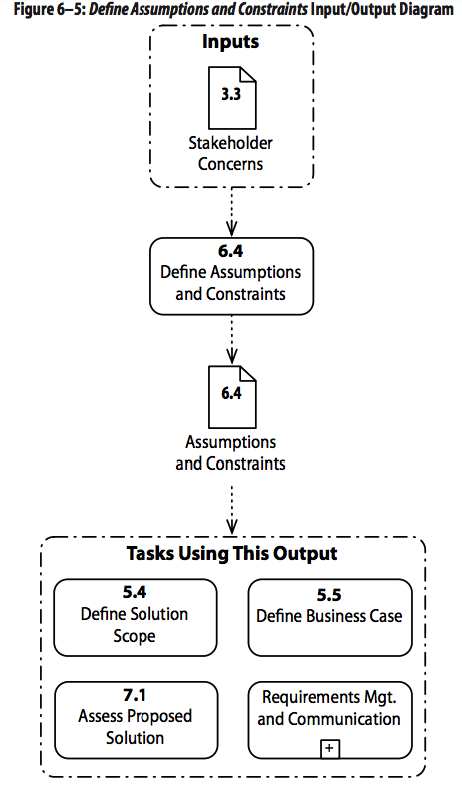
Assumptions are factors that are believed to be true, but have not been confirmed. Assumptions may affect all aspects of the project and pose a certain degree of risk if they do not prove to be true. The business analyst identifies and documents assumptions, attempts to confirm the accuracy of the assumptions, and identifies and manages risks related to the ability of a solution to meet the business need.
Constraints are defined as restrictions or limitations on possible solutions. The business analyst is responsible for documenting any restrictions or limitations to the solution design, construction, testing, validation and deployment. Solution constraints describe aspects of the current state, or planned future state that may not be changed. They are not requirements, since they are not implemented in any form by the project team. Constraints are provided to the project team to inform them that options they would normally be allowed to consider are not available.
Assumptions and constraints are generally documented with associated attributes (e.g., date identified, owner, impact, associated risk, and other explanatory information). They are defined and clarified as requirements are understood. In many cases, lower-level requirements may be dependent on, and therefore traced back to, the presence of an assumption or constraint and so may be affected if the assumption proves false or the constraint is changed.
An assumption is anything that is believed to be true but that has not actually been verified. Assumptions can relate to something in the present or in the future. Assumptions need to be documented, and if an assumption is found to be false it will usually impact the project in some manner. Assumptions are therefore a source of potential project risk. Assumptions may also reflect an understanding of how desired outcomes are likely to be achieved. For instance, stakeholders may believe that customers will respond in a certain way to a change in how a product is delivered, but there may be only anecdotal evidence to support that belief.
Business constraints describe limitations on available solutions, or an aspect of the current state that cannot be changed by the deployment of the new solution. They may reflect budgetary restrictions, time restrictions, limits on the number of resources available, restrictions based on the skills of the project team and the stakeholders, a requirement that certain stakeholders not be affected by the implementation of the solution, or any other organizational restriction. Constraints need to be carefully examined to ensure that they are accurate and justified.
Technical constraints include any architecture decisions that are made that may impact the design of the solution. These may include development languages, hardware and software platforms, and application software that must be used. Technical constraints may also describe restrictions such as resource utilization, message size and timing, software size, maximum number of and size of files, records and data elements. Technical constraints include any enterprise architecture standards that must be followed. Technical constraints may create a situation where a requirement cannot be met using the current solution approach or by a solution component and the business analyst must work with the project team to identify other ways to meet the associated business need
Basic Modeling techniques
Data dictionary and glossary
data dictionary — a shared repository that defines the meaning, data type, length, format, necessary precision, and allowed range or list of values for all data elements or attributes used in the application.
The information in the data dictionary binds together the various requirements representations. Integration problems are reduced if all developers respect the data dictionary definitions. Begin collecting data definitions as you encounter them during requirements elicitation. The data dictionary complements the project glossary, which defines individual terms. You might want to merge the glossary entries into the data dictionary, although I prefer to keep them separate. The data dictionary can be managed as an appendix to the SRS or as a separate document or file. Compared with sprinkling data definitions throughout the functional requirements, a separate data dictionary makes it easy to find the information you need, and it avoids redundancy and inconsistencies. Some commercial analysis and design tools include a data dictionary component. If you set up the data dictionary manually, consider using a hypertext approach. Clicking on a data item that is part of a data structure definition would take you to the definition of that individual data item, thereby making it easy to traverse the hierarchical tree of definitions. Items in the data dictionary are represented using a simple notation (DeMarco 1979; Robertson and Robertson 1994). The item being defined is shown on the left side of an equal sign, with its definition on the right. This notation defines primitive data elements, the composition of multiple data elements into structures, optional data items, iteration (repeats) of a data item, and a list of values for a data item. The following examples are from the Chemical Tracking System (of course!).
Request ID = * a 6-digit system-generated sequential integer,
               beginning with 1, that uniquely identifies each
               request *
What is a Data Dictionary?
As the name suggests, data dictionaries provide information about your data. Descriptions can include data attributes, fields, or other properties such as data type, length, valid values, default values, relations with other data fields, business definition, transformation rules business rules, constraints etc.—anything you need to define each physical data element inside operational data sources and data warehouses. This is also relevant for logical BI data objects, and it should have a business flavor to it, not just technical.
A data dictionary should be a one-stop shop for IT system analysts, designers and developers to understand everything about their metadata. They are used to help translate data level business requirements into technical requirements, and should ideally be able to provide this information in an easily understood, structured and organized way. IT teams should be able to tell within a few seconds exactly which inputs should be included in order to meet project goals, from attribute type to field requirements to default values.
Data dictionaries are often presented in spreadsheet format with rows and columns defining each attribute or metadata category that needs to be addressed in a system. They are sometimes something someone enters on their own and has to comment on and refresh manually.
What is a Business Glossary?
Business glossaries help define terminology across business units. They offer clear definitions across the entire enterprise with the goal of keeping terms consistent and helping everyone stay on the same page.
A good business glossary is an important part of collaboration, particularly in larger businesses that span numerous departments. You’d be surprised at how differently each different business unit defines data elements relevant to their own operations, even in related departments (such as sales and marketing). As organizations define the logical meaning of data elements and can create their own calculated columns, there is a lot of room for inconsistency.
Data flow diagrams
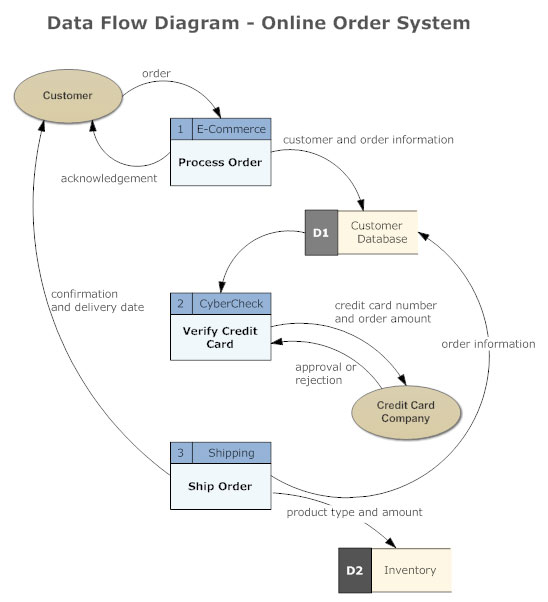
A data flow diagram (DFD) maps out the flow of information for any process or system. It uses defined symbols like rectangles, circles and arrows, plus short text labels, to show data inputs, outputs, storage points and the routes between each destination. Data flowcharts can range from simple, even hand-drawn process overviews, to in-depth, multi-level DFDs that dig progressively deeper into how the data is handled. They can be used to analyze an existing system or model a new one. Like all the best diagrams and charts, a DFD can often visually “say” things that would be hard to explain in words, and they work for both technical and nontechnical audiences, from developer to CEO. That’s why DFDs remain so popular after all these years. While they work well for data flow software and systems, they are less applicable nowadays to visualizing interactive, real-time or database-oriented software or systems.
Two common systems of symbols are named after their creators:
- Yourdon and Coad
- Yourdon and DeMarco
- Gane and Sarson
Using any convention’s DFD rules or guidelines, the symbols depict the four components of data flow diagrams.
- External entity: an outside system that sends or receives data, communicating with the system being diagrammed. They are the sources and destinations of information entering or leaving the system. They might be an outside organization or person, a computer system or a business system. They are also known as terminators, sources and sinks or actors. They are typically drawn on the edges of the diagram.
- Process: any process that changes the data, producing an output. It might perform computations, or sort data based on logic, or direct the data flow based on business rules. A short label is used to describe the process, such as “Submit payment.”
- Data store: files or repositories that hold information for later use, such as a database table or a membership form. Each data store receives a simple label, such as “Orders.”
- Data flow: the route that data takes between the external entities, processes and data stores. It portrays the interface between the other components and is shown with arrows, typically labeled with a short data name, like “Billing details.”
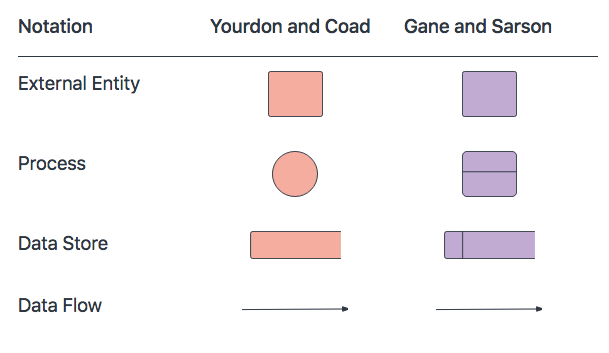
DFD rules and tips
- Each process should have at least one input and an output.
- Each data store should have at least one data flow in and one data flow out.
- Data stored in a system must go through a process.
- All processes in a DFD go to another process or a data store.
ERD
If the requirements within a set involve a description of the structure and relationships among data within the system, it's often convenient to represent that information in an entity-relationship diagram (ERD)
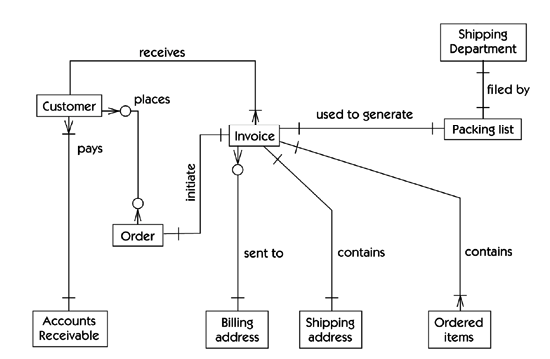
Note that the ERD provides a high-level "architectural" view of the data represented by customers, invoices, packing lists, and so on; it would be further augmented with appropriate details about the required information to describe a customer. The ERD does correctly focus on the external behaviors of the system and allows us to define such questions as "Can there be more than one billing address per invoice?" Answer: no.
Although an ERD is a capable modeling technique, it has the potential disadvantage of being difficult for a nontechnical reader to understand. The lines connecting "Customer" to "Order" and "Order" to "Invoice" are annotated with circles and "crows-feet" indicators. The obvious question is: What does all of this mean? Attempting to answer such a question within this book would be a major digression which we will avoid, but avoiding the question in the review of a requirements set is likely to mean that some users simply won't understand what's going on. The alternatives are to send the appropriate users to a two-day training course in ERD notation, which they may or may not appreciate, or to use the notation as a "technical" form of documentation within the development group.
Process modeling (flowcharts, activity diagrams)
Flowcharts
A flowchart is a diagram that depicts a process, system or computer algorithm. They are widely used in multiple fields to document, study, plan, improve and communicate often complex processes in clear, easy-to-understand diagrams. Flowcharts, sometimes spelled as flow charts, use rectangles, ovals, diamonds and potentially numerous other shapes to define the type of step, along with connecting arrows to define flow and sequence. They can range from simple, hand-drawn charts to comprehensive computer-drawn diagrams depicting multiple steps and routes. If we consider all the various forms of flowcharts, they are one of the most common diagrams on the planet, used by both technical and non-technical people in numerous fields. Flowcharts are sometimes called by more specialized names such as Process Flowchart, Process Map, Functional Flowchart, Business Process Mapping, Business Process Modeling and Notation (BPMN), or Process Flow Diagram (PFD). They are related to other popular diagrams, such as Data Flow Diagrams (DFDs) and Unified Modeling Language (UML) Activity Diagrams.
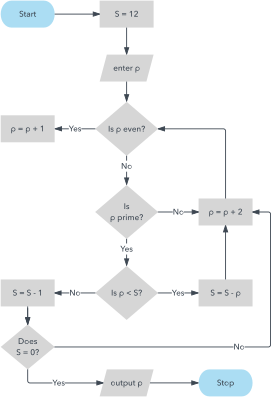
As a visual representation of data flow, flowcharts are useful in writing a program or algorithm and explaining it to others or collaborating with them on it. You can use a flowchart to spell out the logic behind a program before ever starting to code the automated process. It can help to organize big-picture thinking and provide a guide when it comes time to code. More specifically, flowcharts can:
- Demonstrate the way code is organized.
- Visualize the execution of code within a program.
- Show the structure of a website or application.
- Understand how users navigate a website or program.
Symbols 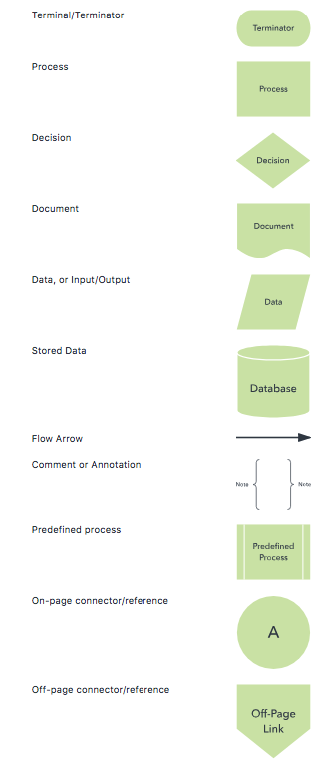
Example 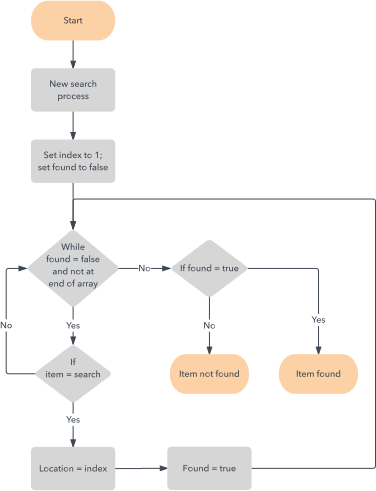
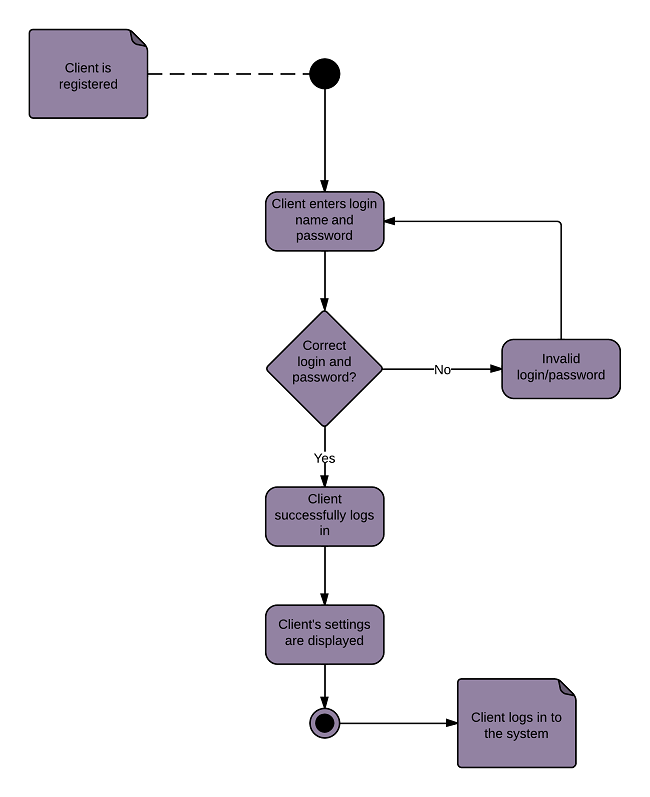
Activity Diagram
The Unified Modeling Language includes several subsets of diagrams, including structure diagrams, interaction diagrams, and behavior diagrams. Activity diagrams, along with use case and state machine diagrams, are considered behavior diagrams because they describe what must happen in the system being modeled.
Stakeholders have many issues to manage, so it's important to communicate with clarity and brevity. Activity diagrams help people on the business and development sides of an organization come together to understand the same process and behavior. You'll use a set of specialized symbols—including those used for starting, ending, merging, or receiving steps in the flow—to make an activity diagram, which we’ll cover in more depth within this activity diagram guide.
Benefits of activity diagrams
- Demonstrate the logic of an algorithm.
- Describe the steps performed in a UML use case.
- Illustrate a business process or workflow between users and the system.
- Simplify and improve any process by clarifying complicated use cases.
- Model software architecture elements, such as method, function, and operation.
Basic components of an activity diagram
- Action: A step in the activity wherein the users or software perform a given task. In Lucidchart, actions are symbolized with round-edged rectangles.
- Decision node: A conditional branch in the flow that is represented by a diamond. It includes a single input and two or more outputs.
- Control flows: Another name for the connectors that show the flow between steps in the diagram.
- Start node: Symbolizes the beginning of the activity. The start node is represented by a black circle.
- End node: Represents the final step in the activity. The end node is represented by an outlined black circle.
Example
Requirements artifacts: Product Vision and Scope document etc
Vision
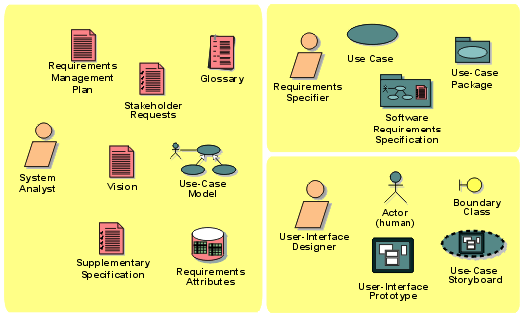
The Vision defines the stakeholders view of the product to be developed, specified in terms of the stakeholders key needs and features. Containing an outline of the envisioned core requirements, it provides the contractual basis for the more detailed technical requirements.
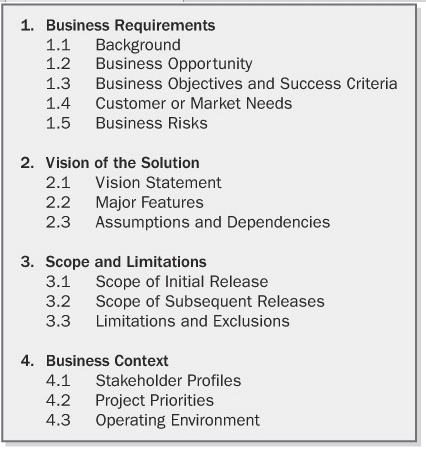
The product vision aligns all stakeholders in a common direction. The vision describes what the product is about and what it eventually could become. The project scope identifies what portion of the ultimate long-term product vision the current project will address. The statement of scope draws the boundary between what's in and what's out. That is, the scope also defines the project's limitations. The details of a project's scope are represented by the requirements baseline that the team defines for that project. The vision applies to the product as a whole. It will change relatively slowly as a product's strategic positioning or an information system's business objectives evolve over time. The scope pertains to a specific project or iteration that will implement the next increment of the product's functionality. Scope is more dynamic than vision because the project manager adjusts the contents of each release within its schedule, budget, resource, and quality constraints. The planner's goal is to manage the scope of a specific development or enhancement project as a defined subset of the grand strategic vision. The scope statement for each project, or for each iteration or enhancement in an evolving product, can appear in that project's SRS, rather than in a separate vision and scope document. Major new projects should have both a complete vision and scope document and an SRS.
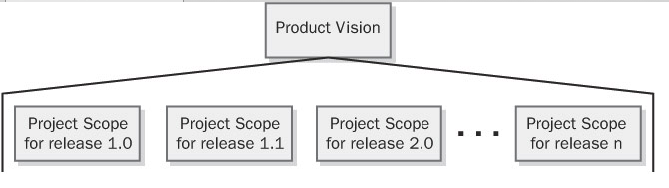
For example, a federal government agency is undertaking a massive five-year information system development effort. The agency defined the business objectives and vision for this system early in the process, and they won't change substantially over the next few years. The agency has planned some 15 individual releases of portions of the ultimate system. Each release is created as a separate project with its own scope description. Each scope description must align with the overall product vision and interlock with the scope statements for the other projects to ensure that nothing is inadvertently omitted.
The vision and scope document collects the business requirements into a single document that sets the stage for the subsequent development work. Some organizations create a project charter or a business case document that serves a similar purpose. Organizations that build commercial software often create a market requirements document (MRD). An MRD might go into more detail than a vision and scope document about the target market segments and the issues that pertain to commercial success. The owner of the vision and scope document is the project's executive sponsor, funding authority, or someone in a similar role. A requirements analyst can work with the owner to write the vision and scope document. Input on the business requirements should come from individuals who have a clear sense of why they are undertaking the project. These individuals might include the customer or development organization's senior management, a project visionary, a product manager, a subject matter expert, or members of the marketing department.
Document templates standardize the structure of the documents created by your organization's project teams. As with any template, adapt this one to meet the specific needs of your own projects.