Qualified
Authentication & Authorization
*Authentication is the process of verifying who you are. When you log on to a PC with a user name and password you are authenticating.
Authorization is the process of verifying that you have access to something. Gaining access to a resource (e.g. directory on a hard disk) because the permissions configured on it allow you access is authorization.
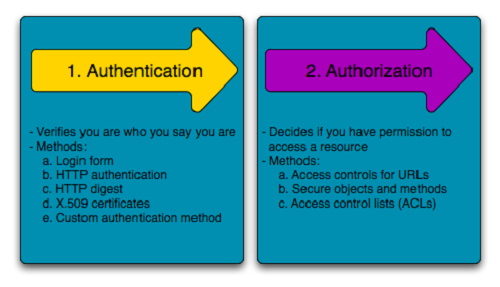
Authentication
Authentication is about validating your credentials such as Username/User ID and password to verify your identity. The system then checks whether you are what you say you are using your credentials. Whether in public or private networks, the system authenticates the user identity through login passwords. Usually authentication is done by a username and password, although there are other various ways to be authenticated.
Single-Factor Authentication: This is the simplest form of authentication method which requires a password to grant user access to a particular system such as a website or a network. The person can request access to the system using only one of the credentials to verify one’s identity. For example, only requiring a password against a username would be a way to verify a login credential using single- factor authentication.
Two-Factor Authentication: This authentication requires a two-step verification process which not only requires a username and password, but also a piece of information only the user knows. Using a username and password along with a confidential information makes it that much harder for hackers to steal valuable and personal data.
Multi Factor Authentication: This is the most advanced method of authentication which requires two or more levels of security from independent categories of authentication to grant user access to the system. This form of authentication utilizes factors that are independent of each other in order to eliminate any data exposure. It is common for financial organizations, banks, and law enforcement agencies to use multiple-factor authentication.
Authorization
Authorization occurs after your identity is successfully authenticated by the system, which therefore gives you full access to resources such as information, files, databases, funds, etc. However authorization verifies your rights to grant you access to resources only after determining your ability to access the system and up to what extent. In other words, authorization is the process to determine whether the authenticated user has access to the particular resources. A good example of this is, once verifying and confirming employee ID and passwords through authentication, the next step would be determining which employee has access to which floor and that is done through authorization.
Confidentiality
The goal of confidentiality is to keep the contents of a transient communication or data on temporary or persistent storage secret.
Usually, some kind of encryption technology is used to achieve confidentiality.
Confidentiality refers to protecting information from being accessed by unauthorized parties. In other words, only the people who are authorized to do so can gain access to sensitive data. Imagine your bank records. You should be able to access them, of course, and employees at the bank who are helping you with a transaction should be able to access them, but no one else should. A failure to maintain confidentiality means that someone who shouldn't have access has managed to get it, through intentional behavior or by accident. Such a failure of confidentiality, commonly known as a breach, typically cannot be remedied. Once the secret has been revealed, there's no way to un-reveal it. If your bank records are posted on a public website, everyone can know your bank account number, balance, etc., and that information can't be erased from their minds, papers, computers, and other places. Nearly all the major security incidents reported in the media today involve major losses of confidentiality.
So, in summary, a breach of confidentiality means that someone gains access to information who shouldn't have access to it.
Data Integrity
Integrity refers to ensuring the authenticity of information—that information is not altered, and that the source of the information is genuine. Imagine that you have a website and you sell products on that site. Now imagine that an attacker can shop on your web site and maliciously alter the prices of your products, so that they can buy anything for whatever price they choose. That would be a failure of integrity, because your information—in this case, the price of a product—has been altered and you didn't authorize this alteration. Another example of a failure of integrity is when you try to connect to a website and a malicious attacker between you and the website redirects your traffic to a different website. In this case, the site you are directed to is not genuine.
TIP
The assurance that data records are accurate, complete, intact and maintained within their original context, including their relationship to other records
Protect original data from:
- Accidental / malicious modification
- Falsification
- Deletion
Data needs to be Attributable, Legible, Contemporaneous, Original, and Accurate (ALCOA)
Accountability
TIP
Accountability - подотчетность, ответственность, учитываемость
The goal of accountability is to ensure that you are able to determine who the attacker or principal is in the case that something goes wrong or an erroneous transaction is identified. In the case of a malicious incident, you want to be able to prosecute and prove that the attacker conducted illegitimate actions. In the case of an erroneous transaction, you want to identify which principal made the mistake.
Most computer systems achieve accountability through authentication and the use of logging and audit trails. To obtain accountability, you can have a system write log entries every time a user authenticates, and use the log to keep a list of all the actions that the user conducted.
Example
The chief financial officer (CFO) of a company may have the authority to transfer money from the company’s bank account to any another, but you want to hold the CFO accountable for any actions that could be carried out under her authority. The CFO should have the ability to transfer money from the company account to other accounts because the company may have certain financial commitments to creditors, vendors, or investors, and part of the CFO’s job may involve satisfying those commitments. Yet, the CFO could abuse that capability.
Suppose the CFO, after logging into the system, decides to transfer some money from the company’s bank account to her own personal account, and then leave the country. When the missing funds are discovered, the system log can help you ascertain whether or not it was the CFO who abused her privileges. Such a system log could even potentially be used as evidence in a court of law.
A good logging or audit trail facility also provides for accurate timestamping. When actions are written to an entry in a log, the part of the entry that contains the time and date at which the action occurred is called a timestamp.
Availability
Availability
Availability means that information is accessible by authorized users. If an attacker is not able to compromise the first two elements of information security (see above) they may try to execute attacks like denial of service that would bring down the server, making the website unavailable to legitimate users due to lack of availability.
While availability is typically thought of as a performance goal, it can also be thought of as a security goal. If an attacker is able to make a system unavailable, a company may lose its ability to earn revenue.
For example, if an online bookstore’s web site is attacked, and legitimate customers are unable to make purchases, the company will lose revenue. An attacker that is interested in reducing the availability of a system typically launches a denial-of-service (DoS) attack. If the online bookstore web site were run on a single web server, and an attacker transmitted data to the web server to cause it to crash, it would result in a DoS attack in which legitimate customers would be unable to make purchases until the web server was started again.
Most web sites are not run using just a single web server, but even multiple web servers running a web site can be vulnerable to an attack against availability.
Non-repudiation
Non-repudiation
Nonrepudiation is a method of guaranteeing message transmission between parties via digital signature and/or encryption. It is one of the five pillars of information assurance (IA). The other four are availability, integrity, confidentiality and authentication.
Nonrepudiation is often used for digital contracts, signatures and email messages.
The goal of non-repudiation is to ensure undeniability of a transaction by any of the parties involved. A trusted third party, such as Trent, can be used to accomplish this.
Non-repudiation is the assurance that someone cannot deny the validity of something. Non-repudiation is a legal concept that is widely used in information security and refers to a service, which provides proof of the origin of data and the integrity of the data. In other words, non-repudiation makes it very difficult to successfully deny who/where a message came from as well as the authenticity of that message.
Digital signatures (combined with other measures) can offer non-repudiation when it comes to online transactions, where it is crucial to ensure that a party to a contract or a communication can't deny the authenticity of their signature on a document or sending the communication in the first place. In this context, non-repudiation refers to the ability to ensure that a party to a contract or a communication must accept the authenticity of their signature on a document or the sending of a message.
Understanding Threats: Defacement, Infiltration, Phishing, Pharming, DoS
понимание угроз
Defacement (подмена, искажение)
Defacement is a form of online vandalism in which attackers replace legitimate pages of an organization’s web site with illegitimate ones.
Defacement is a very different type of threat than what other web sites, such as financial institutions or e-commerce vendors, might face. The attackers of these web sites may be most interested in compromising bank accounts or conducting credit card fraud. Therefore, how we design systems to be secure against attacks is dependent on the type of threats that we expect them to face.
Infiltration (проникновение)
Infiltration is an attack in which an unauthorized party gains full access to the resources of a computer system (including, but not limited to, use of the CPUs, disks, and network bandwidth).
Consider the threat from an infiltration in which an attacker is able to write to a database running behind, say, a financial web site, but not be able to read its contents. If the attacker is able to write information to the database without reading it, the situation might not be as bad as you might think. So long as you can detect that the attacker’s write took place, the situation can be mitigated. You can always restore the correct account numbers and balances from a backup database, and redo all transactions that occurred after the unauthorized writes to prevent your users from being affected.
::tip Phishing Phishing is an attack in which an attacker (in this case, a phisher) sets up a spoofed web site that looks similar to a legitimate web site. :::
The attacker then attempts to lure victims to the spoofed web site and enter their login credentials, such as their usernames and passwords. In a phishing attack, attackers typically lure users to the spoofed web site by sending them e-mails suggesting that there is some problem with their account, and that the user should click a link within the e-mail to “verify” their account information. The link included in the e-mail, of course, is to the attacker’s web site, not the legitimate site. When unsuspecting users click the link, they arrive at the spoofed site and enter their login credentials. The site simply logs the credentials, and either reports an error to the user or redirects the user to the legitimate site (or both). The attacker later uses the logged credentials to log into the user’s account and transfer money from the user’s account to their own.
Pharming is another attack in which a user can be fooled into entering sensitive data into a spoofed web site. It is different than phishing in that the attacker does not have to rely on the user clicking a link in an e-mail. With pharming, even if the user correctly enters a URL (uniform resource locator)—or web address—into a browser’s address bar, the attacker can still redirect the user to a malicious web site.
When a user enters a URL—say, www.google.com/index.html—the browser needs to first figure out the IP address of the machine to which to connect. It extracts the domain name, www.google.com, from the URL, and sends the domain name to a domain name server (DNS).
The DNS is responsible for translating the domain name to an IP address. The browser then connects to the IP address returned by the DNS and issues an HTTP request for index.html. In a pharming attack, an attacker interferes with the machine name–to–IP address translation for which the DNS is responsible. The attacker can do so by, for instance, compromising the DNS server, and coaxing it into returning the attacker’s IP address instead of the legitimate one. If the user is browsing via HTTP, the attack can be unnoticeable to the user. However, if a user connects to a site using SSL, a pharming attack (in most cases) will result in a dialog box from the browser complaining that it was not able to authenticate the server due to a “certificate mismatch.”
Denial-of-Service (DoS)
Another significant threat that e-commerce and financial institutions face are DoS attacks. In one type of DoS attack, the attacker sends so many packets to a web site that it cannot service the legitimate users that are trying access it. A financial institution or e-commerce site can end up losing money and revenue as the result of such a DoS attack because its customers will not be able to conduct transactions or make online purchases.
HTTP & HTTPS protocols. Differences and Similarities
Instead of HyperText Transfer Protocol (HTTP), this website uses HyperText Transfer Protocol Secure (HTTPS).
Using HTTPS, the computers agree on a "code" between them, and then they scramble the messages using that "code" so that no one in between can read them. This keeps your information safe from hackers.
They use the "code" on a Secure Sockets Layer (SSL), sometimes called Transport Layer Security (TLS) to send the information back and forth.
How does HTTP work? How is HTTPS different from HTTP? This tutorial will teach you about SSL, HTTP and HTTPS.
How Does HTTP Work? In the beginning, network administrators had to figure out how to share the information they put out on the Internet.
They agreed on a procedure for exchanging information and called it HyperText Transfer Protocol (HTTP).
Once everyone knew how to exchange information, intercepting on the Internet was not difficult. So knowledgeable administrators agreed upon a procedure to protect the information they exchanged. The protection relies on SSL Certificate to encrypt the online data. Encryption means that the sender and recipient agree upon a "code" and translate their documents into random-looking character strings.
The procedure for encrypting information and then exchanging it is called HyperText Transfer Protocol Secure (HTTPS).
With HTTPS if anyone in between the sender and the recipient could open the message, they still could not understand it. Only the sender and the recipient, who know the "code," can decipher the message.
Humans could encode their own documents, but computers do it faster and more efficiently. To do this, the computer at each end uses a document called an "SSL Certificate" containing character strings that are the keys to their secret "codes."
SSL certificates contain the computer owner's "public key."
The owner shares the public key with anyone who needs it. Other users need the public key to encrypt messages to the owner. The owner sends those users the SSL certificate, which contains the public key. The owner does not share the private key with anyone.
The security during the transfer is called the Secure Sockets Layer (SSL) and Transport Layer Security (TLS).
The procedure for exchanging public keys using SSL Certificate to enable HTTPS, SSL and TLS is called Public Key Infrastructure (PKI).
Similarity between HTTP and HTTPS:
In many ways, https is identical to http, because it follows the same basic protocols. The http or https client, such as a Web browser, establishes a connection to a server on a standard port. When a server receives a request, it returns a status and a message, which may contain the requested information or indicate an error if part of the process malfunctioned. Both systems use the same Uniform Resource Identifier (URI) scheme, so that resources can be universally identified. Use of https in a URI scheme rather than http indicates that an encrypted connection is desired.
Difference between HTTP and HTTPS:
- URL begins with “http://" in case of HTTP while the URL begins with “https://” in case of HTTPS.
- HTTP is unsecured while HTTPS is secured.
- HTTP uses port 80 for communication while HTTPS uses port 443 for communication.
- HTTP operates at Application Layer while HTTPS operates at Transport Layer.
- No encryption is there in HTTP while HTTPS uses encryption.
- No certificates required in HTTP while certificates required in HTTPS.
For HTTPS connection, public key and signed certificates are required for the server. When using an https connection, the server responds to the initial connection by offering a list of encryption methods it supports. In response, the client selects a connection method, and the client and server exchange certificates to authenticate their identities. After this is done, both parties exchange the encrypted information after ensuring that both are using the same key, and the connection is closed. In order to host https connections, a server must have a public key certificate, which embeds key information with a verification of the key owner's identity. Most certificates are verified by a third party so that clients are assured that the key is secure. In other words, we can say, HTTPS works similar to HTTP but SSL adds some spice in it.
HTTP includes the following actions:
- The browser opens a TCP connection.
- The browser sends a HTTP request to the server
- The server sends a HTTP response to the browser. 4. The TCP connection is closed.
SSL will include the following actions:
- Authenticate the server to the client.
- Allow the client and server to select the cryptographic algorithms, or ciphers, that they both support.
- Optionally authenticate the client to the server.
- Use public-key encryption techniques to generate shared secrets.
- Establish an encrypted SSL connection.
- Once the SSL connection is established the usual transfer of HTTP requests will continue.
Key Differences Between HTTP and HTTPS
The points given below covers the difference between HTTP and HTTPS:
- If we talk about security HTTP has security issues whereas HTTPS is secured.
- Hypertext Transfer Protocol operates at application layer. On the contrary, Hypertext Transfer Protocol Secure functions at Transport Layer.
- HTTPS requires certificates to verify the identity of the websites. As against, in HTTP there is no requirement of certificates.
- No encryption is used in HTTP. On the other hand both encryption and decryption is used in HTTPS.
- For communication purposes, port number 80 is utilized in HTTP, while HTTPS makes use of port number 443.
- HTTP is prone to man-in-the-middle and eavesdropping attacks, but HTTPS is designed to resist such attacks.
Basic HTTP Authentication
In the context of an HTTP transaction, basic access authentication is a method for an HTTP user agent (e.g. a web browser) to provide a user name and password when making a request. In basic HTTP authentication, a request contains a header field of the form Authorization: Basic <credentials>, where credentials is the base64 encoding of id and password joined by a single colon (:).
If an HTTP receives an anonymous request for a protected resource it can force the use of Basic authentication by rejecting the request with a 401 (Access Denied) status code and setting the WWW-Authenticate response header as shown below:
HTTP/1.1 401 Access Denied
WWW-Authenticate: Basic realm="My Server"
Content-Length: 0
The word Basic in the WWW-Authenticate selects the authentication mechanism that the HTTP client must use to access the resource. The realm string can be set to any value to identify the secure area and may used by HTTP clients to manage passwords.
Most web browsers will display a login dialog when this response is received, allowing the user to enter a username and password. This information is then used to retry the request with an Authorization request header:
GET /securefiles/ HTTP/1.1
Host: www.httpwatch.com
Authorization: Basic aHR0cHdhdGNoOmY=
The Authorization specifies the authentication mechanism (in this case Basic) followed by the username and password. Although, the string aHR0cHdhdGNoOmY= may look encrypted it is simply a base64 encoded version of <username>:<password>. In this example, the un-encoded string "httpwatch:foo" was used and would be readily available to anyone who could intercept the HTTP request.
Basic authentication
Basic authentication places credentials in unencrypted form within the HTTP request, and so it is frequently stated that the protocol is insecure and should not be used. But forms-based authentication, as used by numerous banks, also places credentials in unencrypted form within the HTTP request.
Any HTTP message can be protected from eavesdropping attacks by using HTTPS as a transport mechanism, which should be done by every security-conscious application. In relation to eavesdropping at least, basic authentication is in itself no worse than the methods used by the majority of today’s web applications.
Password security
Many web sites, operating systems, and other types of software have been built to use passwords to authenticate users. Although the security community has been working over the years to move toward systems that use more sophisticated authentication mechanisms, it is likely that password systems will be in use for some time.
The most basic approach at building a password system might be to use a file that stores usernames and passwords. Such a (colon-delimited) file might look as follows:
john:automobile
mary:balloon
joe:wepntkas
When a user tries to log in, you could simply locate the corresponding username in the file, and do a string comparison to determine whether the password that the user enters matches the one in the password file. (If the username does not appear in the password file, the login would, of course, be denied.) Java code for this simple approach is shown here. This basic approach obviously has many limitations—do not attempt to use this code in a real system!
Hashing
In an attempt to remedy the situation, you could decide not to store passwords “in the clear.”
Instead, you could store an encrypted version of the passwords, and decrypt the passwords in the file whenever you need to check them. To do so, you could use a symmetric encryption algorithm, such as AES (Advanced Encryption Standard). You would need to keep track of a key used to encrypt the passwords, and then you would need to determine where to store the key. Storing the key in the password file itself would be a bad idea, since then an attacker that gets hold of the password file could also decrypt all of the passwords in the file. If the key is stored anywhere on the same system as the password file, in fact, that system still becomes an extremely valuable attack target.
Some commonly used hash functions are SHA-1 and MD5. While SHA-1 and MD5 are commonly used, there have been recent attacks against them, and it is advisable to use hash functions such as SHA-256 and SHA-512 instead.
The advantage of storing hashed passwords in the password file is that even if an attacker were to steal the password file, she would not be able to determine that John’s password is “automobile” just by looking at the file.
If the attacker knows that you are using the SHA-256 hash function to store one-way encrypted versions of passwords, the attacker can iterate through all the words in a dictionary and compute the SHA-256 hashes of them. Such an attack is called an offline dictionary attack, and is usually geared at determining some user’s password. The attacker may not care which user’s password is determined so long as she can determine some user’s password. The attack is called “offline” because the attacker is not required to actually try username and password combinations online against a real system to conduct her attack, as she has possession of the password file.
Salting
Salting is the practice of including additional information in the hash of the password. To illustrate how salting works and why it makes the attacker’s job harder, we first modify the structure of the password file. Instead of just having the password file store a username and a hashed password, we include a third field for a random number in the password file. When a user—for example, John—creates his account, instead of just storing John’s username and hashed password, we choose a random number called the salt
In online dictionary attacks, the attacker actively tries username and password combinations using a live, running system, instead of, say, computing hashes and comparing them against those in some acquired password file. If an attacker cannot acquire a copy of the password file, and is limited to conducting online dictionary attacks, it at least allows you to monitor the attacker’s password guessing. If a large number of failed logins are coming from one or more IP addresses, you can mark those IP addresses as suspicious. Subsequent login attempts from suspicious IPs can be denied, and additional steps can be taken to mitigate the online dictionary attack.
Additional Password Security Techniques
Strong Passwords
Honeypot” Passwords
To help catch attackers trying to hack into a password security system, you can use simple passwords and usernames as “honey” to attract the attackers. For instance, many systems might have a default username called “guest” that has the password “guest.” You do not expect normal users to use this guest account. You can set up your system such that if the attacker tries to log in using a default password for the guest user, you can set that as a trigger so that your system administration staff can be notified. When somebody tries logging into it, you know that it may be an indication that an attacker is trying to break into your system.
Aging Passwords
Even if the user chooses a good password, you might not want the user to use that password for the entire time that they are going to use your system. Every time that the user enters the password, there is a potential opportunity that an attacker can be looking over the user’s shoulder. Therefore, you could encourage users to change their passwords at certain time intervals—every month, every three months, or every year.
Limited Login Attempts
Artificial Delays
You could introduce increasing artificial delays when users attempt to log into a system over the network. The first time that a user attempts to log in, you present the user with the username and password prompt immediately. If the user enters an incorrect password, you can have the system wait 2 seconds before allowing the user to try again. If the user still gets the username or password wrong, you can have it wait 4 seconds before allowing that user to try again. Generalizing, you can exponentially increase the amount of time before letting a particular client with a particular IP address try to log into your network.
Image Authentication
One-Time Passwords
Core Defense Mechanisms
Handling User Access
A central security requirement that virtually any application needs to meet is to control users’ access to its data and functionality. In a typical situation, there are several different categories of user; for example, anonymous users, ordinary authenticated users, and administrative users. Further, in many situations different users are permitted to access a different set of data; for example, users of a web mail application should be able to read their own email but not other people’s.
Most web applications handle access using a trio of interrelated security mechanisms:
Authentication
Authenticating a user involves establishing that the user is in fact who he claims to be. Without this facility, the application would need to treat all users as anonymous—the lowest possible level of trust. The majority of today’s web applications employ the conventional authentication model in which the user submits a username and password, which the application checks for validity.
Session management
After successfully logging in to the application, the user will access various pages and functions, making a series of HTTP requests from their browser. At the same time, the application will be receiving countless other requests from different users, some of whom are authenticated and some of whom are anonymous. In order to enforce effective access control, the application needs a way of identifying and processing the series of requests that originate from each unique user.
Virtually all web applications meet this requirement by creating a session for each user and issuing the user a token that identifies the session. The session itself is a set of data structures held on the server, which are used to track the state of the user’s interaction with the application. The token is a unique string that the application maps to the session. When a user has received a token, the browser automatically submits this back to the server in each subsequent HTTP request,enabling the application to associate the request with that user. HTTP cookies are the standard method for transmitting session tokens, although many applications use hidden form fields or the URL query string for this purpose. If a user does not make a request for a given period, then the session is ideally expired,
Access control
The final logical step in the process of handling user access is to make and enforce correct decisions regarding whether each individual request should be permitted or denied. If the preceding mechanisms are functioning correctly, the application knows the identity of the user from whom each request is received. On this basis, it needs to decide whether that user is authorized to perform the action, or access the data, that he is requesting
Handling User Input
- “Reject Known Bad”
This approach typically employs a blacklist containing a set of literal strings or patterns that are known to be used in attacks. The validation mechanism blocks any data that matches the blacklist and allows everything else.
- “Accept Known Good”
This approach employs a white list containing a set of literal strings or patterns, or a set of criteria, that is known to match only benign input. The validation mechanism allows data that matches the white list, and blocks everything else.
Sanitization
Instead of rejecting this input, the application sanitizes it in various ways to prevent it from having any adverse effects. Potentially malicious characters may be removed from the data altogether, leaving only what is known to be safe, or they may be suitably encoded or “escaped” before further processing is performed.
Safe Data Handling
Multistep Validation and Canonicalization
Handling attckers
- Handling errors
- Maintaining audit logs
- Alerting administrators
- Reacting to attacks