Qualified
Understanding networks: layers and protocols
A
network protocolis a set of rules for communicating between computers. Protocols govern format, timing, sequencing, and error control
The OSI (Open Systems Interconnection) Reference Model defines seven layers of networking protocols.
The OSI protocols were defined by the International Organization for Standardization (ISO)
| OSI Layer | Name | Common Protocols |
|---|---|---|
| 7 | Application | HTTP, FTP, SMTP, DNS, Telnet |
| 6 | Presentation | |
| 5 | Session | |
| 4 | Transport | TCP, UDP |
| 3 | Network | IP, (IPv4 и IPv6) |
| 2 | Data Link | Ethernet |
| 1 | Physical |
Physical layerof the network focuses on hardware elements, such as cables, repeaters, and network interface cards.- Ethernet (10 Mbps)
- Fast Ethernet (100 Mbps)
- Gigabit Ethernet (1000 Mbps)
Network Layeris in charge of routing network messages (data) from one computer to another.- IP (which is paired with TCP at the transport layer for Internet network)
- IPX (which is paired with SPX at the transport layer for some older Macintosh, Linus, UNIX, Novell and Windows networks).
Transport layeris concerned with efficient and reliable transportation of the data packets from one network to another. In most cases, a document, e-mail message or other piece of information is not sent as one unit. Instead, it is broken into small data packets, each with header information that identifies its correct sequence and document. When the data packets are sent over a network, they may or may not take the same route -- it doesn't matter. After all packets are received, a message goes back to the originating network. If a packet does not arrive, a message to "re-send" is sent back to the originating network.- TCP (с установлением соединения)
- UDP (без установления соединения).
Session/Presentation/Applicationlayers of networksDNS(Domain Name System) - translates network address (such as IP addresses) into terms understood by humans (such as Domain Names) and vice-versaDHCP(Dynamic Host Configuration Protocol) - can automatically assign Internet addresses to computers and usersFTP(File Transfer Protocol) - a protocol that is used to transfer and manipulate files on the InternetHTTP(HyperText Transfer Protocol) - an Internet-based protocol for sending and receiving webpagesIMAP(Internet Message Access Protocol) - a protocol for e-mail messages on the InternetIRC(Internet Relay Chat) - a protocol used for Internet chat and other communicationsPOP3(Post Office protocol Version 3) - a protocol used by e-mail clients to retrieve messages from remote serversSMTP(Simple Mail Transfer Protocol) - a protocol for e-mail messages on the Internet
Basic understanding of TCP/IP model and protocols
OSI в данное время не используется, вместо нее - стек протоколов TCP/IP
- Прикладной (Application Layer):
HTTP,HTTPS,SSH,WWW,FTP,SMTP,DNS,DHCP - Транспортный (Transport Layer):
TCP,UDP - Интернет (Internet Layer):
IP - Уровень сетевого доступа (Network Access Layer):
Ethernet
Transmission Control Protocol/Internet Protocol (TCP/IP)
Defining internet, intranet and VPN
Internet
The internet is a large scale client server system which uses a TCP/IP, a set of protocols which provides end-to-end connectivity specifying how data should be packetized, addressed, transmitted, routed and received at the destination. The World Wide Web, email, chat and file transfer services are all made possible by the internet.
Intranet
An intranet is a local or restricted communications network, especially a private network created using World Wide Web software. The Intranet is guided by Internet Protocols like HTTP and TCP/IP. In simple terms, it can be said as a private network accessible only to an organization’s staff.
The intranet changed the way how corporations operate. In an intranet, network applications can be created that can run on many types of computers. It is a secure network, as it is protected by a firewall. The firewall acts as the gate keeper between a device and the network, foreseeing security of incoming and outgoing network traffic.
VPN
VPN(Virtual Private Network) - is a service that lets you access the web safely and privately by routing your connection through a server and hiding your online actions.
A virtual private network (VPN) is a connection between two or more computers or devices that are not on the same private network. In fact, there could be LANs or WANs in between each of the VPN devices. In order to ensure that only the proper users and data sessions cross to a VPN device, data encapsulation and encryption are used. A “tunnel” is created, so to speak, through the LANs and WANs that might intervene; this tunnel connects the two VPN devices together. Every time a new session is initiated, a new tunnel is created. Some technicians refer to this as tunneling through the Internet, although some VPN tunnels might go through private networks as well.
You start the VPN client (software) from your VPN service. This software encrypts your data, even before your Internet Service Provider or the coffee shop WiFi provider sees it. The data then goes to the VPN, and from the VPN server to your online destination — anything from your bank website to a video sharing website to a search engine. The online destination sees your data as coming from the VPN server and its location, and not from your computer and your location.
PPTP(Point-To-Point Tunneling Protocol). This is one of the oldest protocols in use, originally designed by Microsoft. Pros: works on old computers, is a part of the Windows operating system, and it’s easy to set up. Cons: by today’s standards, it’s barely secure. Avoid a provider if this is the only protocol offered.
L2TP/IPsec(Layer 2 Tunneling Protocol). This is a combination of PPTP and Cisco’s L2F protocol. The concept of this protocol is sound — it uses keys to establish a secure connection on each end of your data tunnel — but the execution isn’t very safe. The addition of the IPsec protocol improves security a bit, but there are reports of NSA’s alleged ability to break this protocol and see what’s being transmitted. No matter if those are actually true, the fact that there’s a debate at all is perhaps enough to avoid this as well.
SSTP(Secure Socket Tunneling Protocol). This is another Microsoft-built protocol. The connection is established with some SSL/TLS encryption (the de facto standard for web encryption these days). SSL’s and TLS’s strength is built on symmetric-key cryptography; a setup in which only the two parties involved in the transfer can decode the data within. Overall, SSTP is a very secure solution.
IKEv2(Internet Key Exchange, Version 2). This is yet another Microsoft-built protocol. It’s an iteration of Microsoft’s previous protocols and a much more secure one at that. It provides you with some of the best security.
OpenVPN. This takes what’s best in the above protocols and does away with most of the flaws. It’s based on SSL/TLS and it’s an open source project, which means that it’s constantly being improved by hundreds of developers. It secures the connection by using keys that are known only by the two participating parties on either end of the transmission. Overall, it’s the most versatile and secure protocol out there.
Basics of Firewalls and DMZ
Firewall
Security devices such as firewalls are the main defense for a company’s networks, whether they are LANs, WANs, intranets, or extranets. Perimeter security zones such as demilitarized zones (DMZs) help keep certain information open to specific users or to the public while keeping the rest of an organization’s data secret.
Firewalls
Firewalls are primarily used to protect one network from another. They are often the first line of defense in network security. There are several types of firewalls; some run as software on server computers, some run as stand-alone dedicated appliances, and some work as just one function of many on a single device. They are commonly implemented between the LAN and the Internet.
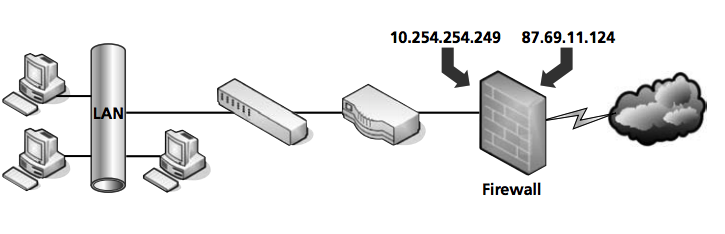
Many of today’s firewalls have two types of firewall technologies built into them: SPI and NAT. However, there are a couple other types of firewall methodologies of which you should be aware:
- Packet filtering inspects each packet that passes through the firewall and accepts or rejects it based on a set of rules. There are two types of filtering: stateless packet inspection and stateful packet inspection (SPI). A stateless packet filter, also known as pure packet filtering, does not retain memory of packets that have passed through the firewall. Because of this, a stateless packet filter can be vulnerable to IP spoofing attacks. However, a firewall running stateful packet inspection is normally not vulnerable to this because it keeps track of the state of network connections by examining the header in each packet. It should be able to distinguish between legitimate and illegitimate packets. This function operates at the network layer of the OSI model.
- NAT filtering, also known as NAT endpoint filtering, filters traffic according to ports (TCP or UDP). This can be done in three ways: using basic endpoint connections, by matching incoming traffic to the corresponding outbound IP address connection, or by matching incoming traffic to the corresponding IP address and port.
- Application-level gateway (ALG) supports address and port translation and checks whether the type of application traffic is allowed. For example, your company might allow FTP traffic through the firewall, but it may decide to disable Telnet traffic. The ALG checks each type of packet coming in and discards those that are Telnet packets. This adds a layer of security; however, it is resource intensive.
- Circuit-level gateway works at the session layer of the OSI model when a TCP or UDP connection is established. Once the connection has been made, packets can flow between the hosts without further checking. Circuit-level gateways hide information about the private network, but they do not filter individual packets.
DMZ
DMZ
A perimeter network or demilitarized zone (DMZ) is a small network that is set up separately from a company’s private local area network and the Internet. It is called a perimeter network because it is usually on the edge of a LAN, but DMZ has become a much more popular term.
A DMZ allows users outside a company LAN to access specific services located on the DMZ. However, when the DMZ set up properly, those users are blocked from gaining access to the company LAN. Users on the LAN quite often connect to the DMZ as well, but without having to worry about outside attackers gaining access to their private LAN. The DMZ might house a switch with servers connected to it that offer web, email, and other services.
Two common DMZ configurations are as follows:
- Back-to-back configuration: This configuration has a DMZ situated between two firewall devices, which could be black box appliances or Microsoft Internet Security and Acceleration (ISA) Servers.
- 3-leg perimeter configuration: In this scenario, the DMZ is usually attached to a separate connection of the company firewall. Therefore, the firewall has three connections—one to the company LAN, one to the DMZ, and one to the Internet.
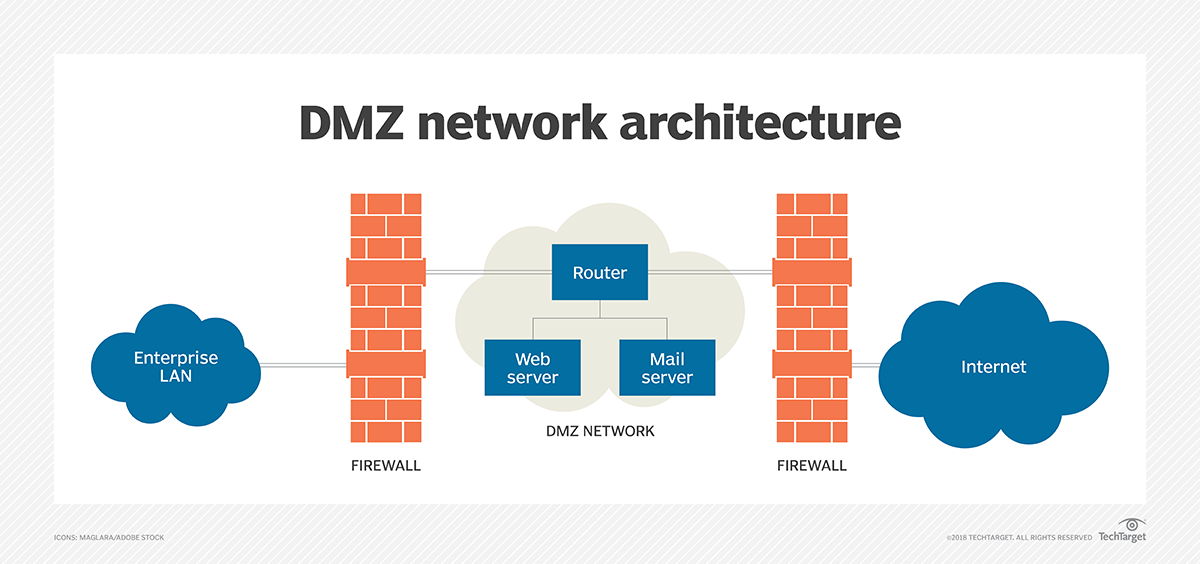
In computer networks, a DMZ (demilitarized zone), also sometimes known as a perimeter network or a screened subnetwork, is a physical or logical subnet that separates an internal local area network (LAN) from other untrusted networks, usually the internet. External-facing servers, resources and services are located in the DMZ. So, they are accessible from the internet, but the rest of the internal LAN remains unreachable. This provides an additional layer of security to the LAN as it restricts the ability of hackers to directly access internal servers and data via the internet.
Any service provided to users on the public internet should be placed in the DMZ network. Some of the most common of these services include web servers and proxy servers, as well as servers for email, domain name system (DNS), File Transfer Protocol (FTP) and voice over IP (VoIP).
The systems running these services in the DMZ are reachable by hackers and cybercriminals around the world and need to be hardened to withstand constant attack. The term DMZ comes from the geographic buffer zone that was set up between North Korea and South Korea at the end of the Korean War.
DMZs are intended to function as a sort of buffer zone between the public internet and the organizational network. Deploying the DMZ between two firewalls means that all inbound network packets are screened using a firewall or other security appliance before they arrive at the servers the organization hosts in the DMZ. This should be enough to block the most casual of threat actors.
Application layer protocols basics (HTTP, FTP, Telnet)
HTTP(Hyper Text Transfer Protocol)- протокол передачи гипертекста, работает на 80 порту. Используется в WWW для передачи гипертекстовых HTML-страниц. При работе по этому протоколу, каждый элемент HTML—страницы загружается отдельно, причем соединение между загрузками прерывается и никакой информации о соединении не сохраняется. Это сделано для того, чтобы пользователя Web-страниц каждый получал "по чуть-чуть, в порядке общей очереди". В противном случае могла бы создаться ситуация, когда один человек качает страницу с большим количеством рисунков высокого разрешения, а все остальные ждут пока он это закончит.FTP(File Transfer Protocol.) - протокол передачи файлов, работает на 20 и 21 порту. Используется для копирование файлов между компами. Полностью занимает канал, пока не будет получен файл, сохраняет информацию о соединении. При сбое возможна докачка с того места, где произошел сбой.TELNET— для подключения и управления удаленным компом, работает на 23 порту. После подключения каждый символ, введенный на локальной машине, обрабатывается так, как если бы он был введен на удаленной машине. Либо может использоваться командный режим — управление удаленной машиной при помощи специальных команд.
Understanding HTTP and WWW
HTTP
HyperText Transfer Protocol (HTTP) is an application-layer protocol used primarily on the World Wide Web. HTTP uses a client-server model where the web browser is the client and communicates with the webserver that hosts the website. The browser uses HTTP, which is carried over TCP/IP to communicate to the server and retrieve Web content for the user.
HTTP is a widely used protocol and has been rapidly adopted over the Internet because of its simplicity. It is a stateless and connectionless protocol.
The view of the Web page that you see through the window of your Web browser is the result of a conversation between the browser and a Web server computer. The language used for that conversation is called Hypertext Transfer Protocol (HTTP). The data that is delivered from the server to the client is a finely crafted jumble of text, images, addresses, and formatting codes rendered to a unified document through an amazing versatile formatting language called Hypertext Markup Language (HTML).
Web servers and browsers communicate using the Hypertext Transfer Protocol (HTTP). The current version of HTTP (1.1) is described in RFC 2616. The purpose of HTTP is to support the transfer of HTML documents. HTTP is an application-level protocol. The HTTP client and server applications use the reliable TCP transport protocol to establish a connection.
HTTP has the following duties:
- To establish a connection between the browser (the client) and the server
- To negotiate settings and establish parameters for the session
- To provide for the orderly transfer of HTML content
- To close the connection with the server
WWW
The World Wide Web (WWW) is a network of online content that is formatted in HTML and accessed via HTTP. The term refers to all the interlinked HTML pages that can be accessed over the Internet. The World Wide Web was originally designed in 1991 by Tim Berners-Lee while he was a contractor at CERN. The World Wide Web is most often referred to simply as "the Web."
The World Wide Web is what most people think of as the Internet. It is all the Web pages, pictures, videos and other online content that can be accessed via a Web browser. The Internet, in contrast, is the underlying network connection that allows us to send email and access the World Wide Web. The early Web was a collection of text-based sites hosted by organizations that were technically gifted enough to set up a Web server and learn HTML. It has continued to evolve since the original design, and it now includes interactive (social) media and user-generated content that requires little to no technical skills. We owe the free Web to Berners-Lee and CERN’s decision to give away one of the greatest inventions of the century.
Basic troubleshooting tools (ICMP, ping, traceroute)
The PING utility is one of the most famous and most helpful networking commands. It's the first command that comes to mind when facing network reachability problems. It's also the first command that needs to be issued when there is a need to find out whether a certain host is "alive" or not. The ping command uses the services of the Internet Control Message Protocol (ICMP), the latter being encapsulated in the IP header. Therefore, the ping utility operates basically on layer 3 (the Network layer) of the OSI model. It does not use the services of the Transport layer, and the reason for that is that traffic reliability issues are not the case here. Ping performs a simple host lookup.
ping www.google.com
TRACEROUTE is another very helpful utility that operates similarly to ping and also uses the services of the ICMP protocol. Traceroute, as the name implies, is used to trace the path between the sender and the destination host. It is a one-way trace, meaning that it traces the route from the source to destination and not the other way around, which by the way, may follow a different path. Traceroute also uses the services of User Datagram Protocol (UDP), in specific implementations, as the transport layer for a specific reason that we'll go into further on.
tracert www.google.com
Internet Control Message Protocol (ICMP) ICMP is a Network layer protocol that belongs to the group of control protocols similar to ARP and RARP. ICMP protocol has been designed with the unreliable characteristics of the IP protocol in mind. Due to this unreliability and connectionless behavior of IP, there was no way of informing the originator host that something went wrong during data transmission. ICMP has been designed to provide this function.
ICMP messages report back to the sender when something unexpected occurs, giving the person a clue of what might have gone wrong. I want to remind you that ICMP does not solve the reliability issues of IP; that is up to the upper layer (the Transport layer) to perform.
Client/Server model
Client–server model is a distributed application structure that partitions tasks or workloads between the providers of a resource or service, called servers, and service requesters, called clients. Often clients and servers communicate over a computer network on separate hardware, but both client and server may reside in the same system. A server host runs one or more server programs which share their resources with clients. A client does not share any of its resources, but requests a server's content or service function. Clients therefore initiate communication sessions with servers which await incoming requests. Examples of computer applications that use the client–server model are Email, network printing, and the World Wide Web.
The client-server characteristic describes the relationship of cooperating programs in an application. The server component provides a function or service to one or many clients, which initiate requests for such services. Servers are classified by the services they provide. For example, a web server serves web pages and a file server serves computer files. A shared resource may be any of the server computer's software and electronic components, from programs and data to processors and storage devices. The sharing of resources of a server constitutes a service.
Whether a computer is a client, a server, or both, is determined by the nature of the application that requires the service functions. For example, a single computer can run web server and file server software at the same time to serve different data to clients making different kinds of requests. Client software can also communicate with server software within the same computer. Communication between servers, such as to synchronize data, is sometimes called inter-server or server-to-server communication.
n general, a service is an abstraction of computer resources and a client does not have to be concerned with how the server performs while fulfilling the request and delivering the response. The client only has to understand the response based on the well-known application protocol, i.e. the content and the formatting of the data for the requested service.
Clients and servers exchange messages in a request–response messaging pattern. The client sends a request, and the server returns a response. This exchange of messages is an example of inter-process communication. To communicate, the computers must have a common language, and they must follow rules so that both the client and the server know what to expect. The language and rules of communication are defined in a communications protocol. All client-server protocols operate in the application layer. The application layer protocol defines the basic patterns of the dialogue. To formalize the data exchange even further, the server may implement an application programming interface (API). The API is an abstraction layer for accessing a service. By restricting communication to a specific content format, it facilitates parsing. By abstracting access, it facilitates cross-platform data exchange.
A server may receive requests from many distinct clients in a short period of time. A computer can only perform a limited number of tasks at any moment, and relies on a scheduling system to prioritize incoming requests from clients to accommodate them. To prevent abuse and maximize availability, server software may limit the availability to clients. Denial of service attacks are designed to exploit a server's obligation to process requests by overloading it with excessive request rates.
Sockets, IP and port addressing
Socket
A network socket is an internal endpoint for sending or receiving data within a node on a computer network. Concretely, it is a representation of this endpoint in networking software (protocol stack), such as an entry in a table (listing communication protocol, destination, status, etc.), and is a form of system resource.
In practice socket usually refers to a socket in an Internet Protocol (IP) network (where a socket may be called an Internet socket), in particular for the Transmission Control Protocol (TCP), which is a protocol for one-to-one connections. In this context, sockets are assumed to be associated with a specific socket address, namely the IP address and a port number for the local node, and there is a corresponding socket address at the foreign node (other node), which itself has an associated socket, used by the foreign process. Associating a socket with a socket address is called binding.
Note that while a local process can communicate with a foreign process by sending or receiving data to or from a foreign socket address, it does not have access to the foreign socket itself, nor can it use the foreign socket descriptor, as these are both internal to the foreign node. For example, in a connection between 10.20.30.40:4444 and 50.60.70.80:8888 (local IP address:local port, foreign IP address:foreign port), there will also be an associated socket at each end, corresponding to the internal representation of the connection by the protocol stack on that node. These are referred to locally by numerical socket descriptors, say 317 at one side and 922 at the other. A process on node 10.20.30.40 can request to communicate with node 50.60.70.80 on port 8888 (request that the protocol stack create a socket to communicate with that destination), and once it has created a socket and received a socket descriptor (317), it can communicate via this socket by using the descriptor (317). The protocol stack will then forward data to and from node 50.60.70.80 on port 8888. However, a process on node 10.20.30.40 cannot request to communicate based on the foreign socket descriptor, (e.g. "socket 922" or "socket 922 on node 50.60.70.80") as these are internal to the foreign node and are not usable by the protocol stack on node 10.20.30.40.
A protocol stack, today usually provided by the operating system (rather than as a separate library, for instance), is a set of services that allow processes to communicate over a network using the protocols that the stack implements. The application programming interface (API) that programs use to communicate with the protocol stack, using network sockets, is called a socket API. Development of application programs that utilize this API is called socket programming or network programming.
In the standard Internet protocols TCP and UDP, a socket address is the combination of an IP address and a port number, much like one end of a telephone connection is the combination of a phone number and a particular extension. Sockets need not have a source address, for example, for only sending data, but if a program binds a socket to a source address, the socket can be used to receive data sent to that address. Based on this address, Internet sockets deliver incoming data packets to the appropriate application process.
Using proxy server
In computer networks, a proxy server is a server (a computer system or an application) that acts as an intermediary for requests from clients seeking resources from other servers. A client connects to the proxy server, requesting some service, such as a file, connection, web page, or other resource available from a different server and the proxy server evaluates the request as a way to simplify and control its complexity. Proxies were invented to add structure and encapsulation to distributed systems.
A proxy server may reside on the user's local computer, or at any point between the user's computer and destination servers on the Internet.
- A proxy server that passes unmodified requests and responses is usually called a gateway or sometimes a tunneling proxy.
- A forward proxy is an Internet-facing proxy used to retrieve data from a wide range of sources (in most cases anywhere on the Internet).
- A reverse proxy is usually an internal-facing proxy used as a front-end to control and protect access to a server on a private network. A reverse proxy commonly also performs tasks such as load-balancing, authentication, decryption or caching.
Uses for
- Content-control software
- Filtering of encrypted data
- Bypassing filters and censorship
- Logging and eavesdropping
- Accessing services anonymously
- Security
- Cross-domain resources
- To control internet usage of employees and children
- Get access to blocked resources
File transfer services: FTP, TFTP
FTP stands for File Transfer Protocol. It is used to send/receive file from the remote computer. It is defined in RFC959. FTP establishes two connections between client system and server system, one for control information and the other for data to be transfered. Control information carry commands/response. Authentication need to be done initially by way of validating username and password. Once it is done files can be transferred between two systems. FTP handles both binary and text format files.
When a FTP client requests to connect to the FTP server, a TCP connection is being established to the FTP server's port 21 reserved for FTP. After authentication is done, another TCP connection is being established for the actual data transfer on port number 20.
get,put are popular FTP commands. In order to avoid use of commands there are GUI based FTP applications have been developed, one of the popular application I have come across is FTP commander PRO another and another application is FileZilla.
TFTP stands for Trivial File Transfer Protocol. It is defined in RFC783. It is simpler than FTP, does file transfer between client and server process but does not provide user authentication and other useful features supported by FTP. TFTP uses UDP while FTP uses TCP.
As TFTP is unreliable protocol due to UDP, it uses application layer recovery supported by UDP. This is done by embedding a small header between the UDP header and the data. This header incorporates codes for example read,write and acknowledgement along with numbering scheme which numbers 512 bytes of data. These block numbers provided are used to acknowledge the receipt and re-send the data in case of checksum failures. TFTP sends one block and waits on acknowledgement before sending another block.
| FTP(File Transfer Protocol) | TFTP(Trivial File Transfer Protocol) |
|---|---|
| it uses TCP port numbers 20 and 21 | it uses UDP port number 69 |
| it uses TCP as transport layer protocol | it uses UDP as transport layer protocol |
| FTP uses robust control commands | TFTP uses simple control commands |
| it sends data over a separate TCP connection from control commands | it uses no connections because UDP is connectionless protocol |
| it requires more memory and programming effort | it requires less memory and programming effort |
| it is specified in RFC959 document | it is specified in RFC783 document |
Name resolution services: DNS, whois
The hostname system was developed early in the history of TCP/IP. In this system, each computer is assigned an alphanumeric name called a hostname. If the operating system encounters an alphanumeric name where it is expecting an IP address, the operating system consults a hosts file. The hosts file contains a list of hostname-to-IP-address associations. If the alphanumeric name is on the list of hostnames, the computer reads the IP address associated with the name. The computer then replaces the hostname in the command with the corresponding IP address and executes the command.
The designers of DNS wanted to avoid having to keep an up-to-date name resolution file on each computer. DNS instead places name resolution data on one or more special servers. The DNS servers provide name resolution services for the network. If a computer on the network encounters a hostname where it is expecting an IP address, it sends a query to the server asking for the IP address associated with the hostname. If the DNS server has the address, it sends the address back to the requesting computer. The computer then invisibly substitutes the IP address for the hostname and executes the command. When a change occurs on the network (such as a new computer or a change to a hostname), the network administrator only has to change the DNS configuration once (on the DNS server). The new information will then be available to any computer that initiates a DNS query to the server. Also, the DNS server can be optimized for search speed and can support a larger database than would be possible with each computer searching separately through the cumbersome hosts file.
WHOIS
WHOIS (pronounced as the phrase "who is") is a query and response protocol that is widely used for querying databases that store the registered users or assignees of an Internet resource, such as a domain name, an IP address block or an autonomous system, but is also used for a wider range of other information. The protocol stores and delivers database content in a human-readable format.
whois searches for an object in a WHOIS database. WHOIS is a query and response protocol that is widely used for querying databases that store the registered users of an Internet resource, such as a domain name or an IP address block, but is also used for a wider range of other information.
Most modern versions of whois try to guess the right server to ask for the specified object. If no guess can be made, whois will connect to whois.networksolutions.com for NIC handles or whois.arin.net for IPv4 addresses and network names.
whois computerhope.com