Qualified
-
- installing node package manager
- instaling required npm
- global vs local instalation
-
- advantages and disadavantages
- run grunt or gulp
bower/jspm
- advantages and disadavantages
- instalation of bower
- get needed dependencies
Karma
- how it works
- structure of config file
Casper.js/Nightwatch.js
- what is
- creating of simple tests
Chrome developers tools
- catch all exeptions and unhandled exeptions
- debugging of JS
- live editing of styles
jslint/jshint
- reasons for using it
- how to configure
-
- Entry
- Output
- Loaders
- Plugins
Typescript
- Basic Types
- Interfaces
- Generics
- strictNullChecks
Main purpose
- .babelrc and its options
- CLI
- presets and plugins
NPM
npmis the world’s largest software registry
npm consists of three distinct components:
- website
discover packages, set up profiles
- CLI
runs from terminal
- registry
large public database of JavaScript software and the meta-information surrounding it.
installing node package manager
- it will be installed with node
npm -v
- nvm - Node Version Manager
global vs local instalation
- local mode (default) - works on the local directory level (project dependencies)
- global mode - suited for installing modules that should always be available globally
/usr/local/lib/node_modules
Gulp
- streaming build system
- система для произвольных задач (task runner)
advantages and disadavantages
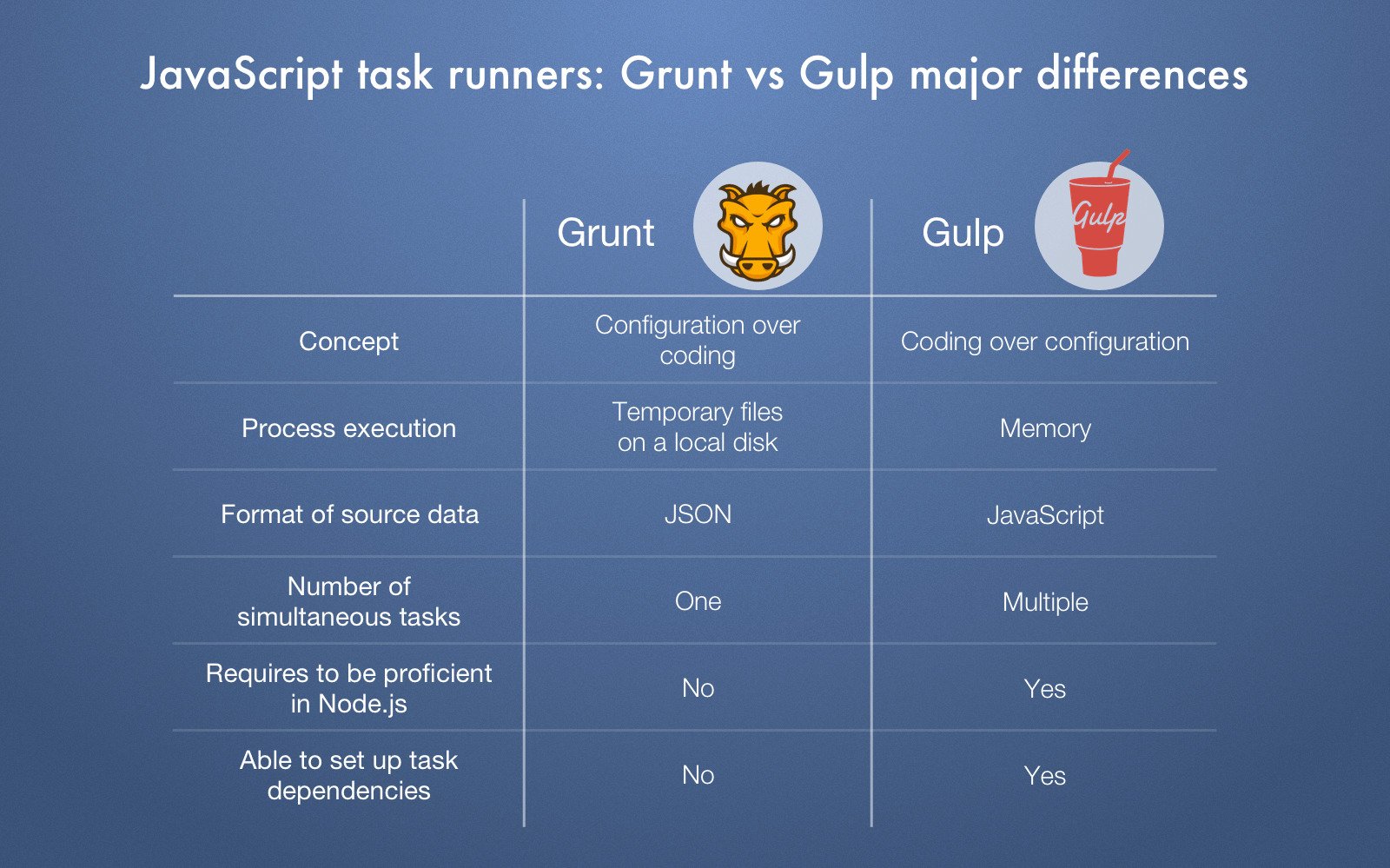
- Gulp uses memory instead of tmp files
- Grunt uses JSON configurations vs Gulp uses js func
run grunt or gulp
// gulpfile.js
const { src, dest, parallel } = require('gulp');
const pug = require('gulp-pug');
const less = require('gulp-less');
const minifyCSS = require('gulp-csso');
const concat = require('gulp-concat');

function html() {
  return src('client/templates/*.pug')
    .pipe(pug())
    .pipe(dest('build/html'))
}

function css() {
  return src('client/templates/*.less')
    .pipe(less())
    .pipe(minifyCSS())
    .pipe(dest('build/css'))
}

function js() {
  return src('client/javascript/*.js', { sourcemaps: true })
    .pipe(concat('app.min.js'))
    .pipe(dest('build/js', { sourcemaps: true }))
}

exports.js = js;
exports.css = css;
exports.html = html;
exports.default = parallel(html, css, js);
Webpack
Entry
Indicates which module webpack should use to begin building out its internal dependency graph. webpack will figure out which other modules and libraries that entry point depends on (directly and indirectly). Default: ./src/index.js
Output
Tells webpack where to emit the bundles it creates and how to name these files. It defaults to ./dist/main.js for the main output file and to the ./dist folder for any other generated file.
Loaders
Out of the box, webpack only understands JavaScript and JSON files. Loaders allow webpack to process other types of files and convert them into valid modules
Plugins
While loaders are used to transform certain types of modules, plugins can be leveraged to perform a wider range of tasks like bundle optimization, asset management and injection of environment variables.
Mode
By setting the mode parameter to either development, production or none, you can enable webpack's built-in optimizations that correspond to each environment. The default value is production.
const path = require('path');

const HtmlWebpackPlugin = require('html-webpack-plugin');

module.exports = {
  mode: 'production',
  entry: './path/to/my/entry/file.js',
  output: {
    path: path.resolve(__dirname, 'dist'),
    filename: 'app.bundle.js'
  },
  module: {
    rules: [
      { test: /\.txt$/, use: 'raw-loader' }
    ]
  },
  plugins: [
    new HtmlWebpackPlugin({template: './src/index.html'})
  ]
};