Expert
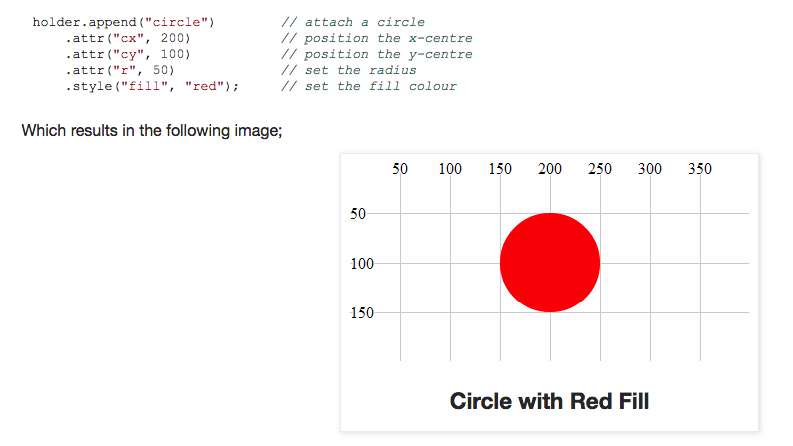
- Data visualisation (highcharts.js, d3.js)
- FileReader API
- FileSystem API
- Graceful Degradation & Progressive Enhancement
- Mobile first
- Offline first
- Data synchronization patterns
- Progressive Web Apps (PWA)
Data visualisation (highcharts.js, d3.js)
Название d3 расшифровывается как data driven document. Это JavaScript библиотека, ориентированная на работу с данными и их визуальное представление для веба, включая загрузку данных, визуализацию в режиме реального времени и множество других возможностей
D3 состоит из:
- Core - выборки, переходы, данные, локализации, цвета и т.д
- Scales - масштабирование данных и цветовых кодировок
- SVG - инструменты для создания масштабируемой векторной графики
- Time - парсинг временных форматов, вычисление календарных интервалов и т.п
- Layouts - получение вторичных данных для позиционирования элементов
- Geography - проектно-специфичные координаты, вычисления над широтой и долготой
- Geometry - утилиты для 2D-геометрии
- Behaviors - формы поведения взаимодействия
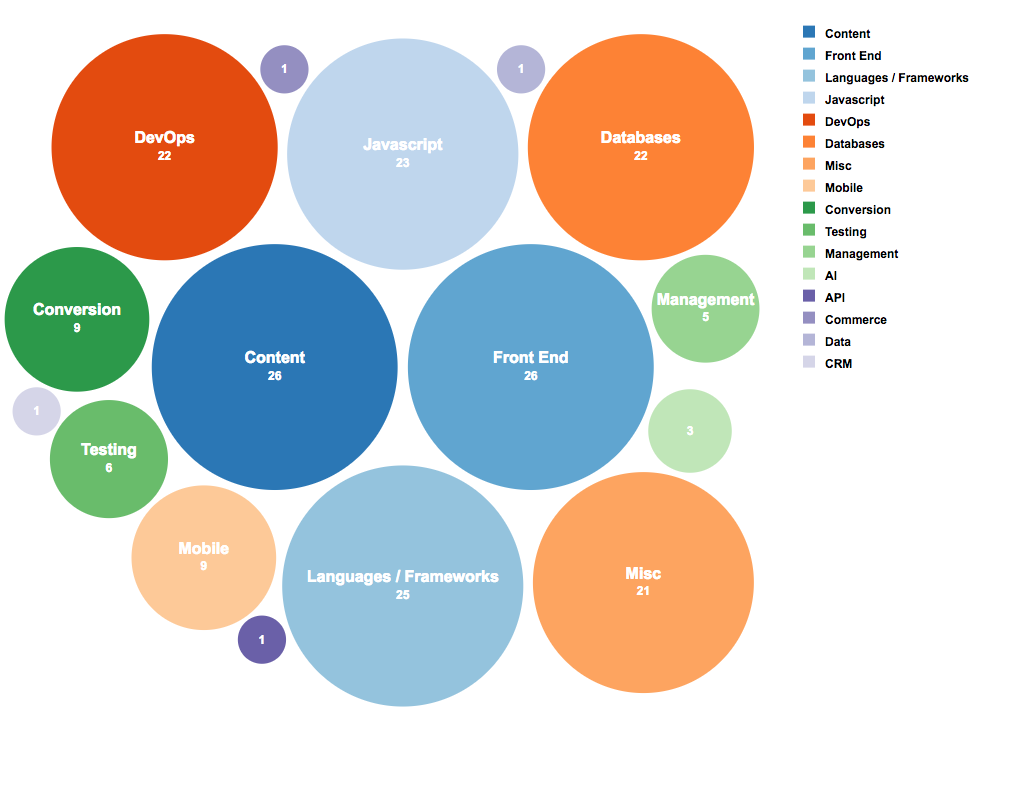
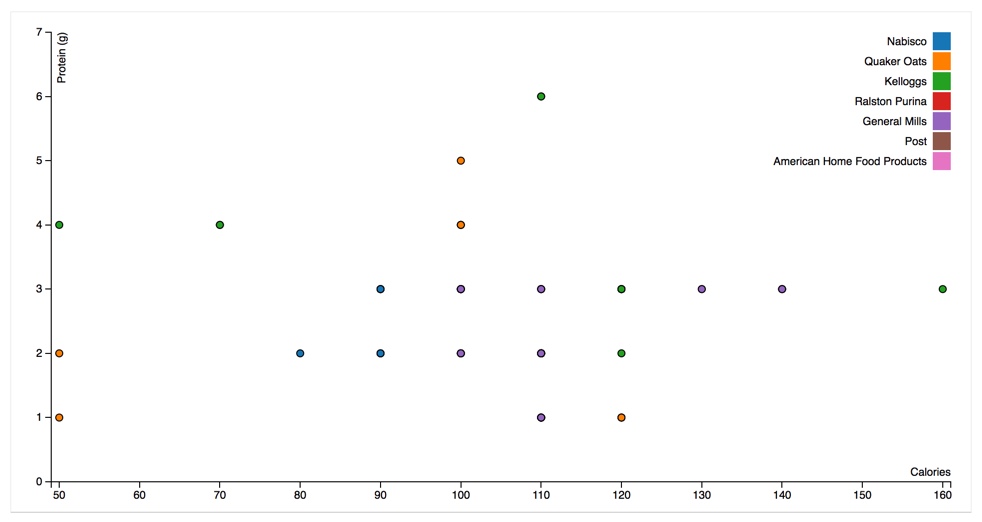
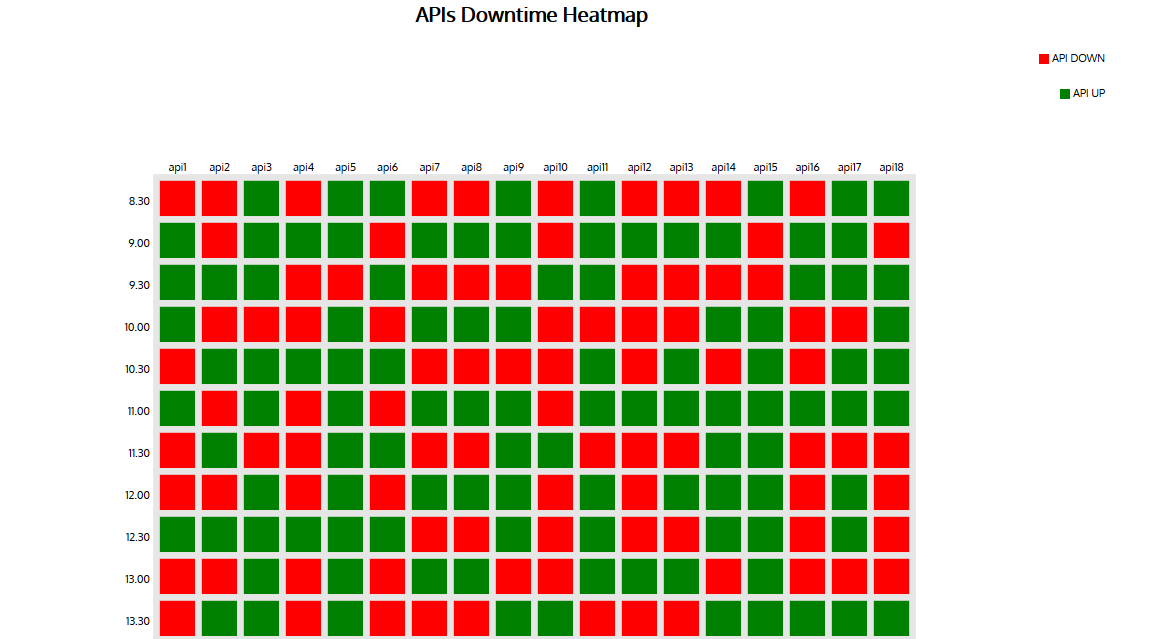
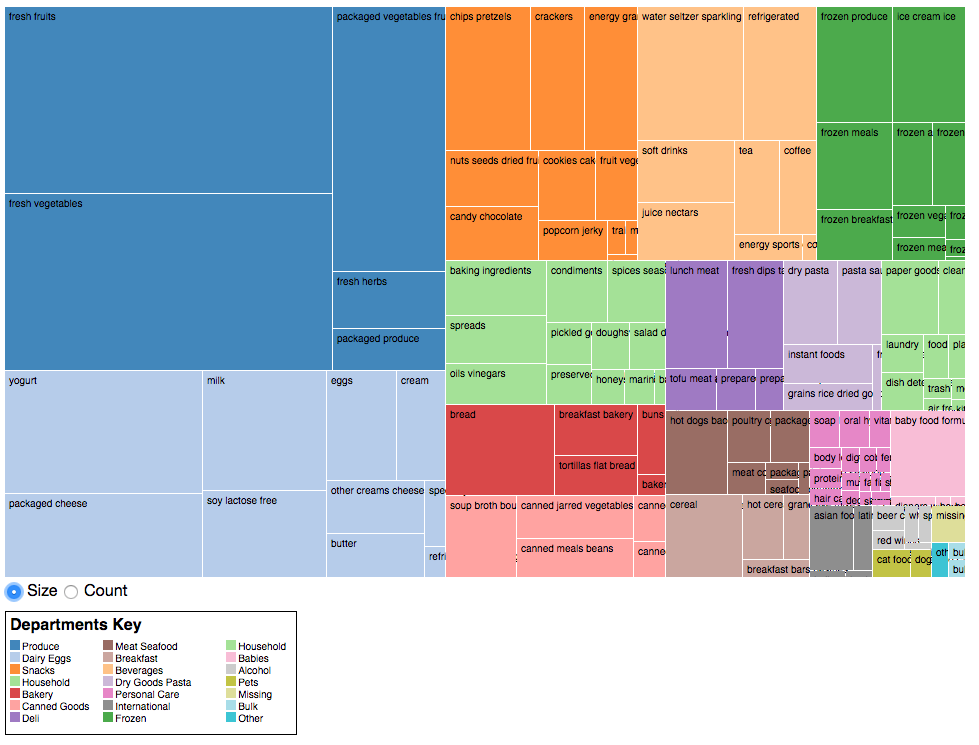
advanced graphs using (timeseries, splines, scatter and bubble charts, gauges, heat and tree maps)
- timeseries
t x y z
0 -2 -3 6
1 -1 -3 6
2 -1 -3 6
3 -2 -5 7
4 -3 -5 7
5 -2 -4 7
6 -2 -4 8
7 -2 -4 9
8 -2 -5 10

- splines

- bubble chart
- scatterplot
- heatmap
- treemap
combine two graph on one plot, custom styling
FileReader API
When a user selects the files from the device then a FileList object is generated and it contains all the selected files within the FileList object
FileList- object contains the list of files, these files are uploaded via the local device.File- is a single object uploaded via the local device. The File object belongs to the FileList object, a File object contains the file’s following information
File(4701) {
    lastModified: '',
    lastModifiedDate: {},
    name: '',
    size: '',
    type: '',
    webkitRelativePath: '',
}
Blob- Binary Large Object, BLOB object is very useful it keeps the content of the file when uploaded via the local device.
FileReader API
The FileReader() object helps you create a new FileReader. The FileReader API offers various asynchronous methods to read File or Blob objects. These methods are very helpful when you are working with large sized files. JavaScript file API allows you to create a new instance from HTML5 FileReader object.
const reader = new FileReader();
readAsDataURL()const preview = document.querySelector('img'); // Image reference const file = document.querySelector('input[type=file]').files[0]; // File refrence const reader = new FileReader(); // Creating reader instance from FileReader() API reader.addEventListener("load", function () { // Setting up base64 URL on image preview.src = reader.result; }, false); reader.readAsDataURL(file); // Converting file into data URLreadAsText()- used to read text files
const reader = new FileReader();

reader.addEventListener("load", function () {
    var fileText = reader.result;
}, false);

reader.readAsText(file, encoding);
```abort()``
- very useful when reading large files
const reader = new FileReader(); reader.abort();readAsBinaryString(file)method gets the raw binary data from the file. This method is fully capable of reading any kind of File or Blob.readAsArrayBuffer(file)method generates an ArrayBuffer via reading a File or Blob object.- It returns Int8Array, Uint8Array, and byteLength arrays.
- The readAsArrayBuffer method is very helpful when converting images from one extension to another extension e.g. JPEG to PNG or vice versa.
<input type="file">
<input
    type="file"
    onchange="showFiles(event)"
    multiple
    accept="image/x-png,image/gif,image/jpeg"
/>
check browser support
if (window.File && window.FileReader && window.FileList && window.Blob) {}
Example (upload multiple files)
<div id="upload" class="upload">
   <input type="file" multiple onchange="showFile()" accept="image/*">
</div>
<ul id="preview"></ul>
if (window.File && window.FileList && window.FileReader) {
    function showFile() {
        var preview = document.getElementById("preview");
        var fileInput = document.querySelector("input[type=file]");

        for (var i = 0; i < fileInput.files.length; i++) {
            var reader = new FileReader();
            reader.onload = function(readerEvent) {
                var listItem = document.createElement("li");
                listItem.innerHTML = "<img src='" + readerEvent.target.result + "' />";
                preview.append(listItem);
            }
            reader.readAsDataURL(fileInput.files[i]);
        }
    }
} else {
    alert("Your browser is too old to support HTML5 File API");
}
FileSystem API
FileSystem API
With the FileSystem API, a web app can create, read, navigate, and write to a sandboxed section of the user's local file system.
The API is broken up into various themes:
- Reading and manipulating files: File/Blob, FileList, FileReader
- Creating and writing: Blob(), FileWriter
- Directories and file system access: DirectoryReader, FileEntry/DirectoryEntry, LocalFileSystem
- проверить доступность (на данный момент только Chrome)
if(window.webkitRequestFileSystem) {}
If you're calling requestFileSystem() for the first time, new storage is created for your app. It's important to remember that this file system is sandboxed, meaning one web app cannot access another app's files. This also means you cannot read/write files to an arbitrary folder on the user's hard drive (for example My Pictures, My Documents, etc.).
function onInitFs(fs) {
  console.log('Opened file system: ' + fs.name);
}
// window.requestFileSystem(type, size, successCallback, opt_errorCallback)
window.requestFileSystem(window.TEMPORARY, 5*1024*1024 /*5MB*/, onInitFs, errorHandler);
error codes for errorHandler:
- FileError.QUOTA_EXCEEDED_ERR
- FileError.NOT_FOUND_ERR
- FileError.SECURITY_ERR
- FileError.INVALID_MODIFICATION_ERR
- FileError.INVALID_STATE_ERR
FileSystem specification also defines a synchronous API, LocalFileSystemSync interface that is intended to be used in Web Workers.
Files in the sandboxed environment are represented by the
FileEntryinterface. A FileEntry contains the types of properties (name, isFile, ...) and methods (remove, moveTo, copyTo, ...) that you'd expect from a standard file system.
fileEntry.isFile === true
fileEntry.isDirectory === false
fileEntry.name
fileEntry.fullPath
...

fileEntry.getMetadata(successCallback, opt_errorCallback);
fileEntry.remove(successCallback, opt_errorCallback);
fileEntry.moveTo(dirEntry, opt_newName, opt_successCallback, opt_errorCallback);
fileEntry.copyTo(dirEntry, opt_newName, opt_successCallback, opt_errorCallback);
fileEntry.getParent(successCallback, opt_errorCallback);
fileEntry.toURL(opt_mimeType);

fileEntry.file(successCallback, opt_errorCallback);
fileEntry.createWriter(successCallback, opt_errorCallback); // writing to a file
Examples:
// create file
function onInitFs(fs) {

  fs.root.getFile('log.txt', { create: true, exclusive: true }, function(fileEntry) {

    // fileEntry.isFile === true
    // fileEntry.name == 'log.txt'
    // fileEntry.fullPath == '/log.txt'

  }, errorHandler);

}

window.requestFileSystem(window.TEMPORARY, 1024*1024, onInitFs, errorHandler);
Например, можно скопировать все файлы при загрузке через <input type="file"> в темповую папку
Graceful Degradation & Progressive Enhancement
Progressive Enhancement (прогрессивное улучшение) - веб-тнтерфейсы должны создаваться поэтапно, от простого к сложному
- HTML (логическая и семантичная верстка)
- CSS (основные стили, шрифты, фон)
- CSS3 (фишки CSS3 - градиенты, углы, прозрачности, тени)
- JS (запросы, интерактивность)
Graceful Degradation (постепенная деградация) - способность системы сохранять свое функционирование в случае отказа некоторых компонентов
Например, форома заказа комнаты в отеле, при выключенном js подгрузит стили, обернутые в тег <noscript>
Mobile first
TIP
Это техника, при которой сайт верстается сначала для устройств с меньшими возможностями, а затем с помощью media queries добавляются возможности и плюшки.
скорость загрузки влияет на выдачу в гугл
большой процент использует мобильный для браузеринга
Responsive Web Design
Показать самое важное содержание в первую очередь
Вебсайт должен быть легковесным и оптимизированным, т.к. скорость подключения мобильной сети может быть слабой в зависимости от местонахождения пользователя
Вебсайт не должен загружать больше ресурсов, чем требуется пользователю для получения нужной информации, т.к. мобильный Интернет все еще остается дорогим.
Дополнительная информация должна грузиться только по требованию пользователя
Offline first
Необходимо обеспечить, чтобы приложение предоставляло минимальный функционал, без сервера
offline first предполагает перемещение всего стека MVC на сторону клиента
создайте объект-обёртку для серверного API на стороне клиента
Используйте отдельный объект данных для хранения и синхронизации состояния. Вся работа с данными должна идти через это прокси-объект.
storing data on the local client so it is always available to the user (offline or online)
syncing data to the cloud storage for sharing, update, and backup purposes when online
PouchDB + Hoodie
Data synchronization patterns
DATA SYNCHRONIZATION MECHANISM PATTERNS
Data synchronization mechanism patterns address the question: when should an application synchronize data between a device and a remote system (such as a cloud server)? This problem is common—yet often overlooked — in mobile application design, but there is no one-size-fits-all solution. Instead, mobile application developers must consider the constraints of many factors, including network availability, data freshness requirements, and user interface design.
The contexts eliciting the use of data synchronization mechanisms patterns can be considered from two perspectives: uploading and downloading. Uploading is the transfer of data from the mobile application to a remote system, whereas downloading is the transfer of data from the mobile application to the remote system. In both cases, the success or failure of the operation should be conveyed to the user either directly (with a notification or dialog), or indirectly (in a log or separate part of the application), with appropriate error information if a failure occurs.
Data synchronization mechanism patterns are often architectural patterns. An architectural pattern “expresses a fundamental structural organization schema for software systems. It provides a set of predefined subsystems, specifies their responsibilities, and includes rules and guidelines for organizing the relationships between them.”iii The following data synchronization mechanism patterns should therefore be viewed as structural organization schemas that address the question of when an application should synchronize data between a device and a remote system in a variety of different contexts.
Asynchronous Data Synchronization pattern
Intent
Manage a data synchronization event asynchronously and without blocking the user interface. Alternatively, allow a data synchronization event to occur independently of the user interface.
Problem
One benefit of using mobile applications is having quick access to data. Responsiveness and waiting time are two key elements that determine how quickly data can be accessed in a mobile environment. A non-responsive or slow-torespond application yields a poor user experience. Even if an application responds to user input quickly, however, a user will be frustrated if they must wait for significant periods of time for data to load. It is therefore important to ensure an application does not block when data synchronization occurs (or is attempted).
Applicability
The following are applicability considerations for asynchronous data synchronization from the uploading and downloading perspectives:
- Uploading
- The next state of the user interface or functionality of the application does not depend on the result of uploading data.
- Downloading
- While fresh data is preferred, the application can at least partially fulfill its functionality with stale data. This constraint entirely depends on the nature of the data
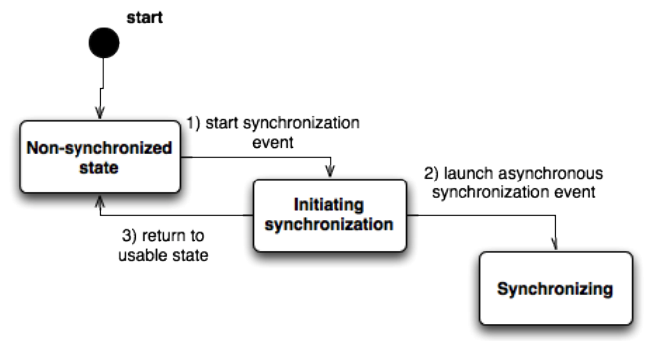
The Asynchronous Data Synchronization pattern is a mechanism pattern, thus it may be best visualized as a series of states. When an application is “usable” (meaning the user can interact with the application) a synchronization event can be started. Rather than executing the synchronization event sequentially, however, the event is launched asynchronously and the application returns to a usable state immediately.
Solution
Initiate data transfer asynchronously via a trigger (such as a user action, a timer tick, an Android “intentv”, or a push notification in iOS) and perform the transfer asynchronously. A notification mechanism (such as Android “toastsvi” or iOS “UIAlertViewsvii”) can be used to inform the user of the result of the data transfer. Likewise, a callback mechanism (such as an Android “intent” or a general callback function) can be used to inform the system when the data transfer completes.
Benefits
- Availability of the application during data synchronization
- Background synchronization of data
Liabilities
- Inconsistencies stemming from concurrent access to a shared dataset
- Data quantity charges unknown to the user
- Data quantity can congest the network
Examples
- Crash data for an application is collected on a remote system. Every time the application detects a crash, upload crash data asynchronously to a remote system.
- Usage statistics for an application are collected on a remote system once a week. A timer on the device ticks and the usage statistics are uploaded asynchronously.
- An application receives push notifications when a remote dataset is changed, and synchronizes the dataset on the device asynchronously.
- An application polls a remote system for updates on a given time interval. A timer on the device ticks and the data is synchronized asynchronously.
Synchronous Data Synchronization
Intent
Manage a data synchronization event synchronously; blocking the user interface while it occurs.
Problem
Some mobile application systems rely on datasets that must be accurate in real time or have certain time constraints limiting usability of the data. Moreover, allowing users to work with stale datasets may hinder or eliminate productivity for these applications. Similarly, some mobile application systems may rely on the response for an action from a remote system before another action can be performed. To prevent an application from entering unknown, non-functional states, a developer must ensure an application blocks until data synchronization is complete (successfully or unsuccessfully).
Applicability
- Fresh data is crucial to the functionality of the application
- The application cannot advance to the next state without knowing the result of a prior synchronization action.
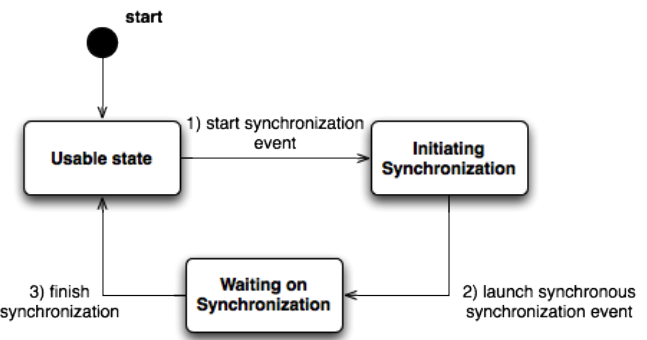
The Synchronous Data Synchronization pattern is a mechanism pattern as well, thus we will visualize it as a series of states. When an application is in a usable state, a synchronization event can be started. The event is launched synchronously and executed in a sequential fashion, leaving the application in a waiting state until the synchronization is finished, whereupon it returns to the usable state.
Solution
Initiate data transfer via a trigger (such as a user action, timer tick, etc.) and perform the transfer synchronously. The application only proceeds to the next state when a result (positive or negative) is reached.
Benefits
- The state of the mobile application system can be managed more easily
Liabilities
- User interface thread blocking
Examples
- A user presses a “submit” button to submit a work order to a digital maintenance system. A loading dialog is shown and the order is transmitted synchronously (the user is made to wait until a result is reached).
- A user opens an application to view the current stock of a warehouse. A loading dialog is shown and the dataset is downloaded synchronously before the application continues.
- A user opens a banking application and is prompted to enter his or her username and password. The user presses submit and the credentials are synchronously validated by the remote system before the application becomes usable.
- The Spotify application on BlackBerry, iPhone, and Android stores the date up to which the current account is paid, and on/after that day, synchronously checks the account status of the current account to update that date or alert the user that his or her account has expired.
DATA STORAGE AND AVAILABILITY PATTERNS
Data Storage and Availability patterns address the questions: how much data should be stored? and how much data should be available without further transfer of data? This question arises in both the design of mobile applications and the design of remote systems with which they interact. Often, mobile application projects have constraints (such as network speed/bandwidth or capacity) both remotely and locally. Likewise, the capacity of local storage is often limited relative to the whole dataset needed for a computation.
Partial Storage
Intent
Synchronize and store data only as needed to optimize network bandwidth and storage space usage.
Problem
Network bandwidth and storage space are two vital concerns for mobile application design. Many applications requiring such resources were originally developed on non-mobile platforms (e.g., laptop, desktop, server, cloud, etc.) where the resources are more abundant. These applications can still be developed as mobile platforms, but specific attention must be paid to conservation/utilization of these resources. While a solution for larger systems would be to increase the network bandwidth or increase the storage capacity for each device, this is impractical on mobile devices, especially from the perspective of mobile application developers who must operate within the constraints of their underlying mobile platforms.
Applicability
- The entire dataset is either too large to store on the device or it is impractical to transfer the entire dataset because much of it is not needed
- The entire dataset is not needed in its entirety for an application to function; rather, parts can be transferred as needed.
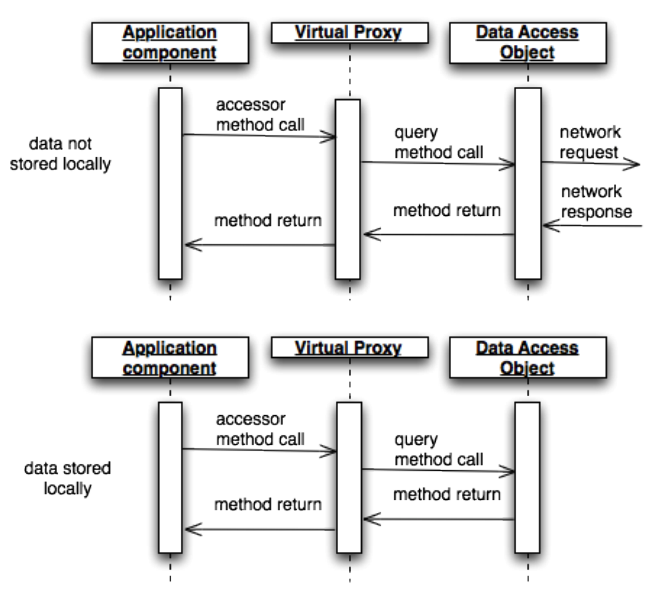
In the diagram, there are two sequences shown for two separate cases that encompass Partial Storage. First, the sequence is shown for when data needs to be accessed and is not stored on the device; second, the sequence is shown for when data is already stored on the device. This diagram uses other patterns described below in the solution section to help visualize the process using existing common patterns.
Solution
Rather than using pre-fetching, data is synchronized dynamically “on-demand” by triggers in the application, most typically using a variant of the Virtual Proxy pattern. A virtual proxy is an object with the same interface as the object used by the system that “intercepts” method calls, allowing initialization of fields only when they are needed.
Partial Storage can be realized using the Virtual Proxy and Data Access Object patterns by creating a virtual proxy that handles the process of on-demand synchronization when data is not in local storage. The Virtual Proxy provides the same interface as the object being accessed by the component and queries the Data Access Object for the data to populate its fields. The Data Access Object determines the local availability of the data and makes network calls if needed. This design minimizes storage needs and does not incur the bandwidth usage of synchronizing the entire dataset
Benefits
- Storage space is reduced
- Datasets can be synchronized at various levels of granularity
Liabilities
- Network connectivity
- Network bandwidth/speed
Examples/Known Uses
- In an application for a digital library, a user enters search terms for a particular topic and a data transfer is invoked. The Virtual Proxy for the Data Access Object is invoked first, which uses the methods of the Data Access Object to determine whether or not to invoke a data transfer. Regardless of whether a data transfer occurs or the Data Access Object retrieves the data from local storage, the resulting title, author, and availability for each book is returned by the Virtual Proxy and displayed. The user chooses one and another such process occurs. The remaining details of the particular item are returned and displayed.
- The Google Maps application works by displaying a relevant map at a certain level of granularity and downloading new tiles as needed when the map is zoomed in or out. This design eliminates the need to store the entire map at every level of detail on the device, but requires network connectivity.
Complete Storage
Intent
Synchronize and store data before it is needed so the application has better response or loading time.
Problem
While wireless connectivity is widespread and highly available in many places, there are times when network connectivity is not available or not desired, but an application must still function. Partial Storage works by loading data on demand, much like a mobile website, and will not work in such a scenario. Moreover, the possibility of low network bandwidth can be an issue with respect to application responsiveness.
Applicability
- The entire dataset should be synchronized between the device and the remote system during a synchronization event.
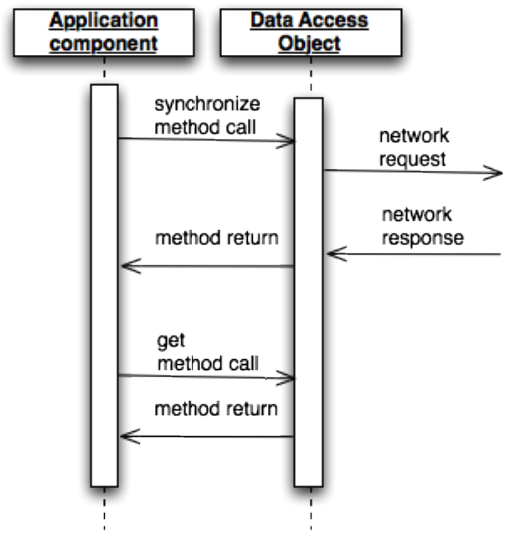
This sequence diagram gives a simplified version of Complete Storage. It draws a distinction between two types of actions: synchronization and a “get” action. The synchronization action causes a network request and returns data to be stored on the device. In Complete Storage, it is this action that synchronizes all of the data. All “get” actions result in local data being returned.
Solution
Store the entire dataset on the device and keep it wholly (as opposed to partially via Partial Storage) synchronized when connectivity is optimal (i.e., when using Wi-Fi where bandwidth is high).
Benefits
- Reliance on network connectivity is decreased
Liabilities
- Device storage usage is increased
- Bandwidth usage is increased
Examples/Known Uses
- An application should be completely usable offline, such as the emergency preparedness application mentioned in the Applicability section.
- An application has a relatively small dataset that will not change often/significantly.
- An application suspects that its dataset has become corrupt and needs a new copy of the entire dataset.
- Dropbox Mobile (which is a popular app for storing and synchronizing personal files on private cloud storage and between devices) uses this pattern to allow a user to access files when bandwidth is low or a connection is not available. It further optimizes the pattern’s liabilities by allowing users to choose which files and folders to synchronize eagerly
DATA TRANSFER PATTERNS
Data Transfer patterns address the problem of transfer quantity in set reconciliation: how can we synchronize between sets of data such that the amount of data transmitted is minimized? As discussed above, network bandwidth is often a concern of mobile applications, so developers should write their applications to minimize resources to accomplish the task of synchronizing data. Some types of data (such as records with a timestamp to keep track of changes) lend themselves to more efficient methods of reconciliation than others, while other types of data (such as files containing compound documents) have less efficient methods of reconciliation without becoming overly complex.
Full Transfer
Intent
On a synchronization event, the entire dataset is transferred between the mobile device and the remote system.
Problem
Some types of data (such as static files or datasets that change entirely after a synchronization event like a “Message of the Day”) either cannot use or will not benefit from a complex reconciliation scheme. Moreover, some situations (such as a corrupt dataset) are more easily handled by a simple reconciliation scheme since a more complex scheme that uses fewer resources may take more time and effort to develop.
Applicability
- The dataset of an application is small enough that it can be downloaded/uploaded in one piece.
- A complex data reconciliation scheme is not needed or provides little benefit over a simple one.
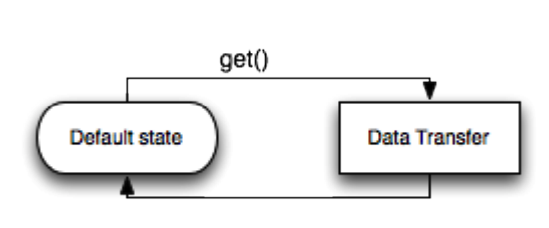
This flow chart shows the simplicity of a Full Transfer. The application simply initiates a transfer to obtain the entire dataset.
Solution
Reconcile data between a device and a remote system by transferring the entire contents of one to the other and making any appropriate changes when data is received.
Benefits
- It is the simplest solution
Liabilities
- Redundancy of data being sent
Examples/Known Uses
- An application detects an error in its dataset. Rather than using a complex reconciliation scheme, it uses Full Transfer to easily replace the faulty dataset.
- An application displays the top ten news articles for a newspaper issued daily (so that the top ten news articles do not change). The dataset changes every time the application is updated, so it uses Full Transfer.
Timestamp Transfer
Intent
On a synchronization event, only the parts of the dataset changed since the last synchronization are transferred between the mobile device and the remote system using a last-changed timestamp.
Problem
With the issue of network speed and bandwidth on mobile devices, the amount of data transferred to reconcile datasets between a device and a remote system should be minimized. Full Transfer wastes too many resources and the dataset does not fit the more strict requirements for Mathematical Transfer (described below). It is still imperative to synchronize data, but another method is needed to minimize data transfer.
Applicability
- The dataset of an application can be downloaded/uploaded in specific pieces
- The pieces of data must have a field to store a timestamp denoting the last time it was modified.
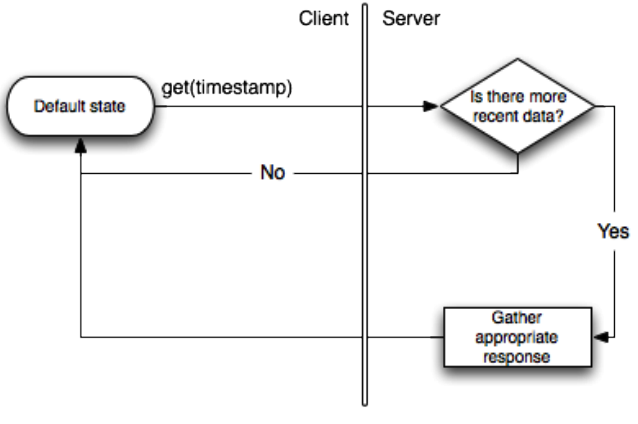
This flow chart shows the increased logic of a Timestamp Transfer. The client initiates a request and attaches a timestamp to the request, which is processed by the server to determine whether or not to return any data.
Solution
A timestamp provided by the remote system from the last successful update is bundled with a request for changed data. The remote system returns only data that has been added or changed after that timestamp. For submitting data, the device only submits data that has been added or changed since the last successful submission
Benefits
- Lower bandwidth utilization than Full Transfer.
Liabilities
- Careful attention must be given to the source of timestamps
- It may not be apparent how to handle deletion of data
Examples/Known Uses
- An application stores routes for public transportation. It uses Timestamp Transfer to only transfer new, changed, or removed routes when it updates.
- Twitter and Facebook’s public APIs each offer developers the ability to retrieve the latest posts using a “since” value, thereby supporting Timestamp Transfer
Mathematical Transfer
Intent
On a synchronization event, only the parts of the dataset changed since the last synchronization are transferred between the mobile device and the remote system using a mathematical method.
Problem
Network bandwidth and speed are concerns, so Full Transfer cannot be used to reconcile a dataset between a device and a remote system. The structure of the dataset also may not be able to keep track of changes efficiently using Timestamp Transfer, or alternatively, a mathematical method can reconcile changes more easily or efficiently than timestamps can.
Applicability
- The dataset of an application can be synchronized using a mathematical method
- The application should use the absolute minimum bandwidth required to synchronize datasets, and time can be spent developing a complex mathematical method.
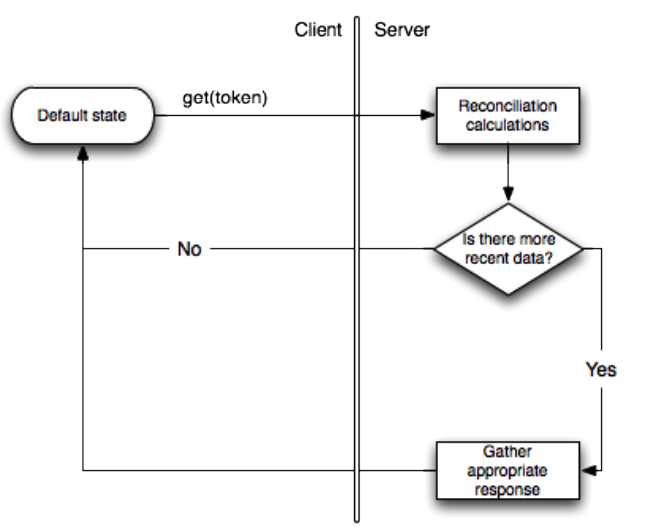
This flow chart is similar to the one in Timestamp Transfer with the addition of a process to calculate the differences in the data sets. In Timestamp Transfer, this is simply a comparison, but in Mathematical Transfer, this could be a more significant calculation that should be considered a separate process.
Solution
A mathematical method or algorithm decides what is transferred between a device and a remote system to synchronize a dataset.
Benefits
- This method potentially uses the least bandwidth compared with the Timestamp Transfer and Full Transfer patterns.
Liabilities
- Mathematical methods are often highly context-dependent
- Mathematical methods often require more time to develop.
Examples/Known Uses
- Internet video conferencing applications (such as Skype and Facetime) on mobile devices use video compression techniques based on human-perceivable differences in the overall imagexiv. The remote system stores the previous frame and uses the “sum of absolute differences” or the “sum of squared differences” methods to determine the optimal encoding scheme for the new frame.
Progressive Web Apps (PWA)
Прогрессивное веб-приложение (PWA) — это веб-сайт, который выглядит и ведет себя так же, как мобильное приложение, что означает, что его можно добавить на главный экран смартфона, отправить push-уведомления, получить доступ к аппаратным средствам устройства и работать в автономном режиме. Да, вы правильно прочли. Progressive Web App работает так же гладко в неустойчивом соединении или при отсутствии сети, так как это было бы с полным доступом в интернет. Источник: https://blog.uamaster.com/progressive-web-apps/ - блог интернет-агентства UaMaster.
PWA – это название группы приложений, которые используют стек Web технологий (JS + HTML + CSS) и позволяют соединить простоту использования Web сайта со специфичными для нативных приложений операционной системы UX и техническими возможностями. Основное предназначение PWA увеличить конверсию, количество пользователей и удобство использования Web приложений на мобильных устройствах.
Progressive Web Apps является логическим продолжением Accelerated Mobile Pages, таким образом, если вы ранее создавали AMP приложения, то вам однозначно стоит обновить своё приложение к нормам PWA приложений. Если вы до этого ничего не слышали о AMP, то это не станет для вас проблемой во время изучения PWA.
PWA приложению необходимо быть:
- Прогрессивным – Работать с каждым пользователем в не зависимости от окружения используя метод постепенного улучшения как основной принцип работы;
- Адаптивным – Подстраиваться под любое устройство: десктоп, смартфоны, планшеты или что либо другое;
- Независимым от соединения – Используя Service Worker приложение должно работать в оффлайн режиме при прерывании или отсутствии соединения;
- Выглядеть нативно – Приложение должно соответствовать привычным для пользователя способам взаимодействия и навигации;
- Самообновляемым – Приложение должно контролировать процесс автоматического обновления посредством Service Worker API;
- Безопасным – Посредством использования HTTPS предотвращать перехват и подмену данных;
- Определяемым – посредством W3C манифеста и регистрации через Service Worker приложение идентифицируется как «приложение» поисковыми системами;
- Удерживающим – Используя технические возможности мотивируем пользователя еще раз использовать приложение, например посредством push уведомлений;
- Легким в установке – Позволяет «сохранить» приложение на устройстве пользователя посредством добавления PWA приложения в список установленных приложений без использования магазина приложений;
- Легким в использовании – Для начала использования приложения достаточно открыть URL. Установка приложения не обязательна.
Пользователь, используя смартфон, открывает ссылку полученную посредством любого приложения, после загрузки web страницы пользователь получает полноценное приложение, которое он может использовать. Тем самым начать использовать новое приложение становится намного проще, ведь не нужно заходить в магазин приложений и ждать пока установится необходимое пользователю приложение. При необходимости пользователь может добавить приложение на рабочий стол посредством пункта опций в браузере «Add to home screen». Или приложение может предложить пользователю сделать это вместо него посредством – Web app install banner.
С технологической точки зрения в PWA используются современные web стандарты, доступные в браузерах, и ничего более. Подход PWA не накладывает каких-то особых ограничений на сами web приложения. Например PWA могут быть одностраничными (SPA — single page applications) приложениями, а могут и не быть таковыми. Важно только чтобы все пользователи могли взаимодействовать с вашим приложением, и использовался подход постепенных (прогрессивных) улучшений — чем современнее браузер пользователя, тем больше возможностей он получит.
Главной же особенностью PWA и тем, что позволяет нам назвать web приложение гордым именем Progressive Web App, является поддержка оффлайн работы с помощью механизма Service Worker’ов и связанная с этим возможность добавления иконки приложения на стартовый экран устройства пользователя (не хотим же мы добавлять на стартовый экран устройства приложения, которые не загрузятся без соединения с интернетом?).
Service Worker’ы предоставляют уникальную возможность запуска кода отдельно от страниц вашего сайта, даже когда сами страницы могут быть закрыты (но запускать код в фоне произвольно долго всё равно не получится, всё-таки ограничения существенны). И эта возможность находит всё больше применений в новых web стандартах.
Кроме внедрения современных web стандартов, в различные браузеры, происходят изменения и улучшения в работе PWA в Chrome. И если отображение иконки установки PWA в OmniBox (адресная строка и строка поиска) в Chrome пока находится в стадии разработки, то установка PWA на Android с помощью механизма WebAPK (APK — Android Package, контейнер Android приложений) уже работает. Изначально PWA после установки представляли собой просто ярлык браузера на стартовом экране. Сейчас такой режим тоже поддерживается. Ярлыки PWA содержат в углу маленькую иконку браузера. Но теперь основной способ установки — это WebAPK. По сути PWA на Android становится полноценными приложениями, генерируемым на лету при установке. И PWA теперь отображаются не только ярлыком на стартовом экране, но и показывается на ряду с другими установленными нативными приложениями в списке всех приложений. Пока механизм WebAPK не позволяет получать доступ к каким-либо нативным возможностям операционной системы, которые были бы недоступны из браузера (кроме поддержки открытия ссылок домена, с которого было загружено PWA, в самом PWA, а не в браузере), но факт того что PWA являются с точки зрения операционной системы полноценными приложениями, не может не радовать.
Зрелость технологии Service Worker’ов также подтверждает тот факт, что все популярные инструменты создания SPA (single page applications) либо поддерживают генерацию Service Worker’ов в одну команду, как это сделано в Angular CLI, либо даже генерируют Service Worker по умолчанию, как в случае с create-react-app. С другой стороны многим разработчикам хочется лучше понимать что, как и когда кэшируется в приложении, поэтому у них возникает желание написать код Service Worker’а самостоятельно. Но это не лучшая идея, чреватая трудно воспроизводимыми ошибками, и в итоге пользователи могут остаться с устаревшей закэшированной версией приложения. Промежуточным, и лучшим с моей точки зрения вариантом, является использование библиотек, из коробки предоставляющих реализацию стратегий кэширования и фоновой синхронизации, но предоставляющих максимальную свободу разработчикам. Самой популярной из таких библиотек на данный момент является Workbox.
Прелесть Progressive Web App в том, что его очень легко обнаружить, как обычный веб-сайт — вы загуглили его, щелкнули ссылку, чтобы открыть, и все, у вас есть приложение на устройстве, готовое к показу. При этом браузер сам предложит вам добавить иконку на рабочий стол. Если вы согласны с этим, вы увидите значок своего приложения на главном экране телефона, мирно находясь рядом с родными приложениями. Теперь вы можете запускать PWA так же, как и мобильное приложение — с приятной заставкой, распознаванием ориентации и т. д. Источник: https://blog.uamaster.com/progressive-web-apps/ - блог интернет-агентства UaMaster.
Итак, Progressive Web App — это сайт, который:
- может «устанавливаться» на смартфон *выглядит как нативное приложение
- работает offline
- присылает push-уведомления
При этом его преимущества перед нативными приложениями:
- кроссплатформенность
- индексируется
- маленький вес
- установку предлагает браузер
- установка моментальная
- не нужно обновлять, всегда предоставляют свежий контент и интерфейс
- улучшения в SEO
Все кэширование, о котором было сказано, выполняется небольшим помощником браузера под названием «Service Worker», который по сути является ничем иным, как файлом JavaScript, который находится в приложении, но выполняется в отдельном процессе, а это значит, что он не будет завершен при закрытии приложения в браузере (или даже самого браузера). После регистрации на главной странице приложения, Service Worker кэширует статическую информацию в оболочке приложения и начинает обрабатывать запросы, отправленные приложением, кэшируя и обслуживая ответы на основе логики, запрограммированной в ней.
Офлайновая поддержка чрезвычайно важна, но чтобы успешно заменить нативное приложение, PWA должно выглядеть и вести себя как нативное приложение. Это достигается с помощью файла manifest.json, который содержит JSON-форматированные свойства приложения, такие как имя, URL главной страницы, значки для различных разрешений, цвета заставки, ориентация устройства и т.п.