Expert
- ES6: generators and iterators
- Symbols
- Typed Arrays
- Experimental new features
- Shallow and retained sizes
- Young and old generation
- Garbage collector
- Anti-patterns related to memory leaks
- Memory cleaning
ES6: generators and iterators
Iterator
В JS есть объекты, содержимое которых мы можем перебирать (объекты, массиивы, ...). Например, конструкция for...of использует итератор
Iterator- это объект, который предоставляет методnext(), возвращающий следующий элемент коллекции
function makeIterator(array) {
  let index = 0;

  return {
    next() {
      return nextIndex < array.length ?
        {
          value: array[nextIndex++],
          done: false
        } : {
          done: true
        }
    }
  }
}

const alphabet = makeIterator(['a', 'b']);

console.log(alphabet.next().value); // 'a'
console.log(alphabet.next().value); // 'b'
console.log(alphabet.next().done); // true

- Итераторы нужны для перебора данных, не вдаваясь в их структуру
Generator
Generator- это функция которая может приостанавливать своё выполнение, возвращать промежуточный результат и далее возобновлять своё выполнение в произвольный момент времени
- когда мы вызываем функцию-генератор, она возвращает нам итератор
yield- ключевое слово, которое приостанавливает выполнение функции (и может принимать значение извне)
function *myGenerator() {
  const name = 'Vasya';
  const who = yield name; // отдаст name на первый вызов next(), при втором - присвоит в переменную who аргумент, переданный в next
  console.log(who);
}

const myIterator = myGenerator();
console.log(myIterator.next()); // { value: 'Vasya', done: false }
console.log(myIterator.next('It')); // { value: undefined, done: true }
- их использует
async/await,redux-saga
Symbols
Symbol- это новый примитивный тип данных, нужен для создания уникальных идентификаторов
- создается без ключевого слова
new
const symbol = Symbol('tag');  // tag - description for debugging

Symbol('a') !== Symbol('a'); // true
- существуют "глобальные символы"
const tag = Symbol.for('tag');

// then we can get
Symbol.for('tag') // вернет этот идентификатор
- для безопасного расширения объекта новым свойством. при этом он не будет также учавствовать в
for...inиObject.keys
Typed Arrays
Typed Arrays were introduced for WebGL APIs, Canvas, Web Audio API, Fwtch API, WebSockets, File API (for effectivly work with binary data). The reason behind this is that converting and guessing the type of standard JavaScript array might be too slow
у типизированных масивов есть все методы обычных, главное различие - тут хранятся только числа заданного размера
Буфер (ArrayBuffer) это объект, представляющий из себя набор данных. Он не имеет формата и не предоставляет возможности доступа к своему содержимому. Для доступа к памяти буфера вам нужно использовать Представления(DataView). Представление являет собой контекст, имеющий тип данных, начальную позицию в буфере, и количество элементов — это позволяет представить данные в виде актуального типизованного массива.
ArrayBuffer
Объект ArrayBuffer - это стандартный набор бинарных данных с фиксированной длинной. Вы не можете манипулировать содержимым ArrayBuffer напрямую. Вместо этого, необходимо создать типизованное представление DataView, которое будет отображать буфер в определенном формате, и даст доступ на запись и чтение его содержимого.
DataView
Объект DataView - это низкоуровневый интерфейс, предоставляющий API для записи/чтения произвольных данных в буфер.
let buffer = new ArrayBuffer(16); // creates 16 bytes buffer

let dv1 = new DataView(buffer); // creates a DataView to be abble access/set whole buffer
let dv2 = new DataView(buffer, 10, 3); // starts at slot 10, get 3 bytes

dv1.setInt8(11, 42); // put "42" in slot 11
const num = dv2.getInt8(1); // retrieve "42"
ArrayBuffer- used to represent chunk of data (raw binary data), но не дает работать с этими даннымиDataView- has to get and set methods
Int8Array(-128 to 127) - 8 бит == 1 байт, (1)1111111Uint8Array(0 - 255)Uint8ClampedArray(0-255), этот тип с автовалидацией, если меньше нуля - запишет 0, больше 255 - будет 255Int16Array(-32768 to 32767)Uint16Array(0 to 65535)Int32ArrayUint32ArrayFloat32ArrayFloat64Array
new TypedArray(); // новое в ES2017
new TypedArray(length);
new TypedArray(typedArray);
new TypedArray(object);
- for example
// canvas image data is typed array:
const imageData = ctx.getImageData(0,0, 200, 100);
const typedArray = imageData.data // data is a Uint8ClampedArray

// File API
reader.readAsArrayBuffer(file);
Experimental new features
- Typed Objects - inactive proposal
- Cancelable Promises - inactive proposal
- SIMD.JS - SIMD APIs - inactive proposal
ArrayBuffer.transfer
The static
ArrayBuffer.transfer()method returns a new ArrayBuffer whose contents have been taken from the oldBuffer's data and then is either truncated or zero-extended by newByteLength. If newByteLength is undefined, the byteLength of the oldBuffer is used. This operation leaves oldBuffer in a detached state.
Syntax
ArrayBuffer.transfer(oldBuffer [, newByteLength]);
The ArrayBuffer.transfer() method allows you to grow and detach ArrayBuffer objects. The ability to grow an ArrayBuffer without copying has the advantage of being much faster for large buffers (similar to realloc). The ability to detach an ArrayBuffer gives the developer explicit control over when the underlying memory is released. This avoids having to drop all references and wait for garbage collection.
Example
const buf1 = new ArrayBuffer(40);
new Int32Array(buf1)[0] = 42;

const buf2 = ArrayBuffer.transfer(buf1, 80);
buf1.byteLength; // 0 but if you use the polyfill then the value is still 40
buf2.byteLength; // 80
new Int32Array(buf2)[0]; // 42
Stage 3
globalThis
It is difficult to write portable ECMAScript code which accesses the global object. On the web, it is accessible as window or self or this or frames; on node.js, it is global or this; among those, only this is available in a shell like V8's d8 or JavaScriptCore's jsc. In a standalone function call in sloppy mode, this works too, but it's undefined in modules or in strict mode within a function. In such contexts, the global object can still be accessed by Function('return this')(), but that form is inaccessible with some CSP settings, such as within Chrome Apps. Below is some code from the wild to get the global object, passed in as the single argument to an IIFE, which works for most cases but won't actually work in d8 when in a module or in strict mode inside a function (which could be fixed using the Function trick):
<script>
  globalThis.foo = 'a';
  globalThis.getGlobalThis = () => globalThis;
</script>
import()
This proposal adds an import(specifier) syntactic form, which acts in many ways like a function (but see below). It returns a promise for the module namespace object of the requested module, which is created after fetching, instantiating, and evaluating all of the module's dependencies, as well as the module itself.
<script>
  const main = document.querySelector("main");
  for (const link of document.querySelectorAll("nav > a")) {
    link.addEventListener("click", e => {
      e.preventDefault();

      import(`./section-modules/${link.dataset.entryModule}.js`)
        .then(module => {
          module.loadPageInto(main);
        })
        .catch(err => {
          main.textContent = err.message;
        });
    });
  }
</script>
BigInt
BigInt is a new primitive that provides a way to represent whole numbers larger than 253, which is the largest number Javascript can reliably represent with the Number primitive.
const alsoHuge = BigInt(9007199254740991);import.meta
Private methods and getter/setters for JavaScript classes
class Counter extends HTMLElement {
  #xValue = 0;

  get #x() { return #xValue; }
  set #x(value) {
    this.#xValue = value;
    window.requestAnimationFrame(this.#render.bind(this));
  }

  #clicked() {
    this.#x++;
  }

  constructor() {
    super();
    this.onclick = this.#clicked.bind(this);
  }

  connectedCallback() { this.#render(); }

  #render() {
    this.textContent = this.#x.toString();
  }
}
window.customElements.define('num-counter', Counter);
Class Public Instance Fields & Private Instance Fields
Like static public methods, static public fields take a common idiom which was possible to write without class syntax and make it more ergonomic, have more declarative-feeling syntax (although the semantics are quite imperative), and allow free ordering with other class elements.
Declaring static properties in the class body is hoped to be cleaner and doing a better job of meeting programmer expectations of what classes should be for. The latter workaround is a somewhat common idiom, and it would be a nice convenience for programmers if the property declaration could be lifted into the class body, matching how methods are placed there.
class ColorFinder {
  static #red = "#ff0000";
  static #blue = "#00ff00";
  static #green = "#0000ff";

  static colorName(name) {
    switch (name) {
      case "red": return ColorFinder.#red;
      case "blue": return ColorFinder.#blue;
      case "green": return ColorFinder.#green;
      default: throw new RangeError("unknown color");
    }
  }

  // Somehow use colorName
}
Static class fields and private static methods
Hashbang Grammar
Promise.allSettled
A common use case for this combinator is wanting to take an action after multiple requests have completed, regardless of their success or failure. Other Promise combinators can short-circuit, discarding the results of input values that lose the race to reach a certain state. Promise.allSettled is unique in always waiting for all of its input values.
*Promise.allSettled returns a promise that is fulfilled with an array of promise state snapshots, but only after all the original promises have settled, i.e. become either fulfilled or rejected.
const promises = [ fetch('index.html'), fetch('https://does-not-exist/') ];
const results = await Promise.allSettled(promises);
const successfulPromises = results.filter(p => p.status === 'fulfilled');
Numeric separators
1_000_000_000           // Ah, so a billion
101_475_938.38          // And this is hundreds of millions

let fee = 123_00;       // $123 (12300 cents, apparently)
let fee = 12_300;       // $12,300 (woah, that fee!)
let amount = 12345_00;  // 12,345 (1234500 cents, apparently)
let amount = 123_4500;  // 123.45 (4-fixed financial)
let amount = 1_234_500; // 1,234,500
Decorators
Object.getOwnPropertyDescriptor(obj, propName) - вернуть дескриптор свойства propName только если оно принадлежит самому ообъекту, а не цепочке его прототипов
Decorator
Decorator - это функция (желательно чистая), которая используется для изменений свойств/методов класса или самого класса
function readonly(target, property, descriptor) {
  descriptor.writtable = false;
  return descriptor;
}

// or 2 variant
function log(logMessage) {
  return function (target, property, descriptor) {
    const originalMethod = descriptor.value;

    descriptor.value = function(...args) {
      console.log('[LOG]', logMessage);
      return originalMethod.call(this, ...args);
    }

    return descriptor;
  }
}

class User {
  // ...

  @readonly
  getFullName() {
    // этот метод нельзя перезаписать
  }

  @log('calling getFullName method on User class')
  getName() {
    // ...
  }
}
декоратор класса
Декоратор класса должен вернуть функцию-конструктор
// UserRef - ссылка на класс внкьри декоратора
function withLoginStatus( UserRef ) {
    return class extends UserRef {
        constructor(...args ) {
            super(...args);
            this.isLoggedIn = false;
        }

        setLoggedIn() {
            this.isLoggedIn = true;
        }
    }
}

@withLoginStatus
class User {
    constructor(firstName, lastName) {
        this.firstName = firstName;
        this.lastName = lastName;
    }
}
Shallow and retained sizes
Think of memory as a graph with primitive types (like numbers and strings) and objects (associative arrays). It might visually be represented as a graph with a number of interconnected points as follows:
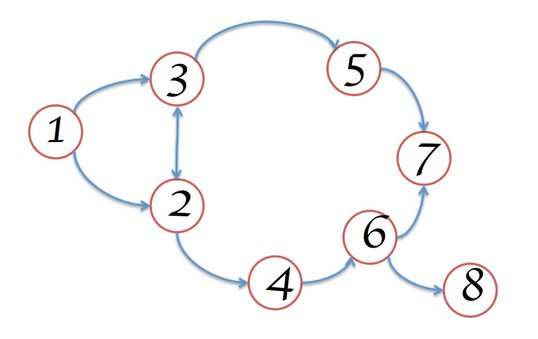
An object can hold memory in two ways:
Directly by the object itself.
Implicitly by holding references to other objects, and therefore preventing those objects from being automatically disposed by a garbage collector (GC for short).
When working with the Heap Profiler in DevTools (a tool for investigating memory issues found under "Profiles"), you will likely find yourself looking at a few different columns of information. Two that stand out are Shallow Size and Retained Size, but what do these represent?
Memory Terminology Meggin Kearney By Meggin Kearney Meggin is a Tech Writer This section describes common terms used in memory analysis, and is applicable to a variety of memory profiling tools for different languages.
The terms and notions described here refer to the Chrome DevTools Heap Profiler. If you have ever worked with either the Java, .NET, or some other memory profiler, then this may be a refresher.
Object sizes Think of memory as a graph with primitive types (like numbers and strings) and objects (associative arrays). It might visually be represented as a graph with a number of interconnected points as follows:
Visual representation of memory
An object can hold memory in two ways:
Directly by the object itself.
Implicitly by holding references to other objects, and therefore preventing those objects from being automatically disposed by a garbage collector (GC for short).
When working with the Heap Profiler in DevTools (a tool for investigating memory issues found under "Profiles"), you will likely find yourself looking at a few different columns of information. Two that stand out are Shallow Size and Retained Size, but what do these represent?
Shallow size
This is the size of memory that is held by the object itself.
Typical JavaScript objects have some memory reserved for their description and for storing immediate values. Usually, only arrays and strings can have a significant shallow size. However, strings and external arrays often have their main storage in renderer memory, exposing only a small wrapper object on the JavaScript heap.
Renderer memory is all memory of the process where an inspected page is rendered: native memory + JS heap memory of the page + JS heap memory of all dedicated workers started by the page. Nevertheless, even a small object can hold a large amount of memory indirectly, by preventing other objects from being disposed of by the automatic garbage collection process.
Retained size
This is the size of memory that is freed once the object itself is deleted along with its dependent objects that were made unreachable from GC roots.
GC roots are made up of handles that are created (either local or global) when making a reference from native code to a JavaScript object outside of V8. All such handles can be found within a heap snapshot under GC roots > Handle scope and GC roots > Global handles. Describing the handles in this documentation without diving into details of the browser implementation may be confusing. Both GC roots and the handles are not something you need to worry about.
There are lots of internal GC roots most of which are not interesting for the users. From the applications standpoint there are following kinds of roots:
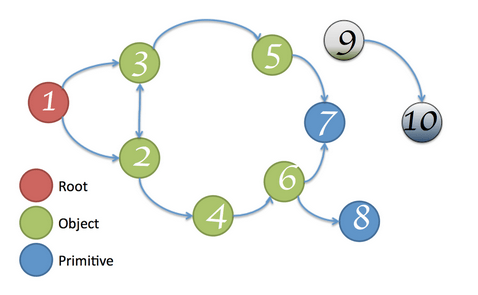
Window global object (in each iframe). There is a distance field in the heap snapshots which is the number of property references on the shortest retaining path from the window.
Document DOM tree consisting of all native DOM nodes reachable by traversing the document. Not all of them may have JS wrappers but if they have the wrappers will be alive while the document is alive.
Sometimes objects may be retained by debugger context and DevTools console (e.g. after console evaluation). Create heap snapshots with clear console and no active breakpoints in the debugger.
The memory graph starts with a root, which may be the window object of the browser or the Global object of a Node.js module. You don't control how this root object is GC'd.
Young and old generation
V8 uses a generational collector. Memory is divided into two generations: the
youngand theold.
- allocation and collection within the young generation is fast and frequent.
- allocation and collection within the old generation is slower and less frequent.
Young generation
- the young generation heap in V8 is split into two spaces, named
fromandto. - memory is allocated from the
tospace. - allocating is very fast, until, the
tospace is full at which point a young generation collection is triggered. - young generation collection first swaps the from and to space, the old to space (now the from space) is scanned and all live values are copied into the to space or tenured into the old generation.
Old generation
- the old generation heap in V8 uses a
mark-compactalgorithm for collection. - old generation allocations occur whenever a value is tenured from the young generation to the old generation. Whenever an old generation collection occurs a young generation collection is done as well. Your application will paused on the order of seconds. In practice this is acceptable because old generation collections are infrequent.
Garbage collector
Главная концепция управления памятью в JS -
принцип достижимости (reachability)
Изначально доступными считаются (корни)
значения, ссылки на которые находятся в стеке вызовов (локальные переменные, параметры функций, которые выполняются или в очереди на выполнение)
все глобальные переменные
Любые другие значения сохраняются в памяти до тех пор, пока доступно из корня по ссылке или цепочке ссылкок
- С примитивами просто - при присвоении они копируются целиком, не создают ссылок, так что при присваивании примитиву другого значения прошлое удаляется.
Объекты и наличие ссылок
Значение остается в памяти, пока на него есть хотя бы одна ссылка
если ссылок на объект нет, память очищается
let user = {};
user = null;
но наличие ссылки не гарантирует что он останется в памяти (два объекта могут ссылаться друг на друга, но быть недоступными из корней)
let user1 = {};
let user2 = {};

user1.friend = user2;
user2.friend = user1;

user1 = null;
user2 = null;
Mark-and-Sweep
When a variable comes into context, such as when a variable is declared inside a function, it is fl agged as being in context. Variables that are in context, logically, should never have their memory freed, because they may be used as long as execution continues in that context. When a variable goes out of context, it is also fl agged as being out of context.
Reference Counting
The idea is that every value keeps track of how many references are made to it
Anti-patterns related to memory leaks
accidental global varout of DOM references(lingering DOM References to Removed Elements)forgotten timers, callbacks, eventListenerscircular references- when two objects reference each other
- between a JS object and a DOM object
closuresside-effects in componentWill*
Отловить можно с помощью:
Chrome DevTools Timeline
- Timeline > Start recording.
- Click Trigger to remove element from DOM.
- Click the basket case icon (it starts the garbage collection process manually.)
- Stop recording.
Chrome DevTools Heap Snapshots
- Profiles > Take a snapshot.
- Click Trigger to remove element from DOM.
- Take another snapshot.
- Compare the snapshots with dropdown selector.
- Search for detached DOM tree elements.
Chrome DevTools Allocation Profiler
- the blue spikes show when memory is allocated for something.
- the gray ones represent allocation memory after the garbage collector reclaims the memory for that specific allocation.
Memory cleaning
Hidden Classes
пока объекты имеют одну структуру, они оптимизированно хранятся, как только добавить свойствао вне конструктора - объект выделяется вы отдельный скрытый класс
Arrays должны иметь одинаковые типы эелементов внутри и не иметь пропусков, не удалять из массивов